

The MalwareTips app
Your community, one tap away.
Open MalwareTips from your Home Screen or desktop. Follow discussions, find answers and pick up where you left off.
- Home Screen access
- Optional push alerts
- Your community
You're ready to explore.Explore what's new
Installation instructions
iPhone & iPad
- Open MalwareTips in Safari and tap Share. You may need to open the Page Menu first.
- Choose Add to Home Screen. If it is not listed, use Edit Actions to add it.
- Keep Open as Web App enabled if shown, then tap Add.
Android
- Open MalwareTips in Chrome or another browser that supports app installation.
- Open the browser menu and look for Install app, Install and create shortcut, or Add to Home screen.
- Choose Install and confirm. Wording varies by browser.
Desktop
- Chrome: use the install icon in the address bar, or the menu under Cast, save and share.
- Edge: open the menu, then More tools, Apps and Install this site as an app.
- Safari on Mac: choose Share or File, then Add to Dock. Firefox on Windows: look for the web apps button in the address bar.
If you cannot find an install option, update your browser or use its bookmark option to keep MalwareTips close.
Keep up with your conversations
After installation, open the app and sign in. Enable push notifications in Preferences if you want alerts. On iPhone and iPad, push requires a Home Screen web app and iOS or iPadOS 16.4 or later.
Sign in to manage notificationsInstallation is optional. Your notification settings stay under your control.
You are using an out of date browser. It may not display this or other websites correctly.
You should upgrade or use an alternative browser.
You should upgrade or use an alternative browser.
Question NextDNS setups
Help answer the author's question with clear explanations and useful steps.


The dns in phone private dns, not the modem router one.When "Private DNS" is on "ON," what secure DNS server does/would the phone use?
When "Private DNS" is on "ON" (not the custom provider option), what secure DNS does the phone use for phone and Wi-Fi networks?The dns in phone private dns, not the modem router one.
Cannot get the point; I use custom provider in phone private dns to bypass the dns provider in modem router settings.When "Private DNS" is on "ON" (not the custom provider option), what secure DNS does the phone use for phone and Wi-Fi networks?

When the Private DNS setting is set to "Automatic" in Android the device attempts to use DNS over TLS (DoT) if the network’s DNS server supports it. If the network’s DNS server (typically provided by the ISP or router via DHCP) supports DoT, Android will encrypt DNS queries to that server. If DoT is not supported, the device falls back to unencrypted DNS queries (UDP on port 53). This mode relies on the network’s DNS configuration and does not explicitly specify a private DNS provider. But Some Android device manufacturers (e.g., Samsung, Google Pixel) or carriers may preconfigure a default Private DNS provider in the "Private DNS provider hostname" setting. For instance, Google Pixel devices may default to "dns.google" when Private DNS is set to "On," but this is not guaranteed across all devices. Most stock Android implementations leave the hostname field blank unless manually set by the user. If you want encrypted dns ( DOT) you should use the "custom provider" option and not the "Automatic" or "ON" option.When "Private DNS" is on "ON" (not the custom provider option), what secure DNS does the phone use for phone and Wi-Fi networks?
Last edited:
Does Android fall back to the default DNS if the custom DNS provider is unreachable?If you want encrypted dns ( DOT) you should use the "custom provider" option
Last edited:
I am not sure; I believe you have to manually disable private dns in android to rely back on modem router dns settings.Does Android fall back to the default DNS if the custom DNS provider is unreachable?
F
ForgottenSeer 123526
If you've taken the step to manually configure a Private DNS provider hostname on your Android device (like dns.google), the system will prioritize a secure DNS over TLS (DoT) connection to that exact server. If this secure connection can't be established, Android will "fail hard." This means it won't fall back to an unencrypted DNS or seek out another DNS server. This strict approach is a privacy measure, designed to prevent situations where an attacker could force your device to use an insecure DNS.Does Android fall back to the default DNS if the custom DNS provider is unreachable?
Does iPadOS fall back to the default DNS if it is using a configuration profile and the DNS provider is unreachable?This strict approach is a privacy measure, designed to prevent situations where an attacker could force your device to use an insecure DNS.
F
ForgottenSeer 123526
If you configure DNS via a configuration profile on iPadOS, especially for encrypted DNS (DoH/DoT), the device will typically not automatically fall back to unencrypted, network-provided DNS if the configured servers become unreachable. Instead, it prioritizes the profile's settings, which can lead to connectivity issues unless you manually intervene or the profile has specific exceptions for certain networks/domains (like captive portals).Does iPadOS fall back to the default DNS if it is using a configuration profile and the DNS provider is unreachable?

No, you would need to use a separate app on the device or the network like AdGuard Home, Yogadns and similar things for DoH/3 or DoQ.Available for use at the browser level?
Apparently since Android 11, if you use Google or Cloudflare as the Private DNS provider, then they use DoH/3 instead of DoT. For any other provider DoT is used.If you've taken the step to manually configure a Private DNS provider hostname on your Android device (like dns.google), the system will prioritize a secure DNS over TLS (DoT) connection to that exact server. If this secure connection can't be established, Android will "fail hard." This means it won't fall back to an unencrypted DNS or seek out another DNS server. This strict approach is a privacy measure, designed to prevent situations where an attacker could force your device to use an insecure DNS.

I do find it a bit of housekeeping in using NextDNS as far as what it is blocking in regard to this Mullvad example (I'm only using the HaGeZi - Multi PRO++ blocklist).
From a Google search of the blocked connection, which I added to the Allowlist.
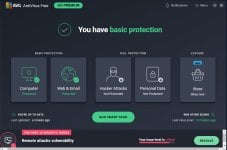
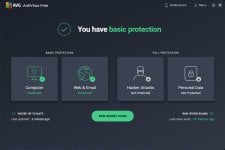
But, I also found this interesting in keeping track of some of the Avast (AVG free antivirus) blocked connections in that my AVG UI, no longer shows the scare banners or suggestions at the bottom. It's been a very clean UI, unless it's taking a time out and will eventually pop up? I've run some Smart Scan with the usual prompts of "needing to or having to resolve issues", but after exiting out of those, there have been no UI notices, even after 3 PC restarts and AVG updates? Everything seems to be functioning normally.
Pre NextDNS router configured/Linked IP.
Post NextDNS after about 6 days.
From a Google search of the blocked connection, which I added to the Allowlist.
ipv4.am.i.mullvad.net is a domain name associated with the Mullvad VPN service. Specifically, it is used by the Mullvad VPN application to check if a user's device is connected to the VPN and to verify DNS leaks. The domain allows the Mullvad app to confirm that it is correctly routing traffic through the VPN.
But, I also found this interesting in keeping track of some of the Avast (AVG free antivirus) blocked connections in that my AVG UI, no longer shows the scare banners or suggestions at the bottom. It's been a very clean UI, unless it's taking a time out and will eventually pop up? I've run some Smart Scan with the usual prompts of "needing to or having to resolve issues", but after exiting out of those, there have been no UI notices, even after 3 PC restarts and AVG updates? Everything seems to be functioning normally.
Pre NextDNS router configured/Linked IP.
Post NextDNS after about 6 days.
Last edited:
You may get the same output with blocking avasui.exe/avgui.exe using firewall.I do find it a bit of housekeeping in using NextDNS as far as what it is blocking in regard to this Mullvad example (I'm only using the HaGeZi - Multi PRO++ blocklist).
From a Google search of the blocked connection, which I added to the Allowlist.
But, I also found this interesting in keeping track of some of the Avast (AVG free antivirus) blocked connections in that my AVG UI, no longer shows the scare banners or suggestions at the bottom. It's been a very clean UI, unless it's taking a time out and will eventually pop up? I've run some Smart Scan with the usual prompts of "needing to or having to resolve issues", but after exiting out of those, there have been no UI notices, even after 3 PC restarts and AVG updates? Everything seems to be functioning normally.
Pre NextDNS router configured/Linked IP.
View attachment 289398
Post NextDNS after about 6 days.
View attachment 289399
@Jonny Quest Are you sure it was blocked by Hagezi Multi Pro++? It's not blocked for me.ipv4.am.i.mullvad.net
I happened to have enable Block Bypass Methods, which explicitly states that it includes VPNs. I just saw it being blocked and allowed it, I should have highlighted that entry to see the notification of what blocked it. Learning curve thing on my part@Jonny Quest Are you sure it was blocked by Hagezi Multi Pro++? It's not blocked for me.


Being able to filter the Logs list by Blocked Queries Only, comes in handy.
Last edited:
NextDNS's "Gaming" filter prevents access to the Apple Store app on iPad. Whitelisting apple.com in NextDNS will also allow ad subdomains. Is it correct?For blocked sites (or parental control) in NextDNS, do you whitelist the root or subdomain?
yes.Whitelisting apple.com in NextDNS will also allow ad subdomains. Is it correct?

That depends whether you just want to quickly allow the service or get more granular control. For example, I allow 5 subdomains for mail.ru and that blocks the rest used for ads, social, etc.For blocked sites (or parental control) in NextDNS, do you whitelist the root or subdomain?
A subtle update regarding the age verification, not sure what it is supposed to do though. 

Recently browsing
Members who viewed this thread in the last 5 minutes
You may also like...
-
 Advanced Plus Security harlan4096's PC Security Config
 -

-

-
 Advanced Plus Security enaph's PC Security Config
 -
 Advanced Security RoxasDev's PC Security Config