Advanced Plus Security Nightwalker's Computer Security Config 2022

Last updated
Jul 4, 2022
How it's used?
For home and private use
Operating system
macOS 15 Sequoia
On-device encryption
Log-in security
Security updates
Allow security updates and latest features
User Access Control
Always notify
Smart App Control
Network firewall
Real-time security
Kaspersky Internet Security
NextDNS client
Firewall security
About custom security
Minor privacy settings, oisd filter list in NextDNS
Periodic malware scanners
Malwarebytes 4
Malware sample testing
I do not participate in malware testing
Browser(s) and extensions
Brave
LibreWolf
Secure DNS
NextDNS
Desktop VPN
Windscribe Pro
Password manager
Bitwarden
Maintenance tools
HiBit Uninstaller
Windows 11 native tools
File and Photo backup
Microsoft OneDrive
System recovery
Macrium Reflect
Risk factors
    • Working from home
    • Browsing to popular websites
    • Browsing to unknown / untrusted / shady sites
    • Opening email attachments
    • Buying from online stores, entering banks card details
    • Downloading software and files from reputable sites
    • Sharing and receiving files and torrents
    • Gaming
    • Streaming audio/video content from trusted sites or paid subscriptions
    • Streaming audio/video content from shady sites
Computer specs
AMD Ryzen 3600 + 16 GB DDR4 + RTX 2070 Super + SSD Adata XPG Gammix S11 Pro 1TB
Notable changes
Removed F-Secure Safe and Adguard PC
What I'm looking for?

Looking for medium feedback.

Jul 4, 2022

Removed:
- F-Secure Safe
- AdGuard for Windows

Added:
- Kaspersky Internet Security
- NextDNS client


Finally I am back to Kaspersky with some little settings changed (HTTPS scan and script injection disabled) after trying some solutions for science, last one was Norton 360 and I hated the experience, it totally convinced me to stop testing for now.
 
Jul 4, 2022

Removed:
- F-Secure Safe
- AdGuard for Windows

Added:
- Kaspersky Internet Security
- NextDNS client


Finally I am back to Kaspersky with some little settings changed (HTTPS scan and script injection disabled) after trying some solutions for science, last one was Norton 360 and I hated the experience, it totally convinced me to stop testing for now.
He talked and talked and ended up going back to Kaspersky 😗

I remember you were using ESET, then from what I saw you were with Norton and now Kaspersky...
 
Jul 4, 2022


Added:
- Kaspersky Internet Security


Finally I am back to Kaspersky with some little settings changed (HTTPS scan and script injection disabled) after trying some solutions for science, last one was Norton 360 and I hated the experience, it totally convinced me to stop testing for now.
That Kabum promotion?
 
He talked and talked and ended up going back to Kaspersky 😗

I remember you were using ESET, then from what I saw you were with Norton and now Kaspersky...

Kaspersky and ESET were always my favorite antivirus solutions, for years I have been alternating between those two.

Norton? Oh well, I just tried it do to some testing and I hated every second of the experience, I would not badmouth it, but I have to say that it isnt the solution for me.
 
That Kabum promotion?
I bought some licenses in the past, so I am set for a long time.

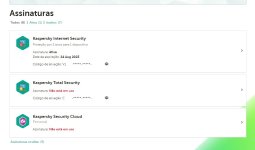
Captura de tela 2022-07-19 205104.jpg
 
Good to see you post again, @Nightwalker. 👍 I see you're using MS Defender but would appreciate an update your configuration, and I'm curious about the details.
Hi my friend, I will update my configuration later, but it became very boring if I have to say myself :LOL:

I became an officer in the military police and during the training I was with very little free time, but now its over and I will have more opportunities to post here again.
 
I will update my configuration later, but it became very boring if I have to say myself :LOL:
Indeed. I'm like yourself, except I keep hanging around here. I vowed to keep using my simple setup and avoid the latest, greatest. Less hassle.
 
Indeed. I'm like yourself, except I keep hanging around here. I vowed to keep using my simple setup and avoid the latest, greatest. Less hassle.
I don’t even post my config anymore. Keeping it simple also because I’ve gotten busy with kids and life. My computer just gets used for a little gaming and ripping and compressing blu rays for plex. I don’t want anything complicating either of those. But, glad to see @Nightwalker around because they are one of the reasons I found my way to MalwareTips after reading some posts on Wilders about ESET.
 
Hi @Nightwalker,

Thanks for sharing your configuration – it's a well‑rounded setup with Kaspersky Internet Security providing strong real‑time protection, NextDNS for DNS‑level filtering, Malwarebytes for periodic scans, and Macrium Reflect/OneDrive for backups. Having a dedicated password manager (Bitwarden) and using privacy‑focused browsers like Brave/LibreWolf are also smart choices.

A few suggestions to further strengthen your security posture:

• **Enable full‑disk encryption** via FileVault (macOS) or BitLocker (Windows) if you haven't already. This protects your data if the device is ever lost or stolen.
• **Multi‑factor authentication**: Make sure your Bitwarden account and other critical logins use MFA (authenticator app or hardware key) to reduce account takeover risk.
• **Outbound firewall control**: Windows' built‑in firewall is robust, but you can add an interactive firewall (e.g., simplewall or Little Snitch) to monitor and alert you to unexpected outbound connections.
• **Layered backups**: OneDrive is convenient but consider a second offline backup (external drive or NAS) to guard against ransomware or cloud account issues. Macrium Reflect makes this easy with scheduled image backups.
• **Ad/tracking protection**: Since you removed AdGuard, ensure your NextDNS configuration or browser shields block ads and trackers. uBlock Origin or the built‑in Brave Shields can add another layer.
• **Safe browsing habits**: For higher‑risk activities (P2P, shady streaming sites) consider using a hardened browser profile or even a sandbox environment (e.g., Sandboxie or a virtual machine) to isolate downloads.

Overall your configuration is solid — keeping your software updated and periodically reviewing your setup (as you're doing) will keep you ahead of most threats. Thanks again for posting and good luck with your police duties!