


Advice Request Norton cannot connect to server - can anyone solve this problem?
- Thread starter Islam Gamal
- Start date
You are using an out of date browser. It may not display this or other websites correctly.
You should upgrade or use an alternative browser.
You should upgrade or use an alternative browser.
Please provide comments and solutions that are helpful to the author of this topic.
- Status
- Not open for further replies.

Last edited:
F
ForgottenSeer 58943
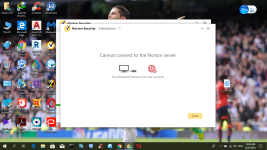
i installed norton today but while activating it , a problem occuered. the problem in the screenshot.
i tried some solutions (uninstall and reinstall- changing the default browser)
i am sorry for my english.
This is a troublesome, long term problem with Norton. It dates back at least 5 years with zero fixes from them. I had support on for one hour to fix it and failed, then escalated it to tier 2 who spent 1.5 hours trying to fix it. I even re-created a new profile and showed them the problem still happened. The sad part is - they don't know what causes it. Sometimes they say it's a DNS issue. Sometimes they say IE has to be removed and reinstalled. Sometimes they reset network settings or disable network drivers, reboot, re-enable drivers.
It's a stupid problem that makes me absolutely detest the bugs in the consumer version of Norton, and why I think SEPC is better (which doesn't have this bug, among others)
thanks man for the explanation. i hate that.This is a troublesome, long term problem with Norton. It dates back at least 5 years with zero fixes from them. I had support on for one hour to fix it and failed, then escalated it to tier 2 who spent 1.5 hours trying to fix it. I even re-created a new profile and showed them the problem still happened. The sad part is - they don't know what causes it. Sometimes they say it's a DNS issue. Sometimes they say IE has to be removed and reinstalled. Sometimes they reset network settings or disable network drivers, reboot, re-enable drivers.
It's a stupid problem that makes me absolutely detest the bugs in the consumer version of Norton, and why I think SEPC is better (which doesn't have this bug, among others)
F
ForgottenSeer 58943
BTW, after 3 hours they fixed my issue with it, this was a year or two ago... They did so much to try and fix it they don't even know what fixed it. After they were done I wiped the machine to remove their remote access crap and undo their changes, and the problem came back on the fresh format so I requested a refund, got it, and moved on from Norton for good.
Sorry it's not a happy ending for you.
Sorry it's not a happy ending for you.
i appreciate your help. thanks bro.BTW, after 3 hours they fixed my issue with it, this was a year or two ago... They did so much to try and fix it they don't even know what fixed it. After they were done I wiped the machine to remove their remote access crap and undo their changes, and the problem came back on the fresh format so I requested a refund, got it, and moved on from Norton for good.
Sorry it's not a happy ending for you.
i will use another product.

RoboMan
Level 38
Verified
Honorary Member
Top Poster
Content Creator
Well-known
High Reputation
Forum Veteran
Mind answering this questions?
- Do you have your timezone and hour/date set correctly?
- Which version and build of Windows 10 are you using?
- All patches up to date?
- Default DNS?
- No VPN or proxy enabled?
- Windows Firewall or 3rd party?
- Windows arquitecture? Downloaded for the correct arquitecture?
- Disable Zemana Anti Logger and MalwareBytes real-time protection if enabled
- Disable Windscribe VPN if active
- Reset DNS to default
1- yesMind answering this questions?
- Do you have your timezone and hour/date set correctly?
- Which version and build of Windows 10 are you using?
- All patches up to date?
- Default DNS?
- No VPN or proxy enabled?
- Windows Firewall or 3rd party?
- Windows arquitecture? Downloaded for the correct arquitecture?
- Disable Zemana Anti Logger and MalwareBytes real-time protection if enabled
- Disable Windscribe VPN if active
- Reset DNS to default
2-the latest version
3-yes
4-yes
5-yes
6-windows firewall
7-i am sorry. i cannot understand it
thanks, i appreciate your effort but the support cannot solve the problem.
OS architecture is either 32-bit or 64-bit.7-i am sorry. i cannot understand it
Could have been something blocking the connection, as some Windows 10 Anti-Spy tools or VPNs may conflict with Norton. Have you uninstalled Norton Security?
yes, i uninstalled it. i appreciate your help.OS architecture is either 32-bit or 64-bit.
Could have been something blocking the connection, as some Windows 10 Anti-Spy tools or VPNs may conflict with Norton. Have you uninstalled Norton Security?
Solution not found.
Thread Closed due to OP uninstalling Norton Security before a solution was found.
Thread Closed due to OP uninstalling Norton Security before a solution was found.
- Status
- Not open for further replies.
You may also like...
-
 Advice Request Norton detects js on safe shopping website, unable to connect anymore
- Started by Moonhorse
- Replies: 3
-
 App Review DrWeb Security Space BETA
- Started by Shadowra
- Replies: 11
-
-
 Chrome VPN extension with 100k installs screenshots all sites users visit
- Started by nicolaasjan
- Replies: 1
-
Advice Request Unwanted app removal when using Revo?
- Started by Captain Holly
- Replies: 6