Advanced Plus Security oldschool's laptop setup 2020

Last updated
Jan 4, 2020
Windows Edition
Pro
Operating system
macOS 15 Sequoia
Log-in security
Security updates
Allow security updates and latest features
User Access Control
Always notify
Real-time security
Windows Defender
VoodooShield Pro v5.57
OS hardening
Firewall security
Microsoft Defender Firewall
About custom security
ConfigureDefender @ modified High
Periodic malware scanners
Emsisoft Emergency Kit
Hitman Pro (paid)
Malware sample testing
I do not participate in malware testing
Browser(s) and extensions
Brave - hardened + built-in protection + WDBP + Netcraft
Edge Dev Chromium - hardened + µBO + Privacy Badger
Firefox - hardened + µBO + Privacy Badger + eTag Stoppa + MBBG
Maintenance tools
Windows built-in
BleachBit 3.0 - "Hilary uses it!"
RunBySmartscreen
File and Photo backup
Copy/Paste -> Free Agent Drive
System recovery
Windows built-in -> Free Agent drive (monthly)
Risk factors
    • Browsing to popular websites
    • Streaming audio/video content from shady sites
    • Browsing to unknown / untrusted / shady sites
    • Working from home
    • Streaming audio/video content from trusted sites or paid subscriptions
Computer specs
Lenovo L340 i3 8145U CPU @ 2.10 GHz 2.300 GHz 8GB DDR4 RAM 1 TB HDD
you can delete overseer by some tricks (disable AVG's defense and delete) and prevent it to be appeared in your computer (use folder security tab to deny write permissions of all accounts)
after all, reenable self-defense
 
Thanks for the tip. Overseer deleted (y)
and we should apply the Folder security setting to block avast from installing overseer in the next update
every update or Repair, avast will re-install overseer if I'm not mistaken

Added AVG Free Beta @ hardened mode + high sensitivity, with settings > balanced for security and performance.

AVG Free now has a number of available personal privacy settings, which may indicate they've responded to the backlash they've experienced the last few years. In any case, I've blocked AVGUI and overseer.exe in firewall. I quite enjoy this AV.

I installed this last weekend and have now joined the AVG Anti-hate Coalition started by @stefanos! :LOL::LOL::LOL:

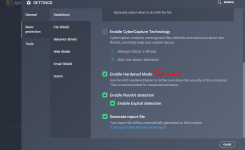
Hardened mode really works. It blocked VoodooShield! :LOL::LOL::LOL:

View attachment 215270

Edit: This new version removes overseer.exe upon uninstall.
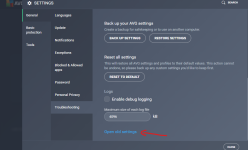
hi, does AVG have Settings -> troubleshooting -> open old settings?
does it have customization for hardened mode aggressive?
 
and we should apply the Folder security setting to block avast from installing overseer in the next update
every update or Repair, avast will re-install overseer if I'm not mistaken


hi, does AVG have Settings -> troubleshooting -> open old settings?
does it have customization for hardened mode aggressive?
Have not option for hardener mode at old settings.
215290
 
Last edited:
when we enable hardened mode, that hardware virtualization is redundant because virtualization is used for Deepscreen (sandbox analysis for 15 seconds to determine if something is safe/malicious). When hardened mode is on (HM moderate), deepscreen is ignored and the app will be blocked straight away without being analyzed

HM moderate: ignore deepscreen and block the app if the app is suspicious enough to trigger deepscreen. It allows everything to run except low prevalent files
HM agressive: check the app with avast's cloud and only runs if it's whitelisted by avast
 
@stefanos @Evjl's Rain - I am still testing overseer.exe. Blocking in FW may hinder updates > necessitate manual update. It's kind of hard to tell because of difference of timestamp/release date for signatures. I allowed it in FW last night and release time was earlier than when blocked, but I am still unsure of the process. I think it may be easier just to block in FW. My question is what exactly does overseer.exe do? It is supposed to check for errors/corruption of the program and initiate a repair. Is it also responsible for reporting all your data? It's such a poor choice of names for this exe, it's no wonder they had such a backlash over it.

Old settings are still available in Troubleshooting.

Hardened mode is in new settings, not old. There is no option for "Aggressive".

It allows everything to run except low prevalent files

Yes. It blocked VoodooShield and @Andy Ful Firewall Hardening Tool.

AVG_OldSettings_2019-06-20 082808.png

AVG_Hardened_Mode 2019-06-20 082402.png
 
My question is what exactly does overseer.exe do?
I don't think blocking it does anything to the system. It's like a debug log collector and it sends to avast. It has nothing to do with functionality of avast
We should delete it since it is scheduled to run in Task scheduler => consumes some resources
 
...
Yes. It blocked VoodooShield and @Andy Ful Firewall Hardening Tool.
...
The Firewall Hardening tool was not sent yet to Avast for whitelisting. It will be sent as a part of the new H_C version, and then it will be probably allowed by AVG overseer.exe.

Here are some notes about overseer from the guy who worked for Avast on this feature in the 2017 year: What "avast overseer" is?
It seems that overseer should not be the reason for blocking VS or H_C.
Users on some forums complain that overseer continues to run after uninstalling AVG.
 
Here are some notes about overseer from the guy who worked for Avast on this feature in the 2017 year: What "avast overseer" is?
It seems that overseer should not be the reason for blocking VS or H_C.

Yes, I'm familiar with that thread. I knew overseer had nothing to do with VS, it was hardened mode as indicated in the notification. I just think it's funny that "all the best security software is malware" - according to @shmu26.
 
oldschool: I apologize for intruding but you have a lot happening in your thread and it's interesting. I'm looking to tighten up the Windows firewall a bit and don't want a third party front-end. What can you say about the Firewall Hardening Tool you're using? Is it worthwhile?

I've already disabled SMB1 via Turn Windows Features On and Off. Are settings similar in scope to this one available in the Tool?
 
oldschool: I apologize for intruding but you have a lot happening in your thread and it's interesting. I'm looking to tighten up the Windows firewall a bit and don't want a third party front-end. What can you say about the Firewall Hardening Tool you're using? Is it worthwhile?

I've already disabled SMB1 via Turn Windows Features On and Off. Are settings similar in scope to this one available in the Tool?

No problemo! There are outbound rule profiles (ala SysHardener) for H_C Recommended, LOLBins, MS Office and Adobe Acrobat. Check here for more info as there is no separate thread for it ATM: https://malwaretips.com/threads/hard_configurator-windows-hardening configurator.66416/page-75 Info is sprinkled throughout. Is the tool useful? Yes. Necessary? It all depends. It also allows you to easily create new rules. Just be aware that rules profiles can only be removed with the tool, not directly in WFW, if I remember correctly.
 
I'll bring the pizza"s we will all have 10 minutes to try to get a virus on old schools computer if you fail,your punishment is you have to run for president of the U.S.A next election. If you succeed you get a free membership to MalwareTips.Gl
 
Just be aware that rules profiles can only be removed with the tool, not directly in WFW
AFAIK you can open "Windows Defender Firewall with Advanced Security" (admin rights required), go to the Outbound Rules tab, scroll down until you find the rules you want, and disable or delete them. That's what I did with the SysHardener rules that became redundant after I installed the FirewallHardening rules.
 
AFAIK you can open "Windows Defender Firewall with Advanced Security" (admin rights required), go to the Outbound Rules tab, scroll down until you find the rules you want, and disable or delete them. That's what I did with the SysHardener rules that became redundant after I installed the FirewallHardening rules.

Regarding Firewall Hardening Tool - from H_C thread post #1641: "... The applied rules may be also viewed when using Windows Firewall Advanced settings, but can be managed only by Firewall Hardening tool, or by editing the Registry under the key: HKLM\SOFTWARE\Policies\Microsoft\WindowsFirewall\FirewallRules. ..."
 
Regarding Firewall Hardening Tool - from H_C thread post #1641: "... The applied rules may be also viewed when using Windows Firewall Advanced settings, but can be managed only by Firewall Hardening tool, or by editing the Registry under the key: HKLM\SOFTWARE\Policies\Microsoft\WindowsFirewall\FirewallRules. ..."
Thanks for the clarification. My bad.