Question On may 31th 2025 Chrome disabled Mv2 extensions, a year has gone. How did it impact your favorite extensions?

Please provide comments and solutions that are helpful to the author of this topic.
Will it receive updates, or is this an outdated extension version?
@lokamoka820, yes, as of right now it still receives updates. Brave independently hosts the MV2 version of uBlock Origin on their own servers so it doesn't depend on the Chrome Web Store anymore. While the core extension code remains working thanks to Brave's current implementation, the most important part—the filter lists—continue to pull automatic updates daily just like always. It's a great solution for now, though down the road it will depend on how long Brave decides to maintain this internal workaround. 🛡️✨
 
@Halp2001 and @lokamoka820

Why not use the build in Mv2 extension option of Brave for uBlockOrigin Mv2?
View attachment 297955
Hi @LinuxFan58, to be honest, when I first tried fixing this, that built-in option wasn't available yet (or at least I completely missed it). So yeah, looking back it definitely felt like a bit of a "sadomasochistic" exercise :LOL:on my part doing it the hard way! I really appreciate you sharing that solution, it makes things so much easier for everyone. 🛡️✨
 
Hi @LinuxFan58, to be honest, when I first tried fixing this, that built-in option wasn't available yet (or at least I completely missed it). So yeah, looking back it definitely felt like a bit of a "sadomasochistic" exercise :LOL:on my part doing it the hard way! I really appreciate you sharing that solution, it makes things so much easier for everyone. 🛡️✨
I understand that you missed it, t is only visible from the settings menu, not when clicking on the extension icon in the top bar :unsure:
 
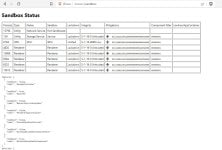
@Sampei.Nihira, actually, Brave does use the AppContainer sandbox for its renderer processes on Windows. I just checked my own running processes in Process Explorer and they split exactly like that for security. The main browser process runs at Medium integrity, while tabs and extensions run at Low and Untrusted. In Chromium, that Untrusted label is the visual proof that the process is strictly isolated inside the AppContainer with no privileges to touch the OS. Here is a screenshot of how it looks on my end.
View attachment 297956

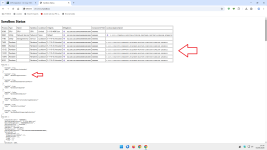
Hi, thanks for your test.
That's not how it works; you should check it this way:

1.png

;)(y)
 
Hi, thanks for your test.
That's not how it works; you should check it this way:

View attachment 297968

;)(y)
You’re absolutely right, @Sampei.Nihira . Thanks for the correction. Technically, the ‘Not Trusted’ label alone isn’t enough to confirm AppContainer — you need to check the specific column, just like you showed in your screenshot. I learned something new today.🎯
So with your test, it’s clear that Brave does use AppContainer — I was just looking at the wrong indicator. Thanks for taking the time to explain it and share the correct screenshot!

Cheers and keep learning! 🙌
 
You’re absolutely right, @Sampei.Nihira . Thanks for the correction. Technically, the ‘Not Trusted’ label alone isn’t enough to confirm AppContainer — you need to check the specific column, just like you showed in your screenshot. I learned something new today.🎯
So with your test, it’s clear that Brave does use AppContainer — I was just looking at the wrong indicator. Thanks for taking the time to explain it and share the correct screenshot!

Cheers and keep learning! 🙌

No, it's my personal Chrome installation that uses the AppContainer Renderer because I made that change a while ago.

All other Chrome installations do not use the AppContainer Renderer.
And so I assume the same is true for all other Brave browsers.
 
Unfortunately, I had to switch back to uBlock Origin. Not because of speed (even though as I continued to use it, difference started to be noticeable more and more), but because on a lot of websites it missed cookie notices. Whenever I reported them to AdGuard team they struggled to reproduce the issue and promptly closed the case; with no replies on comments.

When I report the issue to uBlock Origin team, they don't fix the issues in most cases, rather than just tag person responsible for the fix and it's been fixed within the hours. I also missed dynamic filtering a lot which AdGuard simply does not have.
 
No, it's my personal Chrome installation that uses the AppContainer Renderer because I made that change a while ago.

All other Chrome installations do not use the AppContainer Renderer.
And so I assume the same is true for all other Brave browsers.
AppContainer was introduced by Microsoft. When Edge moved to Chromium they also adopted AppContainer. I enabled it at that time with Group Policy.

Don´t know whether it still works, but documentation is still online available (see picture)
1780816643929.png
 
Last edited:
  • Like
Reactions: lokamoka820
AppContainer was introduced by Microsoft. When Edge moved to Chromium they also adopted AppContainer. I enabled it at that time with Group Policy.

Don´t know whether it still works, but documentation is still online available (see picture)
View attachment 297991

The policy alone isn't enough to enable the Appcontainer Renderer, though I prefer to use a Chrome Command Line Switch.
Try it on your wife's Windows PC.
Anyway, it's part of my trick.;)
 
Unfortunately, I had to switch back to uBlock Origin. Not because of speed (even though as I continued to use it, difference started to be noticeable more and more), but because on a lot of websites it missed cookie notices. Whenever I reported them to AdGuard team they struggled to reproduce the issue and promptly closed the case; with no replies on comments.

When I report the issue to uBlock Origin team, they don't fix the issues in most cases, rather than just tag person responsible for the fix and it's been fixed within the hours. I also missed dynamic filtering a lot which AdGuard simply does not have.
Was this one of the issues created by you? I see that it was closed without a comment from the filter maintainer, ghajini, which matches your explanation.
ghajini is a long-time volunteer contributor to uBO but new to AdGuard (not an employee). AdGuard official maintainers usually give time for the user to respond before closing.
Anyway, for this specific site, the culprit is Bypass Paywall Clean, not AdGuard. The maintainer didn't enable BPC filter, so he couldn't reproduce it. But even then, he wouldn't fix it since it's a BPC filter rule issue. You would need a user rule to prioritize the AdGuard rule over the BPC rule for this specific site. I already have a couple of rules like this in my own filter. For this specific site, this rule is needed.
||consentmanager.net^$important,domain=uefa.tv
 
Yes, this was me. I realized afterwards it was Bypass Paywall Clean so I removed it completely as it was making issues with bunch of other websites as well.

Btw I thought these maintainers download configuration and apply it on their machine to test these report, but apparently I was wrong.