New Update Osprey Browser Protection discussion and updates

Congratulations with your graduation 🏆🏆🏆

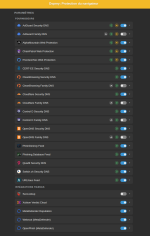
The new V2 has not landed in Chrome webstore yet, but I have one suggestion about the false positives number set to minimum of two.

Because you allow users to include protection services and select which protection provider to enable, you facilitate personal preference on protection. With that in mind I would prefer to set my own false positive level. So could you make it a variable field in the settings (with a default of two)?
Sure. That'll be planned for the next iteration.
 
:P

2026-05-23_17-35.png 2026-05-23_17-35_1.png
 
Sorry for the inactivity. I've been sitting on a big update, and I just graduated college.

Here's the changes in version 2.0.0 that's live on Firefox:


Let me know what you think. :)
Thank you very much @Foulest and congratulations on graduating from college. :)

You were able to do what some of us have not accomplished yet. 🎓
 
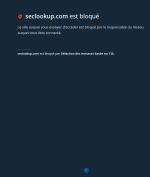
I just tested it and it seems to block before page loads. @Foulest could you confirm that's the case?

I remember earlier version of the extension blocked the access to website while it was loading.
I can't confirm this to be the case. Do you have a specific website I can test? Also, what browser are you using?
 
So, Osprey block is before page load?
Osprey doesn't hold or freeze any pages when checking if it's malicious. Pages should load just fine without any interruptions. All checks happen in the background and only block pages when something is detected. Otherwise, one check being down could hang everything.
 
I can't confirm this to be the case. Do you have a specific website I can test? Also, what browser are you using?
I used malware.wicar.org for test and website didn't load before Osprey checked the URL. I'm using Firefox BTW. This is why I asked did the behavior change with recent updates. Because in previous versions there was a brief white flash and you could see website loading before Osprey redirected to block page.

example.gif
 
Last edited:
@Foulest sidenote about new integrations, a few of the 5 depend on metadefender -- api key. I have not used them lately and when I logged in with my email, they said you need to reset your password as we have a new policy since 2020, but it was easier at the moment to create a new acct, and used a real (no alias) email from fastmail which I think is a big (worldwide) and reputable email vendor and entered it and metaDef replied we cannot register that email domain? so later I returned and used my old email that needed an updated password, entered it, and they said they were sending me an email with the procedure to update your password and it never arrived ie I think it was never sent...? Is everyone else having success with metadefender api key, what's the secret, or does metadefender just suck. (very annoying). meanwhile I did manage to get a xcitium api key but their Valkyrie Verdict page never works for me, or so sluggish it's unusable, does it work successfully with Osprey?
 
  • Like
Reactions: Sorrento
I think that page is just kind of slow to load.
Not sure. I'd be grateful if someone could test this on actual malicious URLs inside virtual machine. 🙏🏻

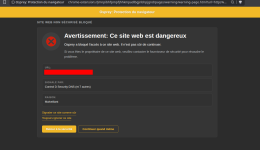
BTW I also noticed that after clicking Continue anyway button, depending on how many providers flagged domain as malicious, you need to click the button multiple times before you can access the site. Dunno if someone reported this to you, or if this is intended behavior.
 
Not sure. I'd be grateful if someone could test this on actual malicious URLs inside virtual machine. 🙏🏻

BTW I also noticed that after clicking Continue anyway button, depending on how many providers flagged domain as malicious, you need to click the button multiple times before you can access the site. Dunno if someone reported this to you, or if this is intended behavior.
This is intended, if you want to report the website as a false positive to every provider that blocked it.
 
This is intended, if you want to report the website as a false positive to every provider that blocked it.
You're using mailto: for opening mail client and sending mail to report false positives, right? You could implement that by clicking on Report this website as safe, you're sending the mail to all security providers that flagged website as malicious at once.

This way user sends just one e-mail instead of sending multiple for each provider. And as a bonus it only needs to click the continue button once to access the website. Additionally, I'd add a checkbox with text something like "I am aware website could have malicious intent" which then makes Continue anyway button available for click.

That might make user question the decision if they didn't read the warning (as many people don't do).