

Panda Installing PUP

Status
Not open for further replies.

Anupam

Level 21
Thread author
Verified
Well-known
Jul 7, 2014
1,017
2,322
1,968
Hi All,

I recently installed Panda Gold Security ( Got Promotional Trial of 6 Months) but did not like it. So I uninstalled it. The strange thing I notice after the un-installation.

A process called panda url filtering is still running in background. I was confused and searched control panel for any Panda Uninstall option. But there was nothing. Then I ran the panda unsinstaller tool but still it was there. To stop it from running Automatically, I disabled the startup entry of it.

Today I scanned my system with HerdProtect and found Panda URL filtering PUP is detected. never expected such cheap tactics from a Reputed Company like Panda.

Never ever trying Panda.

Proof:
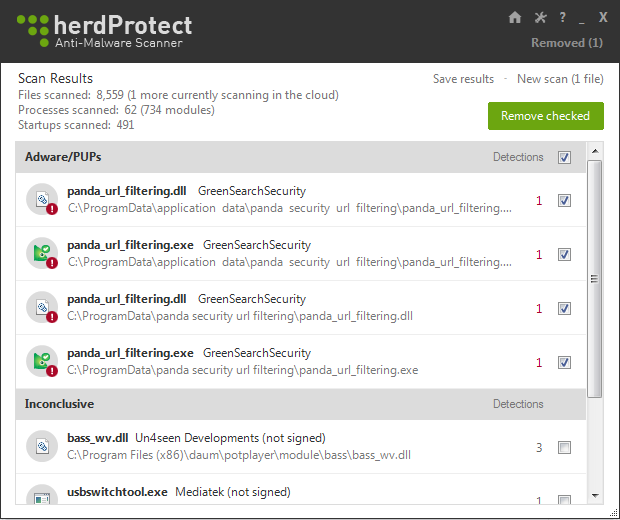
upload_2015-10-24_16-22-42.png
 
My Panda uninstallation didn't leave any leftover things, and it was 1 or 2 months ago, this behavior is strange and kinda new... Too bad from them.
 
  • Like
Reactions: Anupam
If I remember correctly, URL filter must be uninstalled separately via Windows Control Panel.

Some antivirus detect it as PUP because it can modify the browser's default search provider.
 
Last edited by a moderator:
Panda anti virus includes Security Toolbar for URL filtering component which some anti virus detects it as PUP. Whether its URL filtering component is PUP or not is a mystery and debatable.
 
Clearly the toolbar itself caused to emerge as Adware/PUP, Visicom Media is known to produce those toolbars; part of a behaviour to detect possible changes on search engine and other BHO related.

Panda incorporates only their URL Filtering based.
 
If I remember correctly, URL filter must be uninstalled separately via Windows Control Panel.

Some antivirus detect it as PUP because it can modify the browser's default search provider.

In windows control panel there is no option to un-isntall it.

I uninstalled both the Antivirus as well as toolbar from Control Panel. After uninstalling toolbar, the toolbar is gone but this hidden process were still there.
 
Panda anti virus includes Security Toolbar for URL filtering component which some anti virus detects it as PUP. Whether its URL filtering component is PUP or not is a mystery and debatable.


It's a PUP when it's installed unknowingly and you don't find any option to un-install it. It's not same as toolbar though, I already uninstalled the toolbar but still this one is there.

some antivirus are much more nasty/worse than many virus:(:(
Avg is the same...

Exactly my thought. Few antiviruses now a days are worse than the Virus itself. We live in a fake promise to protect our system but in reality these companies steals our privacy and fill it with PUP.
 
  • Like
Reactions: upnorth and Kuttz
This toolbar is part of Panda and must be removed separately.


As already told, this is after uninstalling the toolbar. I forgot to take the screenshot that I already un-installed the toolbar.
 
We make the point: you have uninstalled the toolbar but the processes are still active.

Have you rebooted after removal?

Follow the path indicated by HerdProtect and delete the folder, search all references to Panda URL filter possibly in safe mode and delete them.
 
  • Like
Reactions: Anupam and Kent
We make the point: you have uninstalled the toolbar but the processes are still active.

Have you rebooted after removal?

Follow the path indicated by HerdProtect and delete the folder, search all references to Panda URL filter possibly in safe mode and delete them.

I got the process after several restart.

When I noticed I first disabled the auto starting up when windows starts. Today herd protect detected it and I deleted the folder.

It's all good now.
 
  • Like
Reactions: LabZero
If you use Windows Firewall also check if theres any exception left and remove those.

Thanks for the headsup! :)
 
  • Like
Reactions: Anupam
If you use Windows Firewall also check if theres any exception left and remove those.

Thanks for the headsup! :)

Right now I am using Norton's Firewall :) I mean norton security which has inbuilt firewall.
 
I've deployed Panda Free, both 2015 and 2016, on hundreds of machines, though never Panda Gold. In every case, when I installed the toolbar (which I used to do to get URL filtering), it placed an uninstall entry for it in Control Panel's appwiz.

To get to the URL filtering component, uninstall the toolbar, and at the end of the process check uninstall URL filtering, and it will go into that additional routine. If you don't uninstall URL filtering, you now will see it as an entry in Control Panel's appwiz, where you can uninstall it. Nothing evil about it, just a little convoluted to get to.

Now, however, I don't install the toolbar/url filtering at all, so I don't have to do any of that.
 
  • Like
Reactions: JakeXPMan
I've deployed Panda Free, both 2015 and 2016, on hundreds of machines, though never Panda Gold. In every case, when I installed the toolbar (which I used to do to get URL filtering), it placed an uninstall entry for it in Control Panel's appwiz.

To get to the URL filtering component, uninstall the toolbar, and at the end of the process check uninstall URL filtering, and it will go into that additional routine. If you don't uninstall URL filtering, you now will see it as an entry in Control Panel's appwiz, where you can uninstall it. Nothing evil about it, just a little convoluted to get to.

Now, however, I don't install the toolbar/url filtering at all, so I don't have to do any of that.


1. I did not remember whether they got me a check box to unisntall it.
2. Even if I haven't checked that as per you I should have good another entry in control panel which I did not.
3. At the end when I ran Panda Uninstaller tool it should have been removed that.
4. If there is no option to uninstall for me it's a PUP.
 
  • Like
Reactions: Hangtooth
Just telling you my experience with the Free edition. The URL filtering uninstall is hidden behind the Toolbar uninstall, and doesn't show until the Toolbar is gone or in the process of going. I would agree it's not an ideal way to set it up, but perhaps it's that way because they license the URL filtering function.
 
  • Like
Reactions: Anupam
Status
Not open for further replies.