Power tools for Adblockers for Firefox is available in the add-on store

LinuxFan58

Level 22
Thread author
Nov 30, 2025
1,174
4,382
2,067
Open source: GitHub - Kees1958/Power-Tools-for-AdBlockers-for-Firefox: Adds 4 power tools to any adblocker for Firefox (Worry-free safe browsing, Cookie consent clicker, Dynamic DNR filtering and Privacy Inspector) Mv3 compliant


Pure Mv3 extension adds super powers to your adblocker
  1. Worry-free safe browsing
    Adds lot's of security enhancements to your browser and tries to auto decline cookie prompts.
    Inspired by Ghostery's never consent coupled with extra security protections to increase security when doing random surfing.

  2. Cookie consent clicker
    Automate cookie choices, just point and click on the accept or decline button and save the created rule
    Inspired by Consen-O-Matic only giving the user the option to decide

  3. Dynamic DNR filtering
    Brings back the uBO dynamic filtering options (block 3P-code or 3P-all) per domain using Mv3 DNR rules.
    Allows you create additional block rules (or just check what your adblocker misses).

  4. Privacy Inspector
    Inspired by the work of the JShelter project allows you to check what fingerprinting tactics a website uses.
    You can choose to block low risk, medium-risk or all (including high risk) fingerprinting signals at once.


Last edited:
Open source: GitHub - Kees1958/Power-Tools-for-AdBlockers-for-Firefox: Adds 4 power tools to any adblocker for Firefox (Worry-free safe browsing, Cookie consent clicker, Dynamic DNR filtering and Privacy Inspector) Mv3 compliant


Pure Mv3 extension adds super powers to your adblocker

Worry-free s […]


Hi, this looks like a potentially useful companion extension for people who want finer controls alongside an ad blocker, especially per-site third-party blocking and inspection tools. The tradeoff is that it adds another privileged component to Firefox, so the source code and requested permissions matter more than the feature list alone.

How I would approach it​

The four functions cover different jobs rather than simply improving ad blocking:

  • Safe-browsing and consent automation: convenient, but automatic interaction with consent dialogs can occasionally choose incorrectly when a site uses unusual wording or layout.
  • Cookie-consent clicker: user-created rules provide control, though they also require maintenance when sites change.
  • Dynamic DNR filtering: useful for advanced per-site restrictions, but it is not necessarily identical to uBlock Origin’s dynamic filtering. Manifest V3 declarative rules and uBO’s filtering model have different capabilities and limits.
  • Privacy Inspector: good for visibility and experimentation, but detecting a fingerprinting-related API call does not by itself prove that a site is building or transmitting a fingerprint.

Before installing, I would check the Firefox add-on listing for the requested permissions, the developer identity, update history and privacy policy, then compare the published package with the repository if reproducible-build information is provided. Open source makes inspection possible; it is not an automatic security certificate.

I would also avoid duplicating functions already enabled in an ad blocker or privacy extension. More overlapping controls can mean harder troubleshooting and occasional site breakage—not necessarily more protection. Starting with one feature at a time makes it much clearer which component caused a problem if a site stops working.
 
@LinuxFan58

Let's take an example.
I want to run a test for download protection only.
So I remove “com” from the TLD list and then check only the 2 following box:

Enable the extra ‘safe regions’ protections additionally (see Privacy & Security tab)
+
Block third-party scripts, frames, and downloads outside safe regions.

Is that correct?

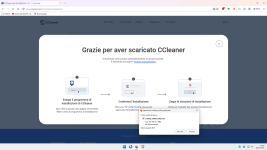
Then I download CCleaner, and it shouldn't work.
Am I missing something?:unsure:

1.png

P.S.

I also tried removing “net” from the TLD list because the download is “net,” but it didn't make a difference.
 
Last edited:
@Sampei.Nihira Sorry, it works as expected. Download block is for third-party. The download is triggered from a first party website so it is allowed.

1789902386857.png


P.S. I was still playing with uBS version 9.6.8 (while 9.6.9 is available in CWS).

I decided to not push those advanced protections to CWS but maybe it is an idea for this extension, it adds a fourth "advanced" set of protections:
- Block access to microphone, camera, screen and clipboard read on websites and frames INSIDE safe regions.
- Block access to Bluetooth, Serial, HID, USB and local network on websites and frames INSIDE safe regions.
- Enforce MEDIUM-risk fingerprinting protections in third-party frames outside safe regions.
- Block first-party downloads outside safe regions and block all 3P outside except safe-CSS, images and video's

What do you think of this "advanced" protections set?
 
Last edited:
@LinuxFan58

OK, so there’s a block on third-party downloads if they’re not included in the TLD list.
Is that correct?

But despite all that, I’m still a bit confused about this:

“Block third-party scripts, frames, and downloads outside safe regions.”

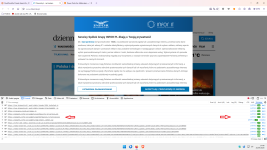
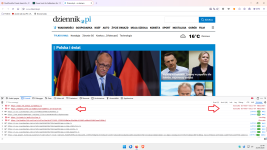
I ran this test on a website with a “pl” TLD, which isn’t included in the TLD list.
And I noticed that the third-party script highlighted by the red arrow is, as you can see from the browser’s developer tools, allowed:

1.png

Is it allowed on an internal list?

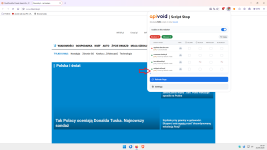
Note that I’ve disabled both uBo + API Void Script Stop, so there’s no interference.

:unsure:

P.S.

In my opinion, you should check two boxes:

  • Block third-party scripts and frames outside safe regions.
  • Block third-party downloads outside safe regions.

Otherwise, it's not very clear.

_______________________________________________________________________________


Congratulations,based on my quick tests, the extension has no impact on the Speedometer 3.1 test.;)(y)
 
Last edited:
  • Like
Reactions: Jan Willy
@Sampei-san

I think that the widget is first-party on that website. Because Firefox published so fast, I will use this as try out for uBS.

I am now adding in Privacy & Security

Medium website breakage risk enhancements (enabled by default when 'advanced' is enabled in Worry-free)

- Block first-party downloads on websites outside the safe-regions
- Enforce Sandbox Content Policy safe scripts on websites outside the safe-regions
- Block third-party from websites outside safe regions, except text, images and videos
- Enforce medium-risk fingerprinting protections in third-party frames outside safe regions
 
Last edited:
  • Applause
Reactions: Sampei.Nihira
@Sampei.Nihira And you are sure you had worry-free safe surfing enabled?

View attachment 300120

Got it.
If I need to run three extensions at the same time, I’ll inevitably have to disable a lot of settings that you assume are enabled.
That’s just how it works.

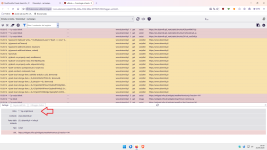
1.png


2.png

TH.

P.S.

But with the new version 1.2.3, I'm having some trouble running tests using only the 1p download.
In my opinion, there are too many options that users expect to be able to disable, but that can't be disabled because they're linked together.
For example, it's not possible to enable only the two options shown in my image above.
Sorry, but I'm used to testing one feature at a time.
 
Last edited: