OK. We will add a direct link to the changelog.


Open MalwareTips from your Home Screen or desktop. Follow discussions, find answers and pick up where you left off.
If you cannot find an install option, update your browser or use its bookmark option to keep MalwareTips close.
After installation, open the app and sign in. Enable push notifications in Preferences if you want alerts. On iPhone and iPad, push requires a Home Screen web app and iOS or iPadOS 16.4 or later.
Sign in to manage notificationsInstallation is optional. Your notification settings stay under your control.
 Thread starter
Gandalf_The_Grey
Thread starter
Gandalf_The_Grey

Homepage: Free PC cleaner & Privacy toolv4.0.14 (16 November 2020)
+ New feature added : You can check and repair your PC
. System files
. Windows image
. File table (MFT, FAT)
. sectors (MFT, FAT)
+ Improved portable version : it remembers your privazer.ini choice
+ Improved UI
Homepage: Free PC cleaner & Privacy toolv4.0.15 (05 December 2020)
+ Improved UI : Cookies
+ Improved cleanup : Snapshots / Shadows
+ Improved feature : Restore points
+ Improved cleanup : Cyberlink PowerDVD, PowerDirector

Has the UI gotten any better? That was the big downside for me.PrivaZer version 4.0.15 released:
No there are some improvements but basically, it's the same.Has the UI gotten any better? That was the big downside for me.
Homepage: Free PC cleaner & Privacy toolv4.0.16 (20 December 2020)
+ Improved cleanup : Snapshots / Shadows
+ Improved cleanup : Restore points
+ Improved cleanup : Gom Player
+ Minor bug fixes
Homepage: Free PC cleaner & Privacy toolv4.0.17 (04 January 2021)
+ New cleanup : BestCrypt
+ Improved cleanup : MFT INDEX
+ Improved cleanup : Temporary files
+ Improved cleanup : Registry
+ Improved cleanup : Gom Player Plus
+ Minor bug fixes

Totally agree. I contacted them years ago complaining the interface looks unprofessional.Has the UI gotten any better? That was the big downside for me.

@oldschool,
I agree with you, our design/UI is far from being the best. The reason for that is that we are more developers than designers
Should be (Dutch)...v4.0.18 (31 January 2021)
+ Improved scan : Shellbags
+ Improved UI
+ Improved support NL (Dutsch)
+ Improved support PL (Polish)

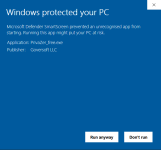
DoneYes, false positive from WIndows Defender/smartscreen.
If you want to help us, click here to submit a request to Microsoft :
Feedback to Microsoft
Report a website or URL that you believe might contain threats such as phishing or malware.feedback.smartscreen.microsoft.com
There is an option on the page to report that is is SAFE
OK?
Homepage: Free PC cleaner & Privacy toolv4.0.19 (03 March 2021)
+ New cleanup : FeatureUsage
+ Improved cleanup Index.dat
+ Minot bug fixes
Homepage: Free PC cleaner & Privacy toolv4.0.20 (13 March 2021)
+ Improved cleanup : MFT
+ Improved cleanup : multiple drives
+ New cleanup : Replay Media Splitter
Homepage: Free PC cleaner & Privacy toolv4.0.21 (01 April 2021)
+ New cleanup : Restore points / Snapshots
+ Improved cleanup : Jumplist
+ Improved support : Windows Insider 21343
v1.29 (19 April 2021)
+ Improved speed
+ Improved scan : Traces of deleted folders
+ Improved UI

I happened to use this software a few hours ago after reading an article introduced on a Japanese site. If there is something wrong with the display in the folder, you may be able to fix it. This software is a little different from Cleaner, which aims to recover capacity and improve speed.Shellbag Analyzer & Cleaner v1.29 released:

Homepage: Free PC cleaner & Privacy toolv4.0.22 (28 April 2021)
+ Improved cleanup : Shellbags
+ Improved cleanup : Restore points / Snapshots
+ Improved UI
+ Improved support : french
Members who viewed this thread in the last 5 minutes