


PrMi New Config
- Thread starter PrMi
- Start date
You are using an out of date browser. It may not display this or other websites correctly.
You should upgrade or use an alternative browser.
You should upgrade or use an alternative browser.

Hello 
No backup and recovery? Something external HDD and using built in from Windows is fine.
You may install Lastpass as your password manager or storing sensitive information.
No backup and recovery? Something external HDD and using built in from Windows is fine.
You may install Lastpass as your password manager or storing sensitive information.
I
illumination
As suggested by jamescv7 some form of back up and recovery. Maybe consider creating guest accounts for the "others" that are using the system.

Hi PrMi, and thank you for sharing your configuration. I support the tips offered by both jamescv7 & illumination in securing your system. A little effort makes a lot of sense.
To secure privacy when using Google Chrome you can browse using "Incognito". This deletes your browsing history when the session ends. It also disables extensions which may track you, so to allow Adblock (plus other helpful extensions like LastPass) go to "settings", then >> "extensions". Make sure to check the box allowing Adblock when in Incognito.
A free program that safely removes accumulated temp files, and can be used daily to keep your system clear & light is CCleaner.
You may opt to extract the portable version, instead, onto an external USB flash drive. It is located at the very bottom of the linked page under "Builds". The portable version places no additions to your system registry.
Chrome provides a built in 3rd party cookie blocker!
To activate the cookie blocker, find it under "Settings".
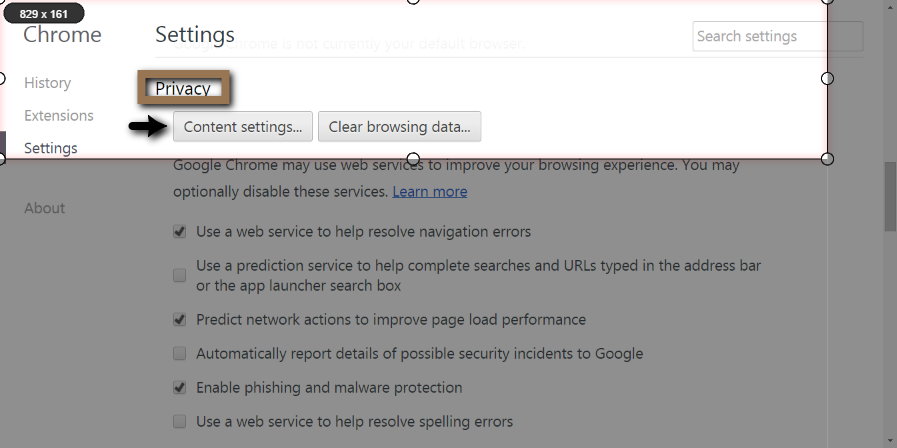
For privacy, you can un-check everything(above) though keep "Enable phishing and malware protection" selected.
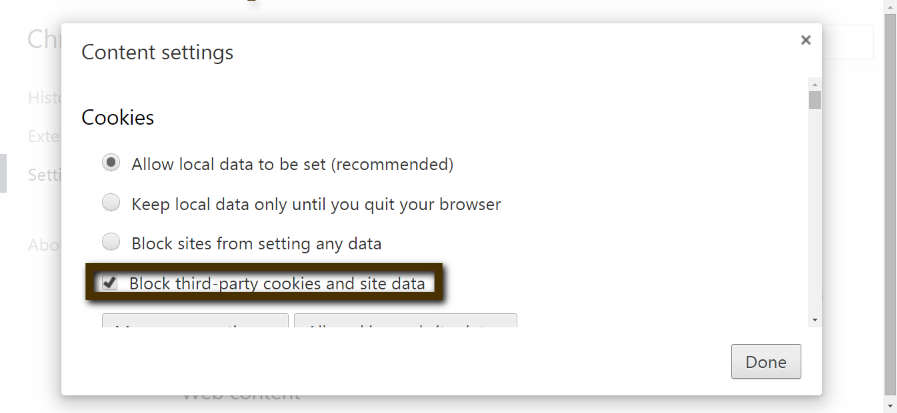
3. Mark the box "Block third party cookies and site data".
To insure removal of data, instead of "Allow", choose "Keep local data only until you quit...browser".
To secure privacy when using Google Chrome you can browse using "Incognito". This deletes your browsing history when the session ends. It also disables extensions which may track you, so to allow Adblock (plus other helpful extensions like LastPass) go to "settings", then >> "extensions". Make sure to check the box allowing Adblock when in Incognito.
A free program that safely removes accumulated temp files, and can be used daily to keep your system clear & light is CCleaner.
You may opt to extract the portable version, instead, onto an external USB flash drive. It is located at the very bottom of the linked page under "Builds". The portable version places no additions to your system registry.
Chrome provides a built in 3rd party cookie blocker!
To activate the cookie blocker, find it under "Settings".
- Scroll down to the bottom, & <click> Advanced Settings
- Beneath "Privacy" <click> Content settings
For privacy, you can un-check everything
(above) though keep "Enable phishing and malware protection" selected.3. Mark the box "Block third party cookies and site data".
To insure removal of data, instead of "Allow", choose "Keep local data only until you quit...browser".
Last edited:

Hello, PrMi.. First of all, you should definitely follow suit the advice given above.
Then, I have two more recommendations:
- add one more on-demand scanner (maybe HitmanPro)
- add WOT & HTTPS Everywhere to your browser.
Thanks for sharing!
Then, I have two more recommendations:
- add one more on-demand scanner (maybe HitmanPro)
- add WOT & HTTPS Everywhere to your browser.
Thanks for sharing!

I agree with all of the suggestions made above. I would also consider using CCleaner or Privazer if not already doing so.

Ummm... sigh there's nothing left for me to add lol. Thanks for the share, is your Bitdefender a full year license or just a trial ? If it's a trial give either Eset SS 8 or NIS 2015 a run.
Cheers
Cheers

Thanks everyone! I use a 500gb external hdd for backup. And i use ccleaner also. The chrome thing u mentioned was already enabled.
I dont use hitman pro because i already have bitdefender + malwarebytes which i tested on virus sign 1 day old samples and it gave about 99% detection.
I have used eset but theres no zero day protection so i dont prefer it. I have bitdefender 9 months liscence. And yes, i also use adblock.
I dont use hitman pro because i already have bitdefender + malwarebytes which i tested on virus sign 1 day old samples and it gave about 99% detection.
I have used eset but theres no zero day protection so i dont prefer it. I have bitdefender 9 months liscence. And yes, i also use adblock.
This is my new config.
Last edited by a moderator:


Add windows firewall control or use a good firewall (free) and back up software (free) otherwise its a good config.
Your config is strong, i like it. I just have one suggestion maybe you should a password manager like LastPass or KeePass to secure your passwords when you are online.
Thanks for sharing
Thanks for sharing
S
Sr. Normal
Looks good . Just add to the suggestion of @tonibalas the extensions Wot and Https Everywhere
Windows firewall. It's simple and effective. I don't use pass manager because they are risky. If hackers gain access to pc they can acces the software database and get all passwords. If I win emsisoft internet security licence they ill switch to it.
Could you explain how "hackers" will gain access to your computer, for the password manager situation. Cheers.
Do you log out of every website you visit, after you close or move away from the PC?
Do you log out of every website you visit, after you close or move away from the PC?

i sure hope you have strong CPU.Lol the pc security channel said so
my point of view is different than the others. i like to have my pc as free as possible.
i would remove MBAM pro or disable it. (that's what i did in mine), i would definitely remove AVG Pc tuneup 2015 and i see no resume to have HITMANPRO. One security suite is more than enough.
the most important thing as mention is backup and again backup
marcuim reflect
aoemi backuper.
cheers
Don't be a sheep.Lol the pc security channel said so
Try out LastPass or any other, and you'll see it is secure. Just don't leave your laptop open on the park bench for others to use.You may also like...
-
 Advanced Plus Security Divine_Barakah's Second Laptop Security Config
- Started by Divine_Barakah
- Replies: 93
-
 Advanced Plus Security Devjit’s Gaming PC 2026
- Started by devjitdutta2025
- Replies: 44
-
 Advanced Plus Security eonline 2025 security config
- Started by eonline
- Replies: 0
-
Question How to set up exclusions to paths that are dynamic not constant?
- Started by Studynxx
- Replies: 19
