

Solved Problem with internet in browsers after unwanted plug-in
- Thread starter Arjan
- Start date
You are using an out of date browser. It may not display this or other websites correctly.
You should upgrade or use an alternative browser.
You should upgrade or use an alternative browser.

Hello,
Please follow this topic and attach required reports
http://malwaretips.com/threads/preparation-guide-before-requesting-malware-removal-help.20334/
Please follow this topic and attach required reports
http://malwaretips.com/threads/preparation-guide-before-requesting-malware-removal-help.20334/


Both files, FRST and fixlist.txt have to be in the same location or the fix will not work!
- Right-click on icon and select
Run as Administrator to start the tool.

(XP users click run after receipt of Windows Security Warning - Open File). - Press the Fix button just once and wait.
- If for some reason the tool needs a restart, please make sure you let the system restart normally. After that let the tool complete its run.
- When finished FRST will generate a log on the Desktop, called Fixlog.txt.
Please attach it to your reply.

Please download ZOEK by Smeenk and save it to your desktop (preferred version is the *.exe one)
Temporary disable your AntiVirus and AntiSpyware protection - instructions here.
- Right-click on icon and select
Run as Administrator to start the tool.
- Wait patiently until the main console will appear, it may take a minute or two.
- In the main box please paste in the following script:
Code:createsrpoint; autoclean; emptyalltemp; ipconfig /flushdns;b - Make sure that Scan All Users option is checked.
- Push Run Script and wait patiently. The scan may take a couple of minutes.
- When the scan completes, a zoek-results logfile should open in notepad.
- If a reboot is needed, it will be opened after it. You may also find it at your main drive (usually C:\ drive)
Post its content into your next reply.
Attachments
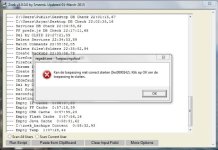
Okay, so I ran Zoek and it finally finished after six hours but at the end it gave two error messages (I don't have a screenshot of the first one but it said something about lack of memory and backup if I remember well, the second one of them is attached and says: "Can't open application correctly (0xc0000142). Click on 'OK' to close the application"), so I don't know if the Zoek scan finished correctly. I attached the fixlog and zoek-results files.
Thanks for the help again!
Thanks for the help again!
Attachments
Export bookmarks from Firefox
https://support.mozilla.org/en-US/kb/export-firefox-bookmarks-to-backup-or-transfer
Export bookmarks from Chrome
https://support.google.com/chrome/answer/96816?hl=en
Uninstall Firefox from Control Panel and click start > search > %appdata% click Roaming and remove folder Mozilla.
Uninstall Chrome
Close all Chrome windows and tabs.
Go to the Start menu > Control Panel.
Click Programs and Features.
Double-click Google Chrome.
Click Uninstall from the confirmation dialog. Delete your user profile information, like your browser preferences, bookmarks, and history, select the "Also delete your browsing data" checkbox.
Click Start, copy %localappdata% click Local and remove folder Google
Download Firefox
https://www.mozilla.org/en-US/firefox/new/
Download Chrome
https://www.google.com/intl/en/chrome/browser/desktop/
https://support.mozilla.org/en-US/kb/export-firefox-bookmarks-to-backup-or-transfer
Export bookmarks from Chrome
https://support.google.com/chrome/answer/96816?hl=en
Uninstall Firefox from Control Panel and click start > search > %appdata% click Roaming and remove folder Mozilla.
Uninstall Chrome
Close all Chrome windows and tabs.
Go to the Start menu > Control Panel.
Click Programs and Features.
Double-click Google Chrome.
Click Uninstall from the confirmation dialog. Delete your user profile information, like your browser preferences, bookmarks, and history, select the "Also delete your browsing data" checkbox.
Click Start, copy %localappdata% click Local and remove folder Google
Download Firefox
https://www.mozilla.org/en-US/firefox/new/
Download Chrome
https://www.google.com/intl/en/chrome/browser/desktop/
Today I tried Chrome and I had the same problem. But with Chrome not only the internet pages do not load but sometimes also the browsers itself doesnt work properly. E.g. when I try to change to a different tab, it takes a long time and it says Chrome doesn't respond. I've always had problems with Chrome on this computer, I really don't know why.

You may also like...
-
Solved Help to remove a virus
- Started by Jone Doh
- Replies: 31
-
-
 Question Is it possible and easy to setup a whitelist of browser utilizing JA4+
- Started by Victor M
- Replies: 1
