I was hacked via a Discord link. The hacker accessed my computer and then my router. This happened a long time ago. I requested a new router replacement (Askey RTF8115VM), but the hacker was able to change the router password as soon as I entered its settings. At the same time, I also bought a new computer that was re-infected. I know this because it sends subliminal messages with YouTube titles and thumbnails. He was also able to hack my iPhone 15 Pro Max. I saw how he blocked PayPal, he could heat up the phone at will, and I couldn't access the app because it would freeze. After everything that happened I bought a new laptop and a new internet router but it does not have a fiber optic connection and before this, I had configured the router (gl flint ax1800) to use it, but after seeing that when testing without the router (gl flint ax1800) he managed to hack my new router (askey rtf8115vm), so I'm afraid to connect my laptop to the internet. The hacker is too annoying, he did social engineering or I watch videos that have nothing to do with my algorithm, sending subliminal messages or I've already become paranoid, anyway I think I'm not paranoid yet because the videos he sends have 5 views or are very old videos and the titles are in other languages. I also add that I came to think that the internet provider itself is infected by a virus, this because I went to internet cafes to download installers for windows, ubuntu, and some other things to free myself from it. I couldn't do it and I'm looking for help so you can tell me what I can do against the hacker, what I should do with the new laptop and router (GL Flint AX1800), and what paths the hacker uses to hack new devices.


The MalwareTips app
Your community, one tap away.
Open MalwareTips from your Home Screen or desktop. Follow discussions, find answers and pick up where you left off.
- Home Screen access
- Optional push alerts
- Your community
You're ready to explore.Explore what's new
Installation instructions
iPhone & iPad
- Open MalwareTips in Safari and tap Share. You may need to open the Page Menu first.
- Choose Add to Home Screen. If it is not listed, use Edit Actions to add it.
- Keep Open as Web App enabled if shown, then tap Add.
Android
- Open MalwareTips in Chrome or another browser that supports app installation.
- Open the browser menu and look for Install app, Install and create shortcut, or Add to Home screen.
- Choose Install and confirm. Wording varies by browser.
Desktop
- Chrome: use the install icon in the address bar, or the menu under Cast, save and share.
- Edge: open the menu, then More tools, Apps and Install this site as an app.
- Safari on Mac: choose Share or File, then Add to Dock. Firefox on Windows: look for the web apps button in the address bar.
If you cannot find an install option, update your browser or use its bookmark option to keep MalwareTips close.
Keep up with your conversations
After installation, open the app and sign in. Enable push notifications in Preferences if you want alerts. On iPhone and iPad, push requires a Home Screen web app and iOS or iPadOS 16.4 or later.
Sign in to manage notificationsInstallation is optional. Your notification settings stay under your control.
You are using an out of date browser. It may not display this or other websites correctly.
You should upgrade or use an alternative browser.
You should upgrade or use an alternative browser.
Solved Help to remove a virus
- Thread starter Jone Doh
- Start date
Windows Malware Removal Help & Support
31 Replies
4,726 Views
- Status
- Not open for further replies.

Hello..! Welcome to MalwareTips..!  My name is icotonev and I'm here to help you remove malware ..! The purpose of this section is to help remove malware from your machine. If you think your computer is infected please read and follow the following instruction:

 malwaretips.com
My name is icotonev and I'm here to help you remove malware ..! The purpose of this section is to help remove malware from your machine. If you think your computer is infected please read and follow the following instruction:
[MANDATORY] Preparation Guide Before Requesting Malware Removal Help | MalwareTips
Hi and welcome to MalwareTips Malware Removal Forum. If you are reading this, then you are probably seeking help or feel infected. Over 5000 topics have...
malwaretips.com
I have two computers, both computers are in my room and both have a different internet router. I will install where Malwarebytes finished scanning. If you need me to connect the iPhone 15 Pro Max, let me know.Hello..! Welcome to MalwareTips..!
[MANDATORY] Preparation Guide Before Requesting Malware Removal Help | MalwareTips
Hi and welcome to MalwareTips Malware Removal Forum. If you are reading this, then you are probably seeking help or feel infected. Over 5000 topics have...
Computer 1Hello..! Welcome to MalwareTips..!
[MANDATORY] Preparation Guide Before Requesting Malware Removal Help | MalwareTips
Hi and welcome to MalwareTips Malware Removal Forum. If you are reading this, then you are probably seeking help or feel infected. Over 5000 topics have...
Attachments
Malwarebytes scan computer 1Hello..! I expect to see the scanning result with Malwarebytes...! Thank you ..!
Attachments
Sorry, but it's still scanning the second computer with Malwarebytes. The second computer was infected, and the first computer (the one that sent the first files) was the one that was infected first. I'll attach images that I believe prove that there is a virus on my iPhone 15 Pro Max and on the computer. This was done on purpose, and right now that unnamed app that came out after shutting down no longer comes out. But I know it's still here because of the subliminal messages it sends on YouTube.
Attachments
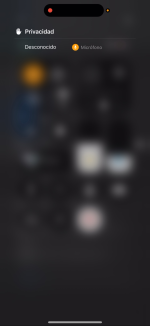
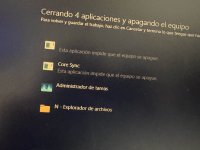
For a computer 1:
Do you recognize these open ports ..?
Farbar Recovery Scan Tool Fix
Farbar Recovery Scan Tool SearchAll
In your next reply, please include:
Do you recognize these open ports ..?
Code:
FirewallRules: [{E4282059-569E-48A8-9C90-74F57F73A9E4}] => (Allow) LPort=32683
FirewallRules: [{3EB1093B-B96D-4091-BF97-AE81B9E3BE7F}] => (Allow) LPort=33683
FirewallRules: [{62733AC8-6028-42E1-B6A3-DC64E8CFCDA2}] => (Allow) LPort=26822
Farbar Recovery Scan Tool Fix
- Right click on the FRST64 icon and select Run as administrator
- Highlight the below information then hit the Ctrl + C keys at the same time and the text will be copied
- There is no need to paste the information anywhere, FRST64 will do it for you
Code:
Start::
CreateRestorePoint:
CloseProcesses:

Task: {F3E6E7ED-A196-4E44-8803-55FAB3AD4E29} - System32\Tasks\Microsoft\Windows\UpdateOrchestrator\USO_UxBroker => %systemroot%\system32\MusNotification.exe  (No File)
Error reading preferences. Please check "Secure Preferences" file for possible corruption. <==== ATTENTION
Edge Extension: (No Name) - C:\Users\MSI\AppData\Local\Microsoft\Edge\User Data\Default\Extensions\bojobppfploabceghnmlahpoonbcbacn [2025-09-05] [UpdateUrl:0] <==== ATTENTION
Edge Extension: (No Name) - C:\Users\MSI\AppData\Local\Microsoft\Edge\User Data\Default\Extensions\ghbmnnjooekpmoecnnnilnnbdlolhkhi [2025-08-22] [UpdateUrl:0] <==== ATTENTION
Edge Extension: (No Name) - C:\Users\MSI\AppData\Local\Microsoft\Edge\User Data\Default\Extensions\jmjflgjpcpepeafmmgdpfkogkghcpiha [2025-08-22] [UpdateUrl:0] <==== ATTENTION
Edge Extension: (No Name) - C:\Users\MSI\AppData\Local\Microsoft\Edge\User Data\Default\Extensions\nkapkmklnmidbbgjaipbgpcnbomnaakc [2025-08-23] [UpdateUrl:0] <==== ATTENTION
CHR Extension: (No Name) - C:\Users\MSI\AppData\Local\Google\Chrome\User Data\Default\Extensions\ghbmnnjooekpmoecnnnilnnbdlolhkhi [2025-08-28] [UpdateUrl:0] <==== ATTENTION
CHR Extension: (No Name) - C:\Users\MSI\AppData\Local\Google\Chrome\User Data\Default\Extensions\ihcjicgdanjaechkgeegckofjjedodee [2025-09-05] [UpdateUrl:0] <==== ATTENTION
CHR Extension: (No Name) - C:\Users\MSI\AppData\Local\Google\Chrome\User Data\Default\Extensions\nmmhkkegccagdldgiimedpiccmgmieda [2025-08-28] [UpdateUrl:0] <==== ATTENTION
CHR Extension: (No Name) - C:\Users\MSI\AppData\Local\Google\Chrome\User Data\Default\Extensions\oombnmpbbhbakfpfgdflaajkhicgfaam [2025-08-28] [UpdateUrl:0] <==== ATTENTION
AlternateDataStreams: C:\Users\MSI\Desktop\FRST64English.exe:MBAM.Zone.Identifier [225]
AlternateDataStreams: C:\Users\Public\Shared Files:VersionCache [1253]

CMD: netsh int ip reset
CMD: ipconfig /flushDNS

CMD: sfc /scannow
CMD: DISM /Online /Cleanup-Image /RestoreHealth

EmptyTemp:
End::- Click Fix
- When completed the tool will create a log on the desktop called Fixlog.txt. Please copy and paste the contents of the file in your reply.
Farbar Recovery Scan Tool SearchAll
- Right click on FRST and select Run as administrator
- Copy/paste the following in the Search: box
Code:
SearchAll: bojobppfploabceghnmlahpoonbcbacn;ghbmnnjooekpmoecnnnilnnbdlolhkhi;jmjflgjpcpepeafmmgdpfkogkghcpiha;nkapkmklnmidbbgjaipbgpcnbomnaakc;ihcjicgdanjaechkgeegckofjjedodee;nmmhkkegccagdldgiimedpiccmgmieda;oombnmpbbhbakfpfgdflaajkhicgfaam- Click Search Files
- When completed click OK and a Search.txt document will open on your desktop
In your next reply, please include:
- Fixlog.txt
- Search.txt
For a computer 1:
Do you recognize these open ports ..?
Code:FirewallRules: [{E4282059-569E-48A8-9C90-74F57F73A9E4}] => (Allow) LPort=32683 FirewallRules: [{3EB1093B-B96D-4091-BF97-AE81B9E3BE7F}] => (Allow) LPort=33683 FirewallRules: [{62733AC8-6028-42E1-B6A3-DC64E8CFCDA2}] => (Allow) LPort=26822
Farbar Recovery Scan Tool Fix
- Right click on the FRST64 icon and select Run as administrator
- Highlight the below information then hit the Ctrl + C keys at the same time and the text will be copied
- There is no need to paste the information anywhere, FRST64 will do it for you
Code:Start:: CreateRestorePoint: CloseProcesses: Task: {F3E6E7ED-A196-4E44-8803-55FAB3AD4E29} - System32\Tasks\Microsoft\Windows\UpdateOrchestrator\USO_UxBroker => %systemroot%\system32\MusNotification.exe (No File) Error reading preferences. Please check "Secure Preferences" file for possible corruption. <==== ATTENTION Edge Extension: (No Name) - C:\Users\MSI\AppData\Local\Microsoft\Edge\User Data\Default\Extensions\bojobppfploabceghnmlahpoonbcbacn [2025-09-05] [UpdateUrl:0] <==== ATTENTION Edge Extension: (No Name) - C:\Users\MSI\AppData\Local\Microsoft\Edge\User Data\Default\Extensions\ghbmnnjooekpmoecnnnilnnbdlolhkhi [2025-08-22] [UpdateUrl:0] <==== ATTENTION Edge Extension: (No Name) - C:\Users\MSI\AppData\Local\Microsoft\Edge\User Data\Default\Extensions\jmjflgjpcpepeafmmgdpfkogkghcpiha [2025-08-22] [UpdateUrl:0] <==== ATTENTION Edge Extension: (No Name) - C:\Users\MSI\AppData\Local\Microsoft\Edge\User Data\Default\Extensions\nkapkmklnmidbbgjaipbgpcnbomnaakc [2025-08-23] [UpdateUrl:0] <==== ATTENTION CHR Extension: (No Name) - C:\Users\MSI\AppData\Local\Google\Chrome\User Data\Default\Extensions\ghbmnnjooekpmoecnnnilnnbdlolhkhi [2025-08-28] [UpdateUrl:0] <==== ATTENTION CHR Extension: (No Name) - C:\Users\MSI\AppData\Local\Google\Chrome\User Data\Default\Extensions\ihcjicgdanjaechkgeegckofjjedodee [2025-09-05] [UpdateUrl:0] <==== ATTENTION CHR Extension: (No Name) - C:\Users\MSI\AppData\Local\Google\Chrome\User Data\Default\Extensions\nmmhkkegccagdldgiimedpiccmgmieda [2025-08-28] [UpdateUrl:0] <==== ATTENTION CHR Extension: (No Name) - C:\Users\MSI\AppData\Local\Google\Chrome\User Data\Default\Extensions\oombnmpbbhbakfpfgdflaajkhicgfaam [2025-08-28] [UpdateUrl:0] <==== ATTENTION AlternateDataStreams: C:\Users\MSI\Desktop\FRST64English.exe:MBAM.Zone.Identifier [225] AlternateDataStreams: C:\Users\Public\Shared Files:VersionCache [1253] CMD: netsh int ip reset CMD: ipconfig /flushDNS CMD: sfc /scannow CMD: DISM /Online /Cleanup-Image /RestoreHealth EmptyTemp: End::
- Click Fix
- When completed the tool will create a log on the desktop called Fixlog.txt. Please copy and paste the contents of the file in your reply.
Farbar Recovery Scan Tool SearchAll
- Right click on FRST and select Run as administrator
- Copy/paste the following in the Search: box
Code:SearchAll: bojobppfploabceghnmlahpoonbcbacn;ghbmnnjooekpmoecnnnilnnbdlolhkhi;jmjflgjpcpepeafmmgdpfkogkghcpiha;nkapkmklnmidbbgjaipbgpcnbomnaakc;ihcjicgdanjaechkgeegckofjjedodee;nmmhkkegccagdldgiimedpiccmgmieda;oombnmpbbhbakfpfgdflaajkhicgfaam
- Click Search Files
- When completed click OK and a Search.txt document will open on your desktop
In your next reply, please include:
- Fixlog.txt
- Search.txt
I don't know how to recognize ports I had before
Attachments
Thank you..!
Farbar Recovery Scan Tool Fix
Next..:
Scan with SecurityCheck by glax24
In your next reply, please include:
Farbar Recovery Scan Tool Fix
- Right click on the FRST64 icon and select Run as administrator
- Highlight the below information then hit the Ctrl + C keys at the same time and the text will be copied
- There is no need to paste the information anywhere, FRST64 will do it for you
Code:
Start::
CloseProcesses:

C:\Users\MSI\AppData\Local\NVIDIA Corporation\NVIDIA Overlay\CefCache\Default\Extensions\ihcjicgdanjaechkgeegckofjjedodee
C:\Users\MSI\AppData\Local\NVIDIA Corporation\NVIDIA Overlay\CefCache\Default\Extensions\oombnmpbbhbakfpfgdflaajkhicgfaam
C:\Users\MSI\AppData\Local\Microsoft\Edge\User Data\Default\Extensions\bojobppfploabceghnmlahpoonbcbacn
C:\Users\MSI\AppData\Local\Microsoft\Edge\User Data\Default\Extensions\ghbmnnjooekpmoecnnnilnnbdlolhkhi
C:\Users\MSI\AppData\Local\Microsoft\Edge\User Data\Default\Extensions\jmjflgjpcpepeafmmgdpfkogkghcpiha
C:\Users\MSI\AppData\Local\Microsoft\Edge\User Data\Default\Extensions\nkapkmklnmidbbgjaipbgpcnbomnaakc
C:\Users\MSI\AppData\Local\Google\Chrome\User Data\Default\Storage\ext\nmmhkkegccagdldgiimedpiccmgmieda
C:\Users\MSI\AppData\Local\Google\Chrome\User Data\Default\Local Extension Settings\ghbmnnjooekpmoecnnnilnnbdlolhkhi
C:\Users\MSI\AppData\Local\Google\Chrome\User Data\Default\Extensions\ghbmnnjooekpmoecnnnilnnbdlolhkhi
C:\Users\MSI\AppData\Local\Google\Chrome\User Data\Default\Extensions\ihcjicgdanjaechkgeegckofjjedodee
C:\Users\MSI\AppData\Local\Google\Chrome\User Data\Default\Extensions\nmmhkkegccagdldgiimedpiccmgmieda
C:\Users\MSI\AppData\Local\Google\Chrome\User Data\Default\Extensions\oombnmpbbhbakfpfgdflaajkhicgfaam

StartRegedit:
Windows Registry Editor Version 5.00
[-HKEY_LOCAL_MACHINE\SOFTWARE\Microsoft\Edge\Extensions\bojobppfploabceghnmlahpoonbcbacn]
[-HKEY_LOCAL_MACHINE\SOFTWARE\WOW6432Node\Microsoft\Edge\Extensions\bojobppfploabceghnmlahpoonbcbacn]
[HKEY_USERS\S-1-5-21-3105478734-3177239116-2570369612-1001\Software\Microsoft\Edge\PreferenceMACs\Default\extensions.settings]
"bojobppfploabceghnmlahpoonbcbacn"=-
[HKEY_USERS\S-1-5-21-3105478734-3177239116-2570369612-1001\Software\Google\Chrome\PreferenceMACs\Default\extensions.settings]
"ghbmnnjooekpmoecnnnilnnbdlolhkhi"=-
[HKEY_USERS\S-1-5-21-3105478734-3177239116-2570369612-1001\Software\Microsoft\Edge\PreferenceMACs\Default\extensions.settings]
"ghbmnnjooekpmoecnnnilnnbdlolhkhi"=-
[HKEY_USERS\S-1-5-21-3105478734-3177239116-2570369612-1001\Software\Microsoft\Edge\PreferenceMACs\Default\extensions.settings]
"jmjflgjpcpepeafmmgdpfkogkghcpiha"=-
[-HKEY_LOCAL_MACHINE\SOFTWARE\WOW6432Node\Microsoft\Edge\Extensions\nkapkmklnmidbbgjaipbgpcnbomnaakc]
[HKEY_USERS\S-1-5-21-3105478734-3177239116-2570369612-1001\Software\Microsoft\Edge\PreferenceMACs\Default\extensions.settings]
"nkapkmklnmidbbgjaipbgpcnbomnaakc"=-
[-HKEY_LOCAL_MACHINE\SOFTWARE\Google\Chrome\Extensions\ihcjicgdanjaechkgeegckofjjedodee]
[-HKEY_LOCAL_MACHINE\SOFTWARE\WOW6432Node\Google\Chrome\Extensions\ihcjicgdanjaechkgeegckofjjedodee]
[HKEY_USERS\S-1-5-21-3105478734-3177239116-2570369612-1001\Software\Chromium\PreferenceMACs\Default\extensions.settings]
"ihcjicgdanjaechkgeegckofjjedodee"=-
[HKEY_USERS\S-1-5-21-3105478734-3177239116-2570369612-1001\Software\Google\Chrome\PreferenceMACs\Default\extensions.settings]
"ihcjicgdanjaechkgeegckofjjedodee"=-
[HKEY_USERS\S-1-5-21-3105478734-3177239116-2570369612-1001\Software\Google\Chrome\PreferenceMACs\Default\extensions.settings]
"nmmhkkegccagdldgiimedpiccmgmieda"=-
[-HKEY_LOCAL_MACHINE\SOFTWARE\WOW6432Node\Google\Chrome\Extensions\oombnmpbbhbakfpfgdflaajkhicgfaam]
[HKEY_USERS\S-1-5-21-3105478734-3177239116-2570369612-1001\Software\Chromium\PreferenceMACs\Default\extensions.settings]
"oombnmpbbhbakfpfgdflaajkhicgfaam"=-
[HKEY_USERS\S-1-5-21-3105478734-3177239116-2570369612-1001\Software\Google\Chrome\PreferenceMACs\Default\extensions.settings]
"oombnmpbbhbakfpfgdflaajkhicgfaam"=-
EndRegedit:

StartPowershell:
Get-Process -Id (Get-NetTCPConnection -LocalPort  32683).OwningProcess
Get-Process -Id (Get-NetTCPConnection -LocalPort  33683).OwningProcess
Get-Process -Id (Get-NetTCPConnection -LocalPort  26822).OwningProcess
EndPowerShell:

EmptyTemp:
Reboot:
End::- Click Fix
- When completed the tool will create a log on the desktop called Fixlog.txt. Please copy and paste the contents of the file in your reply.
Next..:
Scan with SecurityCheck by glax24
- Temporarily disable Microsoft SmartScreen only if it blocks the download of the software. The program is safe
- Download SecurityCheck by glax24 from here
- If SmartScreen blocks the file from running click on More info and Run anyway
- This tool is safe. Smartscreen is overly sensitive. You can check the VirusTotal scan of the tool from here
- Right-click with your mouse on the Securitycheck.exe and select "Run as administrator" and reply YES to allow it to run
- Wait for the scan to finish. It will open a text file named SecurityCheck.txt Close the file. Attach it with your next reply.
- You can find this file in a folder called SecurityCheck, C:\SecurityCheck\SecurityCheck.txt
In your next reply, please include:
- Fixlog.txt
- SecurityCheck.txt
Thank you..!
Farbar Recovery Scan Tool Fix
- Right click on the FRST64 icon and select Run as administrator
- Highlight the below information then hit the Ctrl + C keys at the same time and the text will be copied
- There is no need to paste the information anywhere, FRST64 will do it for you
Code:Start:: CloseProcesses: C:\Users\MSI\AppData\Local\NVIDIA Corporation\NVIDIA Overlay\CefCache\Default\Extensions\ihcjicgdanjaechkgeegckofjjedodee C:\Users\MSI\AppData\Local\NVIDIA Corporation\NVIDIA Overlay\CefCache\Default\Extensions\oombnmpbbhbakfpfgdflaajkhicgfaam C:\Users\MSI\AppData\Local\Microsoft\Edge\User Data\Default\Extensions\bojobppfploabceghnmlahpoonbcbacn C:\Users\MSI\AppData\Local\Microsoft\Edge\User Data\Default\Extensions\ghbmnnjooekpmoecnnnilnnbdlolhkhi C:\Users\MSI\AppData\Local\Microsoft\Edge\User Data\Default\Extensions\jmjflgjpcpepeafmmgdpfkogkghcpiha C:\Users\MSI\AppData\Local\Microsoft\Edge\User Data\Default\Extensions\nkapkmklnmidbbgjaipbgpcnbomnaakc C:\Users\MSI\AppData\Local\Google\Chrome\User Data\Default\Storage\ext\nmmhkkegccagdldgiimedpiccmgmieda C:\Users\MSI\AppData\Local\Google\Chrome\User Data\Default\Local Extension Settings\ghbmnnjooekpmoecnnnilnnbdlolhkhi C:\Users\MSI\AppData\Local\Google\Chrome\User Data\Default\Extensions\ghbmnnjooekpmoecnnnilnnbdlolhkhi C:\Users\MSI\AppData\Local\Google\Chrome\User Data\Default\Extensions\ihcjicgdanjaechkgeegckofjjedodee C:\Users\MSI\AppData\Local\Google\Chrome\User Data\Default\Extensions\nmmhkkegccagdldgiimedpiccmgmieda C:\Users\MSI\AppData\Local\Google\Chrome\User Data\Default\Extensions\oombnmpbbhbakfpfgdflaajkhicgfaam StartRegedit: Windows Registry Editor Version 5.00 [-HKEY_LOCAL_MACHINE\SOFTWARE\Microsoft\Edge\Extensions\bojobppfploabceghnmlahpoonbcbacn] [-HKEY_LOCAL_MACHINE\SOFTWARE\WOW6432Node\Microsoft\Edge\Extensions\bojobppfploabceghnmlahpoonbcbacn] [HKEY_USERS\S-1-5-21-3105478734-3177239116-2570369612-1001\Software\Microsoft\Edge\PreferenceMACs\Default\extensions.settings] "bojobppfploabceghnmlahpoonbcbacn"=- [HKEY_USERS\S-1-5-21-3105478734-3177239116-2570369612-1001\Software\Google\Chrome\PreferenceMACs\Default\extensions.settings] "ghbmnnjooekpmoecnnnilnnbdlolhkhi"=- [HKEY_USERS\S-1-5-21-3105478734-3177239116-2570369612-1001\Software\Microsoft\Edge\PreferenceMACs\Default\extensions.settings] "ghbmnnjooekpmoecnnnilnnbdlolhkhi"=- [HKEY_USERS\S-1-5-21-3105478734-3177239116-2570369612-1001\Software\Microsoft\Edge\PreferenceMACs\Default\extensions.settings] "jmjflgjpcpepeafmmgdpfkogkghcpiha"=- [-HKEY_LOCAL_MACHINE\SOFTWARE\WOW6432Node\Microsoft\Edge\Extensions\nkapkmklnmidbbgjaipbgpcnbomnaakc] [HKEY_USERS\S-1-5-21-3105478734-3177239116-2570369612-1001\Software\Microsoft\Edge\PreferenceMACs\Default\extensions.settings] "nkapkmklnmidbbgjaipbgpcnbomnaakc"=- [-HKEY_LOCAL_MACHINE\SOFTWARE\Google\Chrome\Extensions\ihcjicgdanjaechkgeegckofjjedodee] [-HKEY_LOCAL_MACHINE\SOFTWARE\WOW6432Node\Google\Chrome\Extensions\ihcjicgdanjaechkgeegckofjjedodee] [HKEY_USERS\S-1-5-21-3105478734-3177239116-2570369612-1001\Software\Chromium\PreferenceMACs\Default\extensions.settings] "ihcjicgdanjaechkgeegckofjjedodee"=- [HKEY_USERS\S-1-5-21-3105478734-3177239116-2570369612-1001\Software\Google\Chrome\PreferenceMACs\Default\extensions.settings] "ihcjicgdanjaechkgeegckofjjedodee"=- [HKEY_USERS\S-1-5-21-3105478734-3177239116-2570369612-1001\Software\Google\Chrome\PreferenceMACs\Default\extensions.settings] "nmmhkkegccagdldgiimedpiccmgmieda"=- [-HKEY_LOCAL_MACHINE\SOFTWARE\WOW6432Node\Google\Chrome\Extensions\oombnmpbbhbakfpfgdflaajkhicgfaam] [HKEY_USERS\S-1-5-21-3105478734-3177239116-2570369612-1001\Software\Chromium\PreferenceMACs\Default\extensions.settings] "oombnmpbbhbakfpfgdflaajkhicgfaam"=- [HKEY_USERS\S-1-5-21-3105478734-3177239116-2570369612-1001\Software\Google\Chrome\PreferenceMACs\Default\extensions.settings] "oombnmpbbhbakfpfgdflaajkhicgfaam"=- EndRegedit: StartPowershell: Get-Process -Id (Get-NetTCPConnection -LocalPort 32683).OwningProcess Get-Process -Id (Get-NetTCPConnection -LocalPort 33683).OwningProcess Get-Process -Id (Get-NetTCPConnection -LocalPort 26822).OwningProcess EndPowerShell: EmptyTemp: Reboot: End::
- Click Fix
- When completed the tool will create a log on the desktop called Fixlog.txt. Please copy and paste the contents of the file in your reply.
Next..:
Scan with SecurityCheck by glax24
- Temporarily disable Microsoft SmartScreen only if it blocks the download of the software. The program is safe
- Download SecurityCheck by glax24 from here
- If SmartScreen blocks the file from running click on More info and Run anyway
- This tool is safe. Smartscreen is overly sensitive. You can check the VirusTotal scan of the tool from here
- Right-click with your mouse on the Securitycheck.exe and select "Run as administrator" and reply YES to allow it to run
- Wait for the scan to finish. It will open a text file named SecurityCheck.txt Close the file. Attach it with your next reply.
- You can find this file in a folder called SecurityCheck, C:\SecurityCheck\SecurityCheck.txt
In your next reply, please include:
- Fixlog.txt
- SecurityCheck.txt
Attachments
Computer 2. Malwarebytes scan is complete. For some reason I can't see the FRST file when I send it, please let me know if you see it, when I upload the file here I don't see that the file is uploaded
Attachments
Hello..! I apologize in advance for the late answer.Thanks for the patience..! We continue for a computer 1 :
Open ports are legitimate...!
 Please start again:
Fresh FRST logs
Please run FRST tool once more, and attach for me fresh logs:
Open ports are legitimate...!
Fresh FRST logs
Please run FRST tool once more, and attach for me fresh logs:
- Double-click on the FRST icon to run it, as you did before. When the tool opens click Yes to disclaimer.
- Press Scan button and wait for a while.
- The scanner will produce two logs on your Desktop: FRST.txt and Addition.txt.
- Please attach these two logs in your next reply.
- FRST.txt
- Addition.txt
For some reason it doesn't calm me down at all.Hello..! I apologize in advance for the late answer.Thanks for the patience..! We continue for a computer 1 :
Open ports are legitimate...!
Please start again:
Fresh FRST logs
Please run FRST tool once more, and attach for me fresh logs:
In your next reply, please include:
- Double-click on the FRST icon to run it, as you did before. When the tool opens click Yes to disclaimer.
- Press Scan button and wait for a while.
- The scanner will produce two logs on your Desktop: FRST.txt and Addition.txt.
- Please attach these two logs in your next reply.
- FRST.txt
- Addition.txt
Attachments
Farbar Recovery Scan Tool - Run Fix in Safe Mode With Attached Fixlist
Things I would like to see in your next reply. Please be sure to copy and paste any requested log information unless you are asked to attach it.
- Download the attached fixlist.txt file and save it in the same location as FRST64 (Desktop, Downloads folder, etc.) <<< Important
- Click Start, type Startup, then select Change advanced startup options
- Under Recovery options and to the right of Advanced startup click Restart now
- Select Troubleshoot
- Select Advanced Options
- Select Startup Settings
- Select Restart
- Press 4 to select Safe Mode and allow the computer to boot up
- Right click on FRST and select Run as administrator
- Click Fix and once completed your computer will reboot
- The tool will create a log in the same location as FRST64 called Fixlog.txt
- Copy and paste the contents of the report in your reply
Things I would like to see in your next reply. Please be sure to copy and paste any requested log information unless you are asked to attach it.
- Fixlog
Attachments
Fix result of Farbar Recovery Scan Tool (x64) Version: 21-08-2025Farbar Recovery Scan Tool - Run Fix in Safe Mode With Attached Fixlist
- Download the attached fixlist.txt file and save it in the same location as FRST64 (Desktop, Downloads folder, etc.) <<< Important
- Click Start, type Startup, then select Change advanced startup options
- Under Recovery options and to the right of Advanced startup click Restart now
- Select Troubleshoot
- Select Advanced Options
- Select Startup Settings
- Select Restart
- Press 4 to select Safe Mode and allow the computer to boot up
- Right click on FRST and select Run as administrator
- Click Fix and once completed your computer will reboot
- The tool will create a log in the same location as FRST64 called Fixlog.txt
- Copy and paste the contents of the report in your reply
Things I would like to see in your next reply. Please be sure to copy and paste any requested log information unless you are asked to attach it.
- Fixlog
Ran by MSI (08-09-2025 07:07:53) Run:3
Running from C:\Users\MSI\Desktop
Loaded Profiles: MSI
Boot Mode: Safe Mode (minimal)
==============================================
fixlist content:
*****************
CloseProcesses:
C:\Users\MSI\AppData\Local\Microsoft\Edge\User Data\Default\Extensions\bojobppfploabceghnmlahpoonbcbacn
C:\Users\MSI\AppData\Local\Microsoft\Edge\User Data\Default\Extensions\ghbmnnjooekpmoecnnnilnnbdlolhkhi
C:\Users\MSI\AppData\Local\Microsoft\Edge\User Data\Default\Extensions\jmjflgjpcpepeafmmgdpfkogkghcpiha
C:\Users\MSI\AppData\Local\Microsoft\Edge\User Data\Default\Extensions\nkapkmklnmidbbgjaipbgpcnbomnaakc
C:\Users\MSI\AppData\Local\Google\Chrome\User Data\Default\Storage\ext\nmmhkkegccagdldgiimedpiccmgmieda
C:\Users\MSI\AppData\Local\Google\Chrome\User Data\Default\Local Extension Settings\ghbmnnjooekpmoecnnnilnnbdlolhkhi
C:\Users\MSI\AppData\Local\Google\Chrome\User Data\Default\Extensions\ghbmnnjooekpmoecnnnilnnbdlolhkhi
C:\Users\MSI\AppData\Local\Google\Chrome\User Data\Default\Extensions\ihcjicgdanjaechkgeegckofjjedodee
C:\Users\MSI\AppData\Local\Google\Chrome\User Data\Default\Extensions\nmmhkkegccagdldgiimedpiccmgmieda
C:\Users\MSI\AppData\Local\Google\Chrome\User Data\Default\Extensions\oombnmpbbhbakfpfgdflaajkhicgfaam
Edge Extension: (No Name) - C:\Users\MSI\AppData\Local\Microsoft\Edge\User Data\Default\Extensions\ghbmnnjooekpmoecnnnilnnbdlolhkhi [2025-08-22] [UpdateUrl:0] <==== ATTENTION
Edge Extension: (No Name) - C:\Users\MSI\AppData\Local\Microsoft\Edge\User Data\Default\Extensions\jmjflgjpcpepeafmmgdpfkogkghcpiha [2025-08-22] [UpdateUrl:0] <==== ATTENTION
CHR Extension: (No Name) - C:\Users\MSI\AppData\Local\Google\Chrome\User Data\Default\Extensions\ghbmnnjooekpmoecnnnilnnbdlolhkhi [2025-08-28] [UpdateUrl:0] <==== ATTENTION
CHR Extension: (No Name) - C:\Users\MSI\AppData\Local\Google\Chrome\User Data\Default\Extensions\nmmhkkegccagdldgiimedpiccmgmieda [2025-08-28] [UpdateUrl:0] <==== ATTENTION
CHR Extension: (No Name) - C:\Users\MSI\AppData\Local\Google\Chrome\User Data\Default\Extensions\oombnmpbbhbakfpfgdflaajkhicgfaam [2025-08-28] [UpdateUrl:0] <==== ATTENTION
*****************
Processes closed successfully.
"C:\Users\MSI\AppData\Local\Microsoft\Edge\User Data\Default\Extensions\bojobppfploabceghnmlahpoonbcbacn" => not found
"C:\Users\MSI\AppData\Local\Microsoft\Edge\User Data\Default\Extensions\ghbmnnjooekpmoecnnnilnnbdlolhkhi" Folder move:
C:\Users\MSI\AppData\Local\Microsoft\Edge\User Data\Default\Extensions\ghbmnnjooekpmoecnnnilnnbdlolhkhi => moved successfully
"C:\Users\MSI\AppData\Local\Microsoft\Edge\User Data\Default\Extensions\jmjflgjpcpepeafmmgdpfkogkghcpiha" Folder move:
C:\Users\MSI\AppData\Local\Microsoft\Edge\User Data\Default\Extensions\jmjflgjpcpepeafmmgdpfkogkghcpiha => moved successfully
"C:\Users\MSI\AppData\Local\Microsoft\Edge\User Data\Default\Extensions\nkapkmklnmidbbgjaipbgpcnbomnaakc" Folder move:
C:\Users\MSI\AppData\Local\Microsoft\Edge\User Data\Default\Extensions\nkapkmklnmidbbgjaipbgpcnbomnaakc => moved successfully
"C:\Users\MSI\AppData\Local\Google\Chrome\User Data\Default\Storage\ext\nmmhkkegccagdldgiimedpiccmgmieda" Folder move:
C:\Users\MSI\AppData\Local\Google\Chrome\User Data\Default\Storage\ext\nmmhkkegccagdldgiimedpiccmgmieda => moved successfully
"C:\Users\MSI\AppData\Local\Google\Chrome\User Data\Default\Local Extension Settings\ghbmnnjooekpmoecnnnilnnbdlolhkhi" Folder move:
C:\Users\MSI\AppData\Local\Google\Chrome\User Data\Default\Local Extension Settings\ghbmnnjooekpmoecnnnilnnbdlolhkhi => moved successfully
"C:\Users\MSI\AppData\Local\Google\Chrome\User Data\Default\Extensions\ghbmnnjooekpmoecnnnilnnbdlolhkhi" Folder move:
C:\Users\MSI\AppData\Local\Google\Chrome\User Data\Default\Extensions\ghbmnnjooekpmoecnnnilnnbdlolhkhi => moved successfully
"C:\Users\MSI\AppData\Local\Google\Chrome\User Data\Default\Extensions\ihcjicgdanjaechkgeegckofjjedodee" => not found
"C:\Users\MSI\AppData\Local\Google\Chrome\User Data\Default\Extensions\nmmhkkegccagdldgiimedpiccmgmieda" Folder move:
C:\Users\MSI\AppData\Local\Google\Chrome\User Data\Default\Extensions\nmmhkkegccagdldgiimedpiccmgmieda => moved successfully
"C:\Users\MSI\AppData\Local\Google\Chrome\User Data\Default\Extensions\oombnmpbbhbakfpfgdflaajkhicgfaam" Folder move:
C:\Users\MSI\AppData\Local\Google\Chrome\User Data\Default\Extensions\oombnmpbbhbakfpfgdflaajkhicgfaam => moved successfully
Edge Extension: (No Name) - C:\Users\MSI\AppData\Local\Microsoft\Edge\User Data\Default\Extensions\ghbmnnjooekpmoecnnnilnnbdlolhkhi [2025-08-22] [UpdateUrl:0] <==== ATTENTION => Error: No automatic fix found for this entry.
Edge Extension: (No Name) - C:\Users\MSI\AppData\Local\Microsoft\Edge\User Data\Default\Extensions\jmjflgjpcpepeafmmgdpfkogkghcpiha [2025-08-22] [UpdateUrl:0] <==== ATTENTION => Error: No automatic fix found for this entry.
CHR Extension: (No Name) - C:\Users\MSI\AppData\Local\Google\Chrome\User Data\Default\Extensions\ghbmnnjooekpmoecnnnilnnbdlolhkhi [2025-08-28] [UpdateUrl:0] <==== ATTENTION => Error: No automatic fix found for this entry.
CHR Extension: (No Name) - C:\Users\MSI\AppData\Local\Google\Chrome\User Data\Default\Extensions\nmmhkkegccagdldgiimedpiccmgmieda [2025-08-28] [UpdateUrl:0] <==== ATTENTION => Error: No automatic fix found for this entry.
CHR Extension: (No Name) - C:\Users\MSI\AppData\Local\Google\Chrome\User Data\Default\Extensions\oombnmpbbhbakfpfgdflaajkhicgfaam [2025-08-28] [UpdateUrl:0] <==== ATTENTION => Error: No automatic fix found for this entry.
The system needed a reboot.
==== End of Fixlog 07:07:54 ====
Excellent. Things look great. For computer 1 left only:
I recommend updating the following software:
Proton Pass v.1.32.3 Warning! Download Update
NVIDIA App 11.0.4.526 v.11.0.4.526 Warning! Download Update
AIDA64 Extreme v7.50 v.7.50 Warning! Download Update
Discord v.1.0.9204 Warning! Download Update
Opera GX Stable 120.0.5543.204 v.120.0.5543.204 Warning! Download Update
Google Chrome v.140.0.7339.80 Warning! Download Update
Microsoft Edge v.139.0.3405.125 Warning! Download Update
Next..:
KpRm by Kernel-panik
I recommend updating the following software:
Proton Pass v.1.32.3 Warning! Download Update
NVIDIA App 11.0.4.526 v.11.0.4.526 Warning! Download Update
AIDA64 Extreme v7.50 v.7.50 Warning! Download Update
Discord v.1.0.9204 Warning! Download Update
Opera GX Stable 120.0.5543.204 v.120.0.5543.204 Warning! Download Update
Google Chrome v.140.0.7339.80 Warning! Download Update
Microsoft Edge v.139.0.3405.125 Warning! Download Update
Next..:
KpRm by Kernel-panik
- Download KpRm and save it to your Desktop (see here if you must use Chrome)
- Note: If the file is detected as malware it is not and it is safe to download. The detection is a false positive.
- Right click on the icon and select Run as administrator
- Click Yes on the Disclaimer
- Place a check mark in Delete Tools, Create Restore Point, and Delete now
- Click Run
- Click OK on All operations are completed
- KpRm will delete itself from you Desktop and you can either save or remove the report that is generated
- You are free to remove any other tools/reports still remaining
- Please copy and paste its contents in your next reply.
# Run at 8/09/2025 09:53:27Excellent. Things look great. For computer 1 left only:
I recommend updating the following software:
Proton Pass v.1.32.3 Warning! Download Update
NVIDIA App 11.0.4.526 v.11.0.4.526 Warning! Download Update
AIDA64 Extreme v7.50 v.7.50 Warning! Download Update
Discord v.1.0.9204 Warning! Download Update
Opera GX Stable 120.0.5543.204 v.120.0.5543.204 Warning! Download Update
Google Chrome v.140.0.7339.80 Warning! Download Update
Microsoft Edge v.139.0.3405.125 Warning! Download Update
Next..:
KpRm by Kernel-panik
- Download KpRm and save it to your Desktop (see here if you must use Chrome)
- Note: If the file is detected as malware it is not and it is safe to download. The detection is a false positive.
- Right click on the icon and select Run as administrator
- Click Yes on the Disclaimer
- Place a check mark in Delete Tools, Create Restore Point, and Delete now
- Click Run
- Click OK on All operations are completed
- KpRm will delete itself from you Desktop and you can either save or remove the report that is generated
- You are free to remove any other tools/reports still remaining
- Please copy and paste its contents in your next reply.
# KpRm (Kernel-panik) version 2.20.0
# Website https://kernel-panik.me/tool/kprm/
# Run by MSI from C:\Users\MSI\Desktop
# Computer Name: DESKTOP-9HJPBJ1
# OS: Windows 11 X64 (26100) (10.0.26100.4946)
# Number of passes: 1
- Checked options -
~ Delete Tools
~ Create Restore Point
~ Delete Quarantines
- Delete Tools -
## FRST
[OK] C:\Users\MSI\Desktop\Addition.txt deleted
[OK] C:\Users\MSI\Desktop\Fixlog.txt deleted
[OK] C:\Users\MSI\Desktop\FRST.txt deleted
[OK] C:\Users\MSI\Desktop\FRST64English.exe deleted
[OK] C:\Users\MSI\Desktop\Search.txt deleted
[OK] C:\Users\MSI\Downloads\FRST64.exe deleted
[OK] C:\FRST deleted
## Malwarebytes (log)
[OK] C:\Users\MSI\Downloads\Malwarebytes Scan Report 2025-09-04 203006.txt deleted
## SecurityCheck
[OK] C:\Users\MSI\Desktop\SecurityCheck.exe deleted
[OK] C:\SecurityCheck deleted
- Create Restore Point -
[OK] System Restore Point created
- Display System Restore Point -
~ RP named Punto de control programado created at 09/01/2025 21:47:45
~ RP named Microsoft Visual C++ 2015-2022 Redistributable (x64) - 14.42.34438 created at 09/04/2025 04:55:48
~ RP named KpRm created at 09/08/2025 14:54:15
~ RP named KpRm created at 09/08/2025 14:54:28
-- KPRM finished in 80.68s --
We start with a computer 2 ..! Please follow the following instruction ..:
Download Farbar Recovery Scan Tool and save it to your desktop. --> IMPORTANT
If your antivirus software detects the tool as malicious, it’s safe to allow FRST to run. It is a false-positive detection.
If English is not your primary language, right click on FRST.exe/FRST64.exe and rename to FRSTEnglish.exe/FRST64English.exe
Note: You need to run the version compatible with your system. If you are not sure which version applies to your system download both of them and try to run them. Only one of them will run on your system, that will be the right version.
In your next reply, please include:
Download Farbar Recovery Scan Tool and save it to your desktop. --> IMPORTANT
If your antivirus software detects the tool as malicious, it’s safe to allow FRST to run. It is a false-positive detection.
If English is not your primary language, right click on FRST.exe/FRST64.exe and rename to FRSTEnglish.exe/FRST64English.exe
Note: You need to run the version compatible with your system. If you are not sure which version applies to your system download both of them and try to run them. Only one of them will run on your system, that will be the right version.
- Double-click the FRST icon to run the tool. When the tool opens click Yes to disclaimer.
- Press Scan button and wait for a while.
- The scanner will produced two logs on your Desktop: FRST.txt and Addition.txt.
- Please attach the content of these two logs in your next reply.
In your next reply, please include:
- FRST.txt
- Addition.txt
- Status
- Not open for further replies.
Recently browsing
Members who viewed this thread in the last 5 minutes
You may also like...
-
 Setup Idea Pretty Good PC Security Regimen
 -

-

-

-
