Protecting from infected USB flash drives

TheMalwareMaster

Level 21
Thread author
Verified
Honorary Member
Top Poster
Well-known
Forum Veteran
Jan 4, 2016
1,066
5,727
1,978
Europe
Good morning, is still, in 2017, very frequent to be infected autorun malware coming from USB flash drives?
How can I disable autorun in order to protect from it? I'm running COMODO Firewall with strong settings. Do I still need to do this?
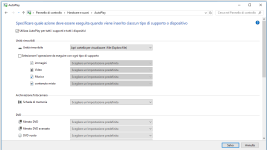
What's the difference between autorun and autoplay?
autoplay.PNG
 
Last edited:
I read on the Internet that Autoplay is different from autorun
Yes. Both are different.

If you connect a storage device to your PC (for example, a USB flash drive or other external drive), that device won't appear under Devices in AutoPlay. AutoPlay will only show non-storage devices, such as some digital cameras, video cameras, and phones.

You can try this to disable Autorun

How to Disable the AutoRun Feature In Windows 10
 
Code:
reg add "HKCU\Software\Microsoft\Windows\CurrentVersion\Explorer\AutoplayHandlers" /v "DisableAutoplay" /t REG_DWORD /d "1" /f
reg add "HKLM\Software\Microsoft\Windows\CurrentVersion\Policies\Explorer" /v "NoAutorun" /t REG_DWORD /d "1" /f
reg add "HKLM\Software\Microsoft\Windows\CurrentVersion\Policies\Explorer" /v "NoDriveTypeAutoRun" /t REG_DWORD /d "255" /f

For reference: 3rd party option - Smadav Antivirus 2017 - Official Website
 
I have a question regarding the infected usb flash drive. Let's say I run shadow defender on my PC and I inserted the infect usb flash drive and launched a virus/malware. My PC is now infected. So, what will be happened to my PC after a system reboot? Will it bring my system back to its original state without infection.
PS. In theory, after a system reboot now virus/malware should be.
 
Last edited:
I have a question regarding the infected usb flash drive. Let's say I run shadow defender on my PC and I inserted the infect usb flash drive and launched a virus/malware. My PC is now infected. So, what will be happened to my PC after a system restore? Will it bring my system back to its original state without infection.
PS. In theory, after a system restore now virus/malware should be.
Yes that is correct, after a reboot your machine will be clean again. I have tried it. ;)
 
Yes that is correct, after a reboot your machine will be clean again. I have tried it. ;)

So, if someone gives a usb it is better to open it in virtualization mode using a shadow defender/sandboxie/Toolwiz Time Freeze to protect a PC if a usb infected.
A story based on true facts. I have a friend who works at computer service center. One day a guy from another computer service center gave him a usb flash drive that was infected. I don't know why my friend behaved like a noob and inserted it to his PC. He had avast internet security installed that missed some viruses. Finally this story with a happy end and he rescued his PC :)
 
So, if someone gives a usb it is better to open it in virtualization mode using a shadow defender/sandboxie/Toolwiz Time Freeze to protect a PC if a usb infected.
A story based on true facts. I have a friend who works at computer service center. One day a guy from another computer service center gave him a usb flash drive that was infected. I don't know why my friend behaved like a noob and inserted it to his PC. He had avast internet security installed that missed some viruses. Finally this story with a happy end and he rescued his PC :)
I have only tried it with SD but it worked like a champion. ;)
 
I have only tried it with SD but it worked like a champion. ;)

I think it will work for a usb drive as well. A shadow defender is a nice program. Thanks to Tony (he is a an author of shadow defender company) because he sometimes runs shadow defender giveaways for everyone and you can it for free. Sandboxie is good but they have never made such giveaways
 
Yes. Both are different.

If you connect a storage device to your PC (for example, a USB flash drive or other external drive), that device won't appear under Devices in AutoPlay. AutoPlay will only show non-storage devices, such as some digital cameras, video cameras, and phones.

You can try this to disable Autorun

How to Disable the AutoRun Feature In Windows 10
Thanks. Do you think COMODO containment and HIPS alone would be able to handle the attack? (with no registry tweak).
I read on an italian site that Microsoft in 2011 removed the autorun feature of USB flash drives with an update... Is this true? Disattivato Autorun ed esecuzione automatica delle Penne USB: aggiornamento Windows - Navigaweb.net
 
  • Like
Reactions: NikolayfromRussia
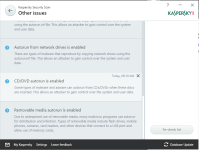
You could also install Kaspersky's free tool "Kaspersky Security Scan". If it finds that you have autorun enabled it will disable it for you. When the scan is done you can just uninstall it.

I take back what i said about the application disabling the autorun for you. It does not. The scan took me a couple of hours because i chose deep scan. At the end it just has a button that shows you "Find Solution" which just takes you to Kaspersky's site. Looks like the application has been updated recently. If i remember correctly it did disable it for you in earlier releases, that's the reason why i suggested it.

I take back my suggestion. Just go with a registry tweak as suggested above.
 

Attachments

  • upload_2017-8-25_8-36-34.png
    upload_2017-8-25_8-36-34.png
    86.7 KB · Views: 467
Last edited:
Thanks. Do you think COMODO containment and HIPS alone would be able to handle the attack? (with no registry tweak).
I read on an italian site that Microsoft in 2011 removed the autorun feature of USB flash drives with an update... Is this true? Disattivato Autorun ed esecuzione automatica delle Penne USB: aggiornamento Windows - Navigaweb.net
I'm not sure what your link says but I think the english version is here

https://support.microsoft.com/en-us/help/967715/how-to-disable-the-autorun-functionality-in-windows

What OS are you using? Does the mentioned OS in the link I posted affects you?
 
  • Like
Reactions: TheMalwareMaster
I'm not sure what your link says but I think the english version is here

https://support.microsoft.com/en-us/help/967715/how-to-disable-the-autorun-functionality-in-windows

What OS are you using? Does the mentioned OS in the link I posted affects you?
The article is quite old, but it says that on Windows XP, Vista, Windows Server 2003 e 2008 and all systems pre-Windows 7 the autorun feature of flash drives was disabled with an update. It also says that Windows 7 didn't get the update because the autorun from flash drives was already disabled since it's was on the market. As a consequence of this, one could no longer get infected from a flash drive.

It seems quite strange... Not sure about Windows 8.x and Windows 10
 
  • Like
Reactions: HarborFront
The article is quite old, but it says that on Windows XP, Vista, Windows Server 2003 e 2008 and all systems pre-Windows 7 the autorun feature of flash drives was disabled with an update. It also says that Windows 7 didn't get the update because the autorun from flash drives was already disabled since it's was on the market. As a consequence of this, one could no longer get infected from a flash drive.

It seems quite strange... Not sure about Windows 8.x and Windows 10
My link says the same.
 
  • Like
Reactions: TheMalwareMaster
For Windows XP+

AutoRun
:
Runs a program, shows a document or plays a movie (etc.) automatically on a disc just after it has been inserted in the computer. When used with non-optical media, an option to open the file is added to the AutoPlay dialog box.

AutoPlay:
Shows a dialog box (called the AutoPlay dialog box) with a list of options that the user can choose between to handle the contents of the media.

It seems that running an executable automatically through autorun.inf is possible, only when using an optical media.

See also (I did not test this reg tweak):
Microsoft Windows Does Not Disable AutoRun Properly | US-CERT
Using AutoRun with a USB Flash Drive / USB stick (Article from SamLogic)

From Windows Vista (SP 2), the autorun function is disabled by default. Still, when clicking the DVD icon in Windows Explorer, the autorun function is activated, and the commands in autorun.inf are executed (but not when clicking the USB FlashDrive icon).

Edit.
Post edited because of:
Microsoft Finally Turns Off AutoRun in Vista, XP
 
Last edited:

You may also like...