Serious Discussion Quick Play with McAfee

LOL, it's baby steps my friend, baby steps, we're not talking about the depth and quality of the Eset or Kaspersky UI 😅
I wouldn’t say they are different quality, they have different inspiration and purpose.

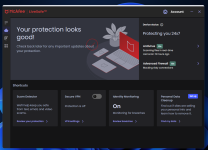
The McAfee designer seems to have been inspired by Google Material Design (the cards, the buttons, the pastel colours, the circular progress indicator), whilst Eset and Kaspersky follow the Microsoft-native glass and lights concept. They also give you plenty of options and settings whilst McAfee doesn’t give you none of that.

But the job is done, Malware is blocked, with or without parameters.

Kaspersky and Eset both use C++ and sciter for their UIs whilst McAfee looks to me as .net based solution and uses Web View.

Sciter is highly corporate way to design extremely fast and lightweight UIs, in the early years it was heavily funded by Norton and Norton was a showcase what is possible to achieve with this framework. Remember how their UI used to launch in milliseconds… well, this is Sciter.

However Sciter is one more language to master (the javascript declarations are slightly different), as well as one more dependency to manage. If there is vulnerability in Sciter, developers need to recompile their UI immediately. This often doesn’t happen.
Web View is managed by Microsoft so developers are increasingly moving away from Sciter to increase development speeds and reduce overhead.
Web View is also a full featured sandboxed chromium solution and as such can support Tailwind, Angular, React, Vue JS and many other frameworks that exist for a reason.
 
I wouldn’t say they are different quality, they have different inspiration and purpose.

The McAfee designer seems to have been inspired by Google Material Design (the cards, the buttons, the pastel colours, the circular progress indicator), whilst Eset and Kaspersky follow the Microsoft-native glass and lights concept. They also give you plenty of options and settings whilst McAfee doesn’t give you none of that.

But the job is done, Malware is blocked, with or without parameters.

Kaspersky and Eset both use C++ and sciter for their UIs whilst McAfee looks to me as .net based solution and uses Web View.

Sciter is highly corporate way to design extremely fast and lightweight UIs, in the early years it was heavily funded by Norton and Norton was a showcase what is possible to achieve with this framework. Remember how their UI used to launch in milliseconds… well, this is Sciter.

However Sciter is one more language to master (the javascript declarations are slightly different), as well as one more dependency to manage. If there is vulnerability in Sciter, developers need to recompile their UI immediately. This often doesn’t happen.
Web View is managed by Microsoft so developers are increasingly moving away from Sciter to increase development speeds and reduce overhead.
Web View is also a full featured sandboxed chromium solution and as such can support Tailwind, Angular, React, Vue JS and many other frameworks that exist for a reason.

Fantastic, and my joking aside, thanks for the nice insights from a developers point of view, as well as this post ;) :)
 
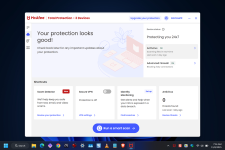
It's not so much a glitch, as something they'll probably resolve soon, now that dark mode ability appears to be more fully rolled out to users. Is that when I ran a Quick scan, it showed a red check mark icon at the end of the scan, instead of the green "looks good" check mark when in Windows light mode.

scan.png


scan2.png
 
Which shows how fickle this forum can be as it wasn't that long ago when almost everyone here hated it.
I think of it more as open minded and not hard set into a solution. Any good scientist/engineer/researcher worth their salt is open to admitting that they were wrong and change their mind after analyzing data/proof. The better ones take it a step further and confirm the analysis prior to making the shift.
 
I've got to update yest, I'm in the interesting situation of having 3 different AV's on 3 computers (I like them all) :oops::oops::oops:
I'm doing the same thing on 3 different Windows PC's, and like it too, why not? :) At times, I like to compare, test one against the other (esp. on two notebooks) :)
 
Last edited:
I think of it more as open minded and not hard set into a solution. Any good scientist/engineer/researcher worth their salt is open to admitting that they were wrong and change their mind after analyzing data/proof. The better ones take it a step further and confirm the analysis prior to making the shift.
Hear, hear. I was just happy with the idea that there could be another respectable competitor in the market after all the consolidation we've witnessed. It's nice to actually have a few choices there. I never saw it coming, but McAfee served me well for the three months I used it exclusively. I look forward to better and better versions ahead.
 
Last edited:
Hear, hear. I was just happy with the idea that there could be another respectable competitor in the market after all the consolidation we've witnessed. It's nice to actually have a few choices there. I never saw it coming, but McAfee served me well for the three months I used it exclusively. I look forward to better and better versions ahead.
Totally agree hence to double up on the greatness that is McAfee and ESET I decided to run them both on my gaming Windows system. Would I recommend it to everyone? Nope. But personally I haven't had a problem with it.

It's like chasing a shot of Anti acid medication (Galveston / Mylanta) with a shot of Vinegar. I strive for equality.
 
On the subject of UIs and Web View (McAfee's chosen architecture), I wanna show 2 different levels of UI optimisation. One is a result of 12 hours of work, the other one has some optimiations on top of that. It is now possible to achieve Sciter-level speeds with Web View.
 
Is it just on my end, but dark mode has switched back to white/light mode? Last night I ran a manual update and when the UI opened it was in light mode. I tried to change the themes in Windows from dark to light then back to dark again with no change, even after doing a restart. It's still the same way this morning.

light mode.png
 
I can confirm that the GUI has returned to light/white mode.

Not a big deal, but they could work in the GUI startup speed in the meantime.
Agree, and I found that when the left side "tool bar" loads, clicking on the Home icon will load the rest of UI more quickly. At least that worked for me.
 
I had reason this evening to uninstall McAfee the amusing thing is that all the uninstaller GUI & info around it was in dark mode unlike the main GUI, this was quite funny :):)
That's what someone else said too, that the installer (as well) has such nice dark theme colors, to bad the app wasn't the same (which I agreed with).