

The MalwareTips app
Your community, one tap away.
Open MalwareTips from your Home Screen or desktop. Follow discussions, find answers and pick up where you left off.
- Home Screen access
- Optional push alerts
- Your community
You're ready to explore.Explore what's new
Installation instructions
iPhone & iPad
- Open MalwareTips in Safari and tap Share. You may need to open the Page Menu first.
- Choose Add to Home Screen. If it is not listed, use Edit Actions to add it.
- Keep Open as Web App enabled if shown, then tap Add.
Android
- Open MalwareTips in Chrome or another browser that supports app installation.
- Open the browser menu and look for Install app, Install and create shortcut, or Add to Home screen.
- Choose Install and confirm. Wording varies by browser.
Desktop
- Chrome: use the install icon in the address bar, or the menu under Cast, save and share.
- Edge: open the menu, then More tools, Apps and Install this site as an app.
- Safari on Mac: choose Share or File, then Add to Dock. Firefox on Windows: look for the web apps button in the address bar.
If you cannot find an install option, update your browser or use its bookmark option to keep MalwareTips close.
Keep up with your conversations
After installation, open the app and sign in. Enable push notifications in Preferences if you want alerts. On iPhone and iPad, push requires a Home Screen web app and iOS or iPadOS 16.4 or later.
Sign in to manage notificationsInstallation is optional. Your notification settings stay under your control.
You are using an out of date browser. It may not display this or other websites correctly.
You should upgrade or use an alternative browser.
You should upgrade or use an alternative browser.
Hot Take Researcher Exposes Zero-Day Clickjacking Vulnerabilities in Major Password Managers
- Thread starter Andy Ful
- Start date
Passwords and passkeys
125 Replies
14,166 Views


Me too, then I found opinions considering it a less safe practice as compressed archive file password is easily cracked compared to password manager master password.I didn't see that., I've used the archive system for many years, its easy to put it on a USB too, and although other systems may be more secure it works well for me & is not reliant on anything other than for me Winrar.
Anyway I am Okay with Keepassxc; it is light with small footprint, it has a nice UI, and I use it to generate passwords, but I keep unencrypted txt copies of my credentials stored offline, in case Keepassxc fails to open its database for any reason.If this or even my laptop PC this was highly compromised my passwords would not be my only problem, so I feel needs to put into perceptive.

Andy Ful
From Hard_Configurator Tools
Verified
Honorary Member
Top Poster
Developer
Well-known
Forum Veteran
Me too, then I found opinions considering it a less safe practice as compressed archive file password is easily cracked compared to password manager master password.
For most people, the main issue with a compressed archive file password is not cracking it, but inserting the password when visiting fake websites.
If one is sufficiently cautious and knowledgeable (in recognizing phishing), this method is probably as good (at home) as a password manager. Of course, both methods can be bypassed in targeted attacks.
Andy Ful
From Hard_Configurator Tools
Verified
Honorary Member
Top Poster
Developer
Well-known
Forum Veteran
Which is why bookmarks are useful assuming you get the correct site in the first place, rather than searching for the site you want which could easily be a fake site.
Yes, this can reduce the danger. However, we had many examples of popular websites compromised by the attackers (ADs, exploits, social-engineering posts, malicious emails, etc.), where users were redirected to phishing websites. So, still caution and knowledge are required.
Of course I know password manager has the advantage of not inserting credentials except for url saved inside its database.If one is sufficiently cautious and knowledgeable (in recognizing phishing)
But it seems clickjacking is compromising the original website with no url change, making this feature not protective against such type of threat.
Andy Ful
From Hard_Configurator Tools
Verified
Honorary Member
Top Poster
Developer
Well-known
Forum Veteran
Of course I know password manager has the advantage of not inserting credentials except for url saved inside its database.
But it seems clickjacking is compromising the original website with no url change, making this feature not protective against such type of threat.
Most people should avoid cars on the road instead of lions. The same is with fake websites and clickjacking (so far).
During the time we spent in this thread, many people suffered from fake websites, and probably a few (if any) were victims of vulnerabilities mentioned in the OP.
Last edited:
F
ForgottenSeer 123960
I would personally advise against engaging with either. A lion is a formidable animal capable of causing significant damage to a vehicle.Most people should avoid cars on the road instead of lions.
Andy Ful
From Hard_Configurator Tools
Verified
Honorary Member
Top Poster
Developer
Well-known
Forum Veteran
I would personally advise against engaging with either. A lion is a formidable animal capable of causing significant damage to a vehicle.

Did not face phishing websites to the present time.Most people should avoid cars on the road instead of lions. The same is with fake websites and clickjacking (so far).
During the time we spent in this thread, many people suffered from fake websites, and probably a few (if any) were victims of vulnerabilities mentioned in the OP.
Websites requiring credentials are only accessed from bookmarks or from password manager (using bookmarked url).
And before bookmarking websites, I check the url provided by google search once using Norton safe web and Kaspersky portal.
In addition, I have one security extension beside the adblockers.
Andy Ful
From Hard_Configurator Tools
Verified
Honorary Member
Top Poster
Developer
Well-known
Forum Veteran
Did not face phishing websites to the present time.
So, you are most probably a cautious and knowledgeable person, like many MT members.

https://malwaretips.com/threads/res...n-major-password-managers.137219/post-1139831
Edit.
I do not use password managers, except for testing. Almost all my passwords are in my memory. I have my own method of creating and remembering passwords. Rarely, when I forget a password, it can be recovered from email, phone, etc.
Last edited:
F
ForgottenSeer 123960
I used to keep a local KeePass database on my system, where I'd create and save extremely complex passwords. Whenever I needed to log in to an account that I used these for, I'd reference the file via unlocking the database, mine was set up with the need to enter both the master password and the key file, and then manually typing in the credentials was my method.I do not use password managers, except for testing. Almost all my passwords are in my memory. I have my own method of creating and remembering passwords. Rarely, when I forget a password, it can be recovered from email, phone, etc.
In hindsight, it was a ridiculously tedious and unnecessary process. I developed this habit from spending too much time on forums with overly paranoid users.
Since then, I've gotten used to using Chrome's built-in password manager with biometrics, focusing on good security habits and staying informed instead of relying on manual workarounds.
Andy Ful
From Hard_Configurator Tools
Verified
Honorary Member
Top Poster
Developer
Well-known
Forum Veteran
Since then, I've gotten used to using Chrome's built-in password manager with biometrics, focusing on good security habits and staying informed instead of relying on manual workarounds.
I prefer something similar on the computers of family members. I cannot count on "good security habits and staying informed", so I use very restrictive Windows-built-in settings on SUA with a hardened Edge browser and Windows Firewall. This is possible because they do not install new applications.
For banking, they use a web browser on another user account.

+1 Continue using your password manager as you did before. If you are a cautious user, you will not encounter any problems. Do not panic over news stories such as Clickjacking. If you believe everything you read in technology news, you will end upTyping 30+ characters password with mix of lower and upper case, numbers, and special marks is a real pain; also paper can be lost or damaged by repeated use of spill of liquids.
It is easier to use local password manager such as Keepassxc; in addition, keeping unencrypted txt backup (two or more) on offline storage (usb memory, usb hdd, sata hdd of air gap pc).
 . I have to thank @Marko :) He opened my eyes in another thread and gave me great advice, and I embraced what he said tooth and nail. I was paranoid about using two antivirus programs at the same time, several security extensions in the browser, and as I read the news here on the MT forum and elsewhere, I became even more paranoid. It was an experience that I learned from testing and browsing the web. Now let's move on and just stay informed, because there are always people behind us.
Do not panic over news stories such as Clickjacking. If you believe everything you read in technology news, you will end up
@Marko :) is a very sensible guy. Stay safe, not paranoid!I have to thank @Marko

I don't know about Chromium browsers, but Firefox is really, really aggressive when it comes to UI redress attacks (like clickjacking). The other day I was trying to embed bunch of websites through iframe to see what would happen and it didn't allow any of them. Basically CSP doesn't allow you to embed anything and instead says you have to open the website directly.
Last edited:

Enpass fixed ths in version : 6.11.6
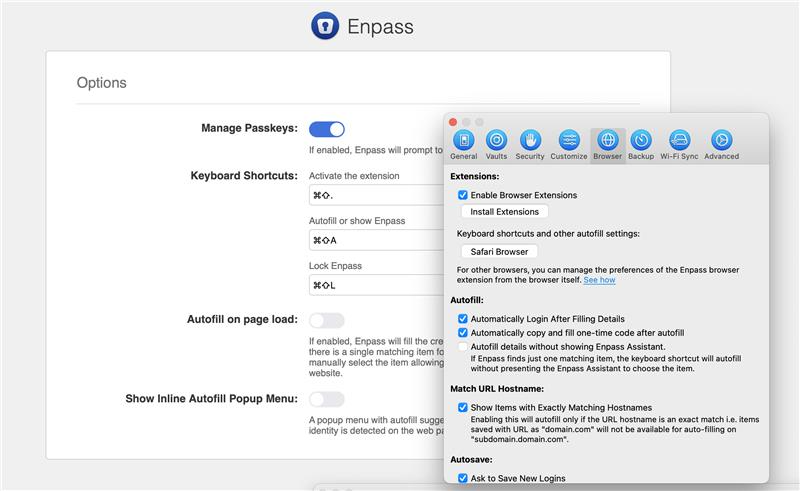
 discussion.enpass.io
Marek Tóth - DOM-based Extension Clickjacking
Czech Republic based security researcher Marek Tóth, unveiled a series of unpatched zero-day clickjacking security vulnerabilities impacting the browser-based plugins for a wide range of password managers: https://marektoth.com/blog/dom-based-extension-clickjacking/ Is this now fixed in all Enpas...
discussion.enpass.io
Last edited:
To be honest all 3 methods including password manager, compressed achieve, or Chrome password manager is sufficient for having good security/hygiene. Even written passwords kept in a secure location is another good alternative but I would choose the previously 3 mentioned before written passwords.
What people often don't discuss is if your pwned and compromised it doesn't matter what method you use. If the attacker has root or admin on your box your toast, and even if they don't in some cases. Best case scenario is to monitor breaches and be alerted ASAP to compromised accounts then change passwords when notified. It's the best you can do.
What people often don't discuss is if your pwned and compromised it doesn't matter what method you use. If the attacker has root or admin on your box your toast, and even if they don't in some cases. Best case scenario is to monitor breaches and be alerted ASAP to compromised accounts then change passwords when notified. It's the best you can do.
Recently browsing
Members who viewed this thread in the last 5 minutes


