[Review] Rollback RX Pro v10

  • Thread starter Thread starter Deleted member 178
  • Start date Start date

How would you rate Rollback RX Pro ?

  • 5 Stars (Excellent)

    Votes: 25 21.2%
  • 4 Stars (Very good)

    Votes: 13 11.0%
  • 3 Stars (Good)

    Votes: 10 8.5%
  • 2 Stars (Fair)

    Votes: 6 5.1%
  • 1 Stars (Poor)

    Votes: 5 4.2%
  • I have never used Rollback RX Pro.

    Votes: 59 50.0%

  • Total voters
    118
Sorry, just a sideline question

Besides the ability to create a system image (with differential/incremental backup methods) does Macrium Reflect provides all those RollBack strengths I listed in post #131 above (and more) in addition to truly fully support TRIM in SSD without issue.

If yes, then I'll go for MR + SD then

Thanks

MRPro is not as convenient as RBRx's rollback, that is the main advantage of RBRx and why people use it

You have to trial both and figure out which one will work for you personally

I know intellectually and theoretically that MBPro is the better program, but RBRx is the one that works better for me personally; in practice RBRx is the better program
 
  • Like
Reactions: Cats-4_Owners-2
MRPro is not as convenient as RBRx's rollback, that is the main advantage of RBRx and why people use it

You have to trial both and figure out which one will work for you personally

I know intellectually and theoretically that MBPro is the better program, but RBRx is the one that works better for me personally; in practice RBRx is the better program
I thought MR also has similar snapshot feature like RBRx? If yes, is this snapshot feature as flexible and feature-rich as RBRx?

But to combo with SD your recommendation is with MR, right?
 
  • Like
Reactions: Cats-4_Owners-2
I thought MR also has similar snapshot feature like RBRx? If yes, is this snapshot feature as flexible and feature-rich as RBRx?

But to combo with SD your recommendation is with MR, right?

I never used MRPro Delta Restore. The person to ask is @Peter2150 and Froggy the Rollback King over at Wilders.

If you want to use MRPro there are questions and answers you need from Peter and Froggy. Some even combo RBRx and MBRx. I just used RBRx so I couldn't give you accurate, in-depth infos on paid MBPro.
 
Besides the ability to create a system image (with differential/incremental backup methods) does Macrium Reflect provides all those RollBack strengths I listed in post #131 above (and more) in addition to truly fully support TRIM in SSD without issue.
Thanks
Yes but only the paid version and making/restoring snapshots are slower.
 
  • Like
Reactions: HarborFront
I use all the Delta stuff in Macrium Reflect. I run hourly incrementals. The average time to take an incremental is about 35 seconds.. That's on a disk that has 167gb. Just tonight I install an imaging program that I didn't like so I did a delta restore. Time was about 1 min 10 seconds. I run routinely with Shadow Defender. No problems. Other factor is safety I've tested power failure, by starting a restore, and hitting power reset. Result is a trashed disk. Another restore and all is good.
 
I use all the Delta stuff in Macrium Reflect. I run hourly incrementals. The average time to take an incremental is about 35 seconds.. That's on a disk that has 167gb. Just tonight I install an imaging program that I didn't like so I did a delta restore. Time was about 1 min 10 seconds. I run routinely with Shadow Defender. No problems. Other factor is safety I've tested power failure, by starting a restore, and hitting power reset. Result is a trashed disk. Another restore and all is good.
BTW, can the snapshots in MR be kept in locations other than its own drive like in another drive or external devices? Can you defrag or lock the snapshots like in RollBack Rx?
 
  • Like
Reactions: Cats-4_Owners-2
You are asking to compare apples and oranges or maybe apples and cran-apples. Macrium Reflect is an image backup solution. In my opinion, it's one of the best. RollBack Rx is a roll-back application. It is NOT an image backup solution. In fact, with Rollback Rx, most people would strongly encourage you to also have an image backup solution. For me, I'd rather stick with one program (Macrium Reflect) than 2 programs. Besides, while I've never used Rollback Rx, I've heard too many horror stories to trust it or use it.
 
You are asking to compare apples and oranges or maybe apples and cran-apples. Macrium Reflect is an image backup solution. In my opinion, it's one of the best. RollBack Rx is a roll-back application. It is NOT an image backup solution. In fact, with Rollback Rx, most people would strongly encourage you to also have an image backup solution. For me, I'd rather stick with one program (Macrium Reflect) than 2 programs. Besides, while I've never used Rollback Rx, I've heard too many horror stories to trust it or use it.
Thanks for reply, just wanted to know kind what user are using, I remember about 3-4 year or less i think was win 7 and then 10 i try the Rollback Rx and not sure what happen , but while starting my pc , it was getting stock at rollback rx loading... so i never got into windows, so lost every thing at that time, both in win 7 and 10 as i try this soft two times.
I know that Macrium Reflect is an image backup, but i think the paid one now it does have option to do incremental backups. I am more leaning maybe towards Macrium Reflect but more pricey than RB Rx.
 
RX is a snapshot program, once installed , all writes to the disk are rerouted to a "virtual" hidden partition , copy of the system one. user have no access to this partition. This system is faster than any imaging but less stable.

Macrium is a imaging software, it just does images of the partitions and store them wherever you like. It si slower than "snapshoting" but way more stable. However Macrium is quite fast and does images almost as fast as RX does snapshots.
 
I really like RB RX but at the moment i don't use it because it's snapshots can only be saved on C: Drive.
For me this is a problem because my SSD is only 120 GB.
Also RB RX disables Trim of the SSD which is something i don't like.
Now as far as being stable i never encountered any problem with it that's why i keep track of it's updates
to see if some features have changed to suit me better.
As for a back up software i agree with the other members that one should have one on their system.
 
Installed today. Too early to make an assessment.

I would like an option to always save the first snapshot, but I haven't seen it, so I have disabled the automatic snapshot deletion and the task to create snapshot automatically, so now, I can choose better, because for free, it only saves 7 snapshots
 
  • Like
Reactions: tonibalas
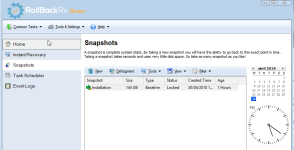
The first snapshot is called Baseline.
Didn't RB RX made one after installation?
 
  • Like
Reactions: Garzaman
Yes, it did it (y)

2018-04-30_20-11-39.png
 
  • Like
Reactions: tonibalas
There you have it.
You should know that Baseline can't be deleted so you can always return to that state of your system.
All other snapshots can be deleted.
 
  • Like
Reactions: Garzaman

You may also like...