New Update Revo Registry Cleaner Updates Thread

lokamoka820

Level 45
Thread author
Verified
Top Poster
Well-known
Mar 1, 2024
3,423
3
11,506
4,369
Banana Republic
Clean, tune, and optimize your registry. Safely.

Features​

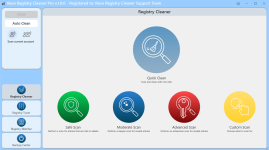
Advanced Registry Cleaner​

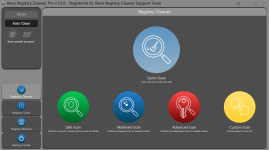
Discover a powerful Registry Cleaner with 15+ scanning categories to find and eliminate invalid and unnecessary Registry Items. Tailor your cleaning process with custom key inclusions/exclusions and 4 different depth scan modes.

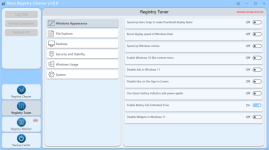
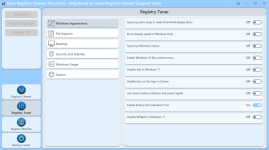
Registry Tuner​

Customize your Windows experience using the 50 Registry tweaks. Optimize, fine-tune, and resolve issues effortlessly, and achieve a smoother system performance.

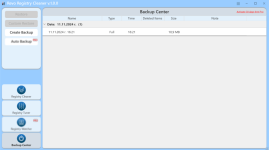
Backup Solutions​

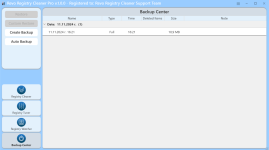
Customized backups for user-specified keys as well as full Registry backups provide peace of mind as they ensure the safety of your Registry data.
Revo Registry Cleaner creates a Full backup of the entire Registry prior to removing the unnecessary entries. It also backs up all deleted Registry entries, which allows you to restore them anytime.
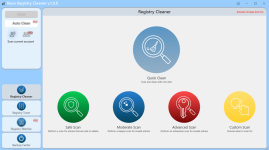
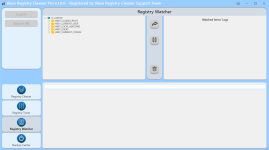
revo-registry-cleaner-free-main-window.pngrevo-registry-cleaner-free-registry-tuner.pngrevo-registry-cleaner-free-backup-center.png
 
Last edited:

NOV 11, 2024 Revo Registry Cleaner Free VERSION 1.0.0​

  • Registry Cleaner - 15+ Scanning Categories and 4 Scan Modes
  • Registry Tuner - up to 50 tweaks for Windows personalization and optimization
  • Backup Center - including Full Registry Backup
  • Registry Key Exclude List
  • Full 64-bit compatibility – Windows 7, 8, 8.1, 10, 11
Download: https://download.revouninstaller.com/download/revoregistrycleaner/RevoRegCleanerFreeSetup.exe
Portable: https://download.revouninstaller.com/download/revoregistrycleaner/RRC_FreePortable.zip
 
  • Like
Reactions: [correlate]
Clean, tune, and optimize your registry. Safely.

Features​

Advanced Registry Cleaner​

Discover a powerful Registry Cleaner with 15+ scanning categories to find and eliminate invalid and unnecessary Registry Items. Tailor your cleaning process with custom key inclusions/exclusions and 4 different depth scan modes.

Registry Tuner​

Customize your Windows experience using the 50 Registry tweaks. Optimize, fine-tune, and resolve issues effortlessly, and achieve a smoother system performance.

Registry Watcher​

Stay in control with real-time tracking of Registry keys and values changes. Review, save, and export registry modifications, and apply filters based on operation type or data content.
The Registry Watcher monitors specified Registry keys in real-time, instantly identifying processes responsible for system modifications.

Backup Solutions​

Create personalized backups for specific keys, perform full Registry backups, or automate scheduled backups to ensure additional safety of your critical data.
The scheduled Auto Backup feature adds an extra layer of convenience, allowing you to automate the backup process for both custom Registry keys and full backups.

Automation and Updates​

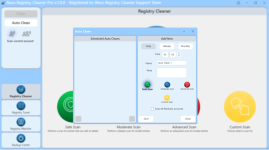
Experience uninterrupted operations with our scheduled Auto Clean feature, by setting up your daily, weekly, or monthly cleanup with your preferred scan mode. The Auto Backup feature automatically backs up your data according to your preferred schedule. Our product also ensures that you're always up to date with automatic background updates.

User-Fоcused Features​

Optimize your Registry experience by choosing between scanning all user accounts or just the current user account. Simplify your Windows Registry maintenance through the Scheduled Auto Clean feature. Switch to Dark Mode for a comfortable interface that suits your preferences.
 

NOV 11, 2024 Revo Registry Cleaner Pro VERSION 1.0.0 / PORTABLE 1.0.0

  • Registry Cleaner - 15+ Scanning Categories and 4 Scan Modes
  • Registry Tuner - up to 50 tweaks for Windows personalization and optimization
  • Registry Watcher - monitors specified Registry keys in real-time
  • Backup Center - including Custom, Auto, and Full Registry Backup
  • Registry Key Include/Exclude List
  • Multiple User Accounts Scanning
  • Auto and Custom Clean
  • Full 64-bit compatibility – Windows 7, 8, 8.1, 10, 11
 
Cheap price for this ?
For most people, the free version will be all they need. You can see a comparison between the free and paid versions at the following link.
 
hello, and after uninstalling a program, have you tried to see how many messes you find in regedit?
I will get my license to try it for 1 year, I hope it will be useful!
 
  • Hundred Points
Reactions: lokamoka820
I just tried this and I didn't get any false positives, which is a good sign, although you usually don't need to clean the registry.
I'm interested because Revo is a well known company and already have experience in registry somehow "with its uninstaller", so thanks for sharing your experience.
 
There is no errors to clean! Never has been.
In exceptionally rare cases, deleting invalid or unneeded registry keys can fix problems. There are even rarer cases when using a registry cleaner will improve performance. I can think of three cases over the last twenty years or so when I've fixed issues by using a registry cleaner and once where there was a noticeable improvement in performance. So it is very rare for a registry cleaner to be of any use, but there sometimes are exceptions.
 

NOV 18, 2024 Revo Registry Cleaner Free VERSION 1.0.5​

  • Improved - Optimizations in Revo Registry Cleaner service
  • Fixed minor bugs
  • Updated language files
Download: https://download.revouninstaller.com/download/revoregistrycleaner/RevoRegCleanerFreeSetup.exe
Portable: https://download.revouninstaller.com/download/revoregistrycleaner/RRC_FreePortable.zip
 
There is no errors to clean! Never has been.
If you don't change software a lot you don't need to use registry cleaners, but if you install and remove software all the time, you will find that some of them left items in context menu, services, startup items, etc. I try software a lot, and I find leftovers after software removal, but you need to just clean what you are sure you removed previously, not every entry comes out.
 

You may also like...