New Update SafeToOpen Browser extension user reviews and opinions

Hi, have a good weekend.
You can't confirm it because you only use OISD big (I assume).
I use HaGeZi - Multi ULTIMATE.
It partially uses many anti-phishing filter lists.
See here:

dns-blocklists/sources.md at main · hagezi/dns-blocklists


However, we can do a simple coordinated test.
You find a link here:

PhishTank > Phish Search

that is only blocked by Safe To Open, and therefore is not blocked by Google Safe Browsing.

And I'll check if it's blocked by NextDNS (HaGeZi, of course).

P.S.

If you want more than one.;)

___________________________________________________________________________________________________________

@SeriousHoax

I have a question for you, since you are always very knowledgeable about DNS.
In your opinion, is the big OISD list always necessary for people like me who use HaGeZi Multi Ultimate?
TH.

P.S.

ChatGPT says no.
I deleted OISD big
OISD big has been added to the Hagezi source again not so long ago. So it's present in Hagezi filters. One advantage of OISD is that it updates frequently. Usually every hour. So it will have some latest domains. Also, it's a good backup of Hagezi. Using it along with Hagezi in NextDNS has no harm. I use both.
 
Hi, have a good weekend.
You can't confirm it because you only use OISD big (I assume).
I use HaGeZi - Multi ULTIMATE.
It partially uses many anti-phishing filter lists.
See here:

dns-blocklists/sources.md at main · hagezi/dns-blocklists


However, we can do a simple coordinated test.
You find a link here:

PhishTank > Phish Search

that is only blocked by Safe To Open, and therefore is not blocked by Google Safe Browsing.

And I'll check if it's blocked by NextDNS (HaGeZi, of course).

P.S.

If you want more than one.;)

___________________________________________________________________________________________________________

@SeriousHoax

I have a question for you, since you are always very knowledgeable about DNS.
In your opinion, is the big OISD list always necessary for people like me who use HaGeZi Multi Ultimate?
TH.

P.S.

ChatGPT says no.
I deleted OISD big
https://www(.)lesecuriesdulac(.)eu/Config.php

Animation.gif

So in the end it is not surprising that SafeToOpen also detects other sites as it relies on AI for rating sites as malicious or suspicious rather than using any blocklists or TIFs.
 
Last edited:
https://www(.)lesecuriesdulac(.)eu/Config.php


So in the end it is not surprising that SafeToOpen also detects other sites as it relies on AI for rating sites as malicious or suspicious rather than using any blocklists or TIFs.

It's a redirect link.
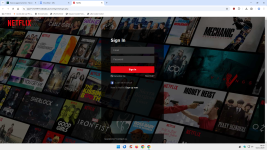
Now it redirects me to a fake Netflix.
Too obvious.

Who would enter their login details on this web page?

0.png
 
https://www(.)lesecuriesdulac(.)eu/Config.php


So in the end it is not surprising that SafeToOpen also detects other sites as it relies on AI for rating sites as malicious or suspicious rather than using any blocklists or TIFs.
Blocked by Symantec browser protection and SmartScreen
Screenshot_2-11-2025_115819_hielpjjagjimpgppnopiibaefhfpbpfn.jpeg
Screenshot_2-11-2025_115837_wp27-c12709-1.btsndrc.ac.jpeg
 
This seems like a good addition as a malware/phishing protection browser extension. Understanding that this may be a relatively new software/company (or even a few people, or one person) operation that is ramping up with whatever they have, I found the following information—some of which is disquieting for me:
  • An incorporated Auckland company (2014) with apparently a residential address.
  • The address (and the phone and contact email addresses) isn't mentioned anywhere on the company's website; it's only listed in the Chrome store, probably compelled to disclose it as a trader.
  • The only "legalese" document found was the privacy statement, which doesn't sound very legalese (maybe not edited by a lawyer?). The TOS is absent.
  • The Firefox extension requires permission to "Exchange messages with programs other than Firefox," which is clearly unnecessary for the end consumers, as there is no other non-browser software involved.
  • The company likely generates revenue via "brand protection," by having real-time worldwide monitoring of new phishing sites. Given the data collected from end users, it seems we're getting a "free" service in exchange for being a source of information on new phishing websites for the company. This ISN'T obvious from the extension's description.
  • Given the "apparent" size of the operation, it seems the current "40,000" brand protections may be overstated.
 
Last edited:
It Works

I was directed via email to a fake banking site which looks pretty identical. And SafeToOpen pops up with a dialog warning me this is not a bank site ! Took a look at the url and sure enough, the TLD is .lol .
 
Last edited:
v. 8.0 is out now:

SafeToOpen 8.0.0 — Major upgrade

This release brings the Firefox extension to full parity with our latest Chrome release and migrates it to Manifest V3.
New protection features

Login safety checks — Before you type a password, SafeToOpen now checks the page for warning signs: brand impersonation, very new domains, login forms hosted on free/shared hosting platforms, forms that submit your password to a different website or over an unencrypted connection, and disguised (look-alike) field labels used by phishing kits.
Brand impersonation detection — Pages that prominently display a well-known brand (banks, postal services, government portals) while being hosted somewhere else are now flagged before you sign in.
Link scanning in webmail and AI assistants — Links are now checked directly inside Gmail, Outlook, Yahoo Mail, Proton Mail, and popular search and AI assistant pages, with safety badges shown next to them.
Deceptive link detection — Links whose visible text shows one domain but actually navigate to another are flagged.
Tracker blocking — Optional blocking of known trackers, with per-site controls and a counter showing what was blocked on each page.
Deeper Analysis — A one-click detailed report for any page: domain age, hosting and certificate information, redirect chain, mixed content, and more.

Improvements

Migrated to Manifest V3 with Firefox's built-in data-collection consent experience.
Clearer page-status badges (safe ✓, suspicious !, dangerous ✕, paused ⏸).
Updated alerts, popup, and settings pages; expanded language support.
Performance improvements and reduced background resource usage via event pages.

Notes for Firefox users

The toolbar button is available under the Extensions menu on Firefox for Android.
Right-click menu items (Scan this page, Trust this page, etc.) are available on desktop only.
 
Can Trafficlight or Webadvisor extensions provide the same?
SafeToOpen uses AI to classify websites as safe or malicious by analyzing their visual structure. If a phishing site tries to mimic a legitimate page like the official Google login - the system detects that it looks identical but is actually a fake, and blocks it immediately.
 
SafeToOpen uses AI to classify websites as safe or malicious by analyzing their visual structure. If a phishing site tries to mimic a legitimate page like the official Google login - the system detects that it looks identical but is actually a fake, and blocks it immediately.
That is what I was exactly looking for.
I do not surf dangerous websites.
I only need to tool to confirm the banking website or email webiste is not compromised before trying to log in.
I could not find solid data to affirm that security extensions or Avast web guard are able to take care of such a task.
 
That is what I was exactly looking for.
I do not surf dangerous websites.
I only need to tool to confirm the banking website or email webiste is not compromised before trying to log in.
I could not find solid data to affirm that security extensions or Avast web guard are able to take care of such a task.
I really liked the older versions but I need to dig deeper into the latest version as there seem to be quite a few changes. It now even has a pro version. So I don't know if their latest free version is as good as the older ones that had all the features.
 
Its basic protection is block trackers

To get more protection Plus one needs to submit with email and as per @Kongo one needs to

Quote

You can create a free account and get a 7 days trial without the need of providing a payment method

Unquote

:rolleyes:
 
Its basic protection is block trackers

To get more protection Plus one needs to submit with email and as per @Kongo one needs to

Quote

You can create a free account and get a 7 days trial without the need of providing a payment method

Unquote

:rolleyes:
That's not correct. The free version also protects from known phishing and malicious sites. There is a "Deeper Analysis" option in the pro version, which checks registration date of the site and other characteristics that could indicate if the site is safe or unsafe.

1781427876349.png
 
Last edited:
That's not correct. The free version also protects from phishing and malicious sites. Just like the pro version. There is just a "Deeper Analysis" option in the pro version, which checks registration date of the site and other characteristics that could indicate if the site is safe or unsafe. It's a nice addition, but the free version definitely is enough. (y)

Actually, uBO is better for protection
 
SafeToOpen uses AI to classify websites as safe or malicious by analyzing their visual structure. If a phishing site attempts to mimic a legitimate page, such as the official Google login, the system detects that it appears identical but is actually a fake and blocks it immediately.
Actually, even Microsoft SmartScreen has had this feature for many years, and Google Safe Browsing on Chrome with Enhanced Safe Browsing enabled also has it. Same for many AV products, though I don't know how effective each of them is.

With that said, this extension has some more features which looks interesting and could be very effective.
 
Actually, even Microsoft SmartScreen has had this feature for many years, and Google Safe Browsing on Chrome with Enhanced Safe Browsing enabled also has it. Same for many AV products, though I don't know how effective each of them is.

With that said, this extension has some more features which looks interesting and could be very effective.
After some more testing and reading about the free and the paid version, i can say that the pro version offers better protection than the free version, when it comes to zero-day threats. In the older versions everything was free and therefor I recommended it after multiple tests. Now I think there are better alternatives out there. However if one decides to give the pro version a try, I am sure he won't be disappointed.
 
After some more testing and reading about the free and the paid version, i can say that the pro version offers better protection than the free version, when it comes to zero-day threats. In the older versions everything was free and therefor I recommended it after multiple tests. Now I think there are better alternatives out there. However if one decides to give the pro version a try, I am sure he won't be disappointed.
I see. I think all, or at least most products from Novirusthanks are paid products, so it's not a surprise per se. I'm not criticizing them since they need to make money to sustain their company, but it is expected that their product will eventually become a paid product or important features will become paid.
Your experience with both the free and paid version should help other users decide.