

second opinion AV scanners

Biozfear said:
maaster said:
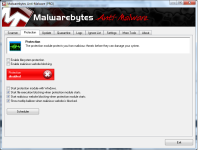
I want to disable real time protection and unnecessary running of program in the background in MBAM pro...can someone suggest options in MBAM pro to disable them...

MBAM Pro you can disable real time protection under options and services shouldn't start (they should be set as automatic by default if option for RT is enabled).

I believe this was asked somewhere in this forum before.

I don't find any thing like options in the window...suggest settings from the attachment!
 

Attachments

  • mbam1.png
    mbam1.png
    149.8 KB · Views: 509
  • mbam2.png
    mbam2.png
    142.3 KB · Views: 533
Kaspersky security scan, its free cloud scan but detection only, you must buy kaspersky software to remove it
http://usa.kaspersky.com/downloads/free-anti-virus-scan?domain=kaspersky.com
 
maaster said:
I don't find any thing like options in the window...suggest settings from the attachment!
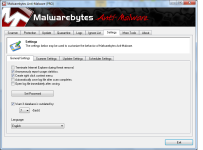
You have it disabled already according to screenshots.

You have 2 options: Start-->RUN--Services.msc and set MBAM services to manual.

This should only kick in when you do an on-demand scanner.

If it doesn't make a difference, uninstall using Revo or IObit uninstaller, then run CCleaner to ensure there are no registry keys left and then check on Regedit just to make sure.

Once all deleted/removed, reinstall MBAM and do not activate the trial (which is what Umbra suggested).
 
I use SpyDllRemover (daily) - 2 seconds heuristic scanner. Our topic here: http://malwaretips.com/Thread-Spy-DLL-Remover

And use MBAM Free (weekly) - 3.5 minutes quick scan.

And RogueKiller (weekly). Our topic: http://malwaretips.com/Thread-RogueKiller-8-3-0

These scanners are sufficient for me.:D
 
Prorootect said:
I use SpyDllRemover (daily) - 2 seconds heuristic scanner. Our topic here: http://malwaretips.com/Thread-Spy-DLL-Remover

And use MBAM Free (weekly) - 3.5 minutes quick scan.

And RogueKiller (weekly). Our topic: http://malwaretips.com/Thread-RogueKiller-8-3-0

These scanners are sufficient for me.:D

OP wanted recommendations based on 4 sets of criteria displayed on the first post, which only leaves HMP as the only option, and not what on demand scanners we can recommend (without any specific criteria)
 
Biozfear said:
maaster said:
I don't find any thing like options in the window...suggest settings from the attachment!

You have it disabled already according to screenshots.

You have 2 options: Start-->RUN--Services.msc and set MBAM services to manual.

This should only kick in when you do an on-demand scanner.

If it doesn't make a difference, uninstall using Revo or IObit uninstaller, then run CCleaner to ensure there are no registry keys left and then check on Regedit just to make sure.

Once all deleted/removed, reinstall MBAM and do not activate the trial (which is what Umbra suggested).
thank you..it worked!
 
Biozfear said:
maaster said:
thank you..it worked!

Glad it is resolved. Could I ask which step worked? Was it services or the reinstall one?

Start-->RUN--Services.msc and set MBAM services to manual and i also setup mbam update service to manual...
 
Setting it to manual it will only start the services when an application calls for it. Unfortunately, not all services on Manual can be started when an application requires ( I remember reading somewhere the exact explanation. Will try to find it and share it here).

Edit: example: VMware 8 - 5 services don't fully work on Manual, that is why I created the script for disable/enable.
 
in case of MBAM it works fine by setting to Manual.

What I was referring to is not all programs will start up the services if set to manual, even though the event is called for. :)

Same for PerfectDisk 11 or 10, although there was a specific EXE done by PD to allow users to run PerfectDisk by setting the services to Manual since as you may or may not know, PerfectDisk will have constantly 2 processes (last time I checked) running on background despite you do not have RT Defrag on.