New Update Shotcut Video Editor

Shotcut v 24.06.26

Windows on Arm​

Hurrah for new Qualcomm Snapdragon X chip! Since there are now good Arm64 CPU systems for Windows, we added a native build for Windows on Arm64 CPU. Treat this as a beta. Known issues are there is no hardware encoder, and some audio filters are missing.

New Stuff​

  • Added SVT-AV1 encoder (faster non-hardware AV1 encoder).
  • Added support for AVIF (AV1) images.
  • Added a Drop Shadow video filter that uses the input alpha channel. (This means that it will not work as expected when used after a text filter on a video clip; rather, you must use a text clip on an upper track.)
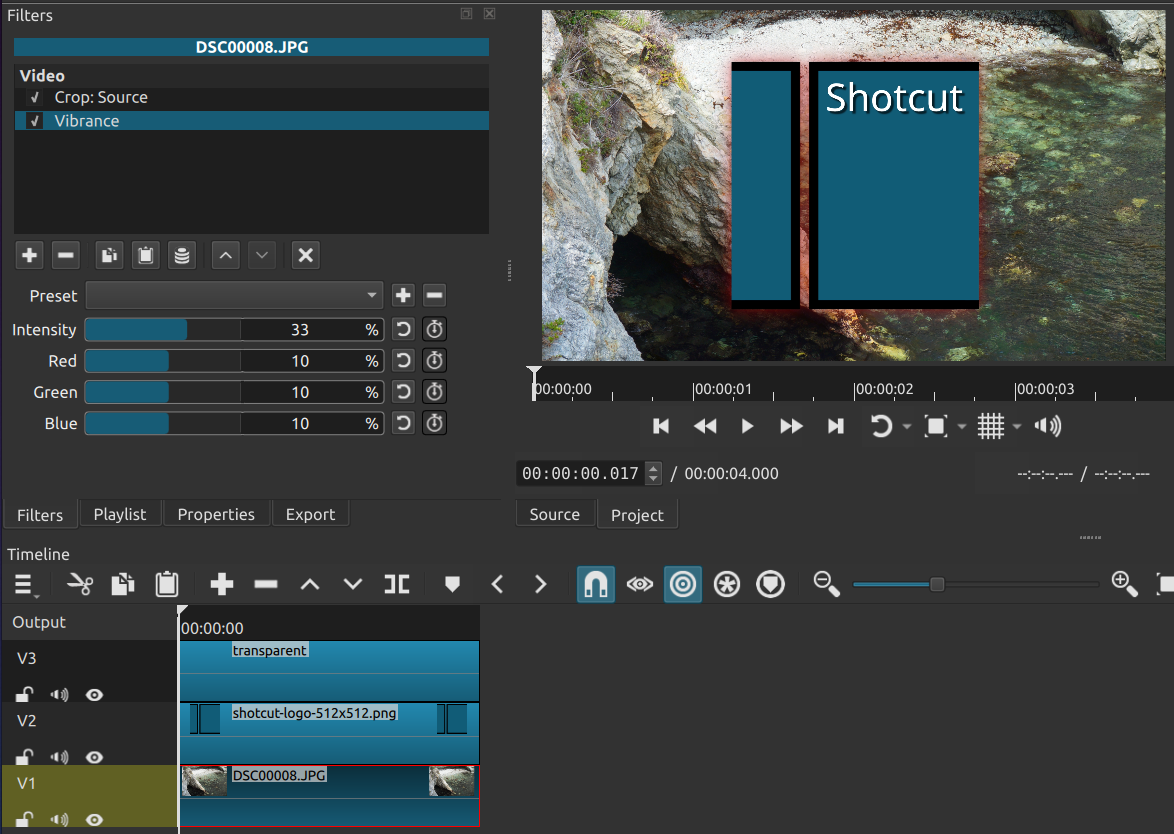
  • Added a Vibrance video filter. This is similar to Saturation, but Vibrance is sensitive to the current saturation instead of adjusting all values equally as in saturation. This is especially helpful to prevent affecting skin tones.
Screenshot Speed: Forward Only filter

  • Added the Mid-Side Matrix audio filter for processing these kinds of microphones into proper stereo sound.
  • Added Keyframes > Scrub While Dragging.
  • Added Playlist > menu > Columns.
  • Added support for DJI LRF (MP4) files as a proxy.

Fixes and Changes​

  • Improved handling for some variable frame rate videos. Now, Properties tries to show the file’s target frame rate and extends the variable detection logic to include strange average frame rate values (what previous versions showed in Properties).
  • Changed Playlist Tiles view mode to show Date instead of In/Start.
  • Fixed using graphics (text, image, etc.) on upper video track with GPU Effects.
  • Fixed an off-by-one frame bug in the duration for Glaxnimate animations.
  • Fixed Undo does not work for time filters.
  • Fixed spamming (Undo) History when using the timeline fade controls.
  • Fixed preview color with GPU Effecs is inaccurate.
  • Fixed Timeline > Select None does not clear the Filters panel or VUI.
  • Fixed single click does not reset a multi-selection.
  • Fixed Export > Codec > Quality hint not updated after changing Rate control.
  • Fixed Properties > Proxy > Make does not regenerate if already exists.
  • Fixed changing Properties (except Speed) affects clips on other tracks with Ripple All Tracks turned on.
  • Fixed drag from Source and drop to Source changes Playlist.
  • Fixed Automatically Add Tracks changes the current video track, which can cause unexpected behavior with Properties > Speed change, for example.
  • Fixed files generated automatically in the project folder (.stab, .rawr, etc.) are incorrectly generated in the app data’s autosave folder in the app session immediately after Shotcut recovers an auto-saved project.
  • Fixed changing Properties can delete a timeline clip.
  • Fixed selected filter changes unexpectedly by changing tabs or clicking filter categories.
  • Fixed Properties > Audio > Track > All.
  • Fixed the project folder when running an autosave-recovered session.
  • Fixed Settings > Timeline > Auto Add Tracks creates too many tracks when drop multiple clips to Timeline.
  • Fixed new Settings > Time Format not used in several places.
  • Fixed View > Application Log > Previous not working after the first time.
  • Fixed Properties > menu > View Bitrate hiding the first second.
  • Upgraded Qt to version 6.7 on macOS, Windows, and Flatpak.
  • Upgraded dav1d to version 1.4.2.
  • Upgraded FFmpeg to version 7.0.
  • Upgraded OpenCV to version 4.9.0.
  • Upgraded VMAF to version 3.0.0.
 
Shotcut v 24.08.29

Subtitles!​

  • Added View > Subtitles.
  • Added Subtitle Burn In video filter (only works on Output track).
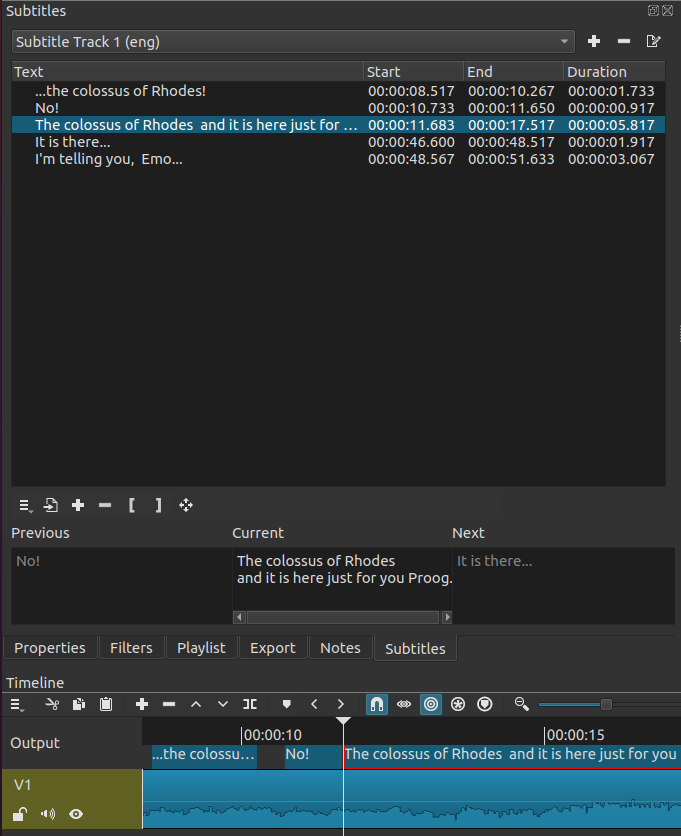
The Subtitles panel can be used to add subtitles to a project. Subtitles can only be added to the Timeline. They can not be added to the playlist or clips. We recommend to save subtitle editing until the timeline editing is complete because moving or cutting clips on the timeline will break the subtitle synchronization.

To start editing subtitles, click the “add” button and give the subtitle track and name and language. After the subtitle track is created the subtitle track area will appear in the timeline above the top video track. Multiple subtitle tracks can be added. But only the currently selected subtitle track is shown in the Subtitle Panel and the Timeline.

Click the “Add subtitle” button to make a new subtitle item at the cursor position. Then type in the “Current” text area to add the text.

Subtitles can also be imported. Supported subtitle import formats include: SRT, VTT, ASS, and SSA. Subtitles are imported at the current cursor position. So be sure to place the cursor before importing subtitles from a file.

Screenshot of new Subtitles panel

Export​

Subtitles can be exported to a file. Subtitles are exported in SRT format.

When exporting a Shotcut project, subtitles will be embedded in the output file if the file format supports it. Formats that commonly support subtitles include MKV, MOV, and MP4. You can disable this using the checkbox at the bottom of the Export > Other tab. You can also enter the text sn=1 in the other box to disable them.

Subtitle Burn In Video Filter​

The Subtitle Burn In filter can only be added to the Output track. The filter allows you to select an existing subtitle track, and overlay the subtitle text on the project video.

Other Changes and Fixes​

  • Added a Power (W) ( #gps_power#) field to the GPS Text video filter.
  • Now Enter or Return in Filters > search changes focus to the search results.
  • Now Up or Down in Help > Actions and Shortcuts > search changes focus to the search results.
  • Changed the Softness to 0 in the Obscure With Blur and Obscure With Mosaic filter sets.
  • Fixed the Linux portable, AppImage, and Snap fail to launch on some systems (e.g. Ubuntu 24.04) with Qt 6 and Wayland.
  • Fixed occasional audio pop/click with some media files especially with uncompressed audio.
  • Fixed lag in Filters > search.
  • Fixed a disabled Crop: Circle or Crop: Rectangle video filter becomes enabled when reselected.
  • Fixed the hevc_toolbox hardware video encoder fails detection on some Intel Macs.
  • Fixed file dialogs open slowly in the Linux AppImage.
  • Fixed overriding Properties > Rotation on a proxy video whose default is not 0 exports with wrong rotation. This bug affected the creation of the proxy and thus requires making a new proxy, which is easier said than done on Windows due to file locking. Properties > Proxy > Disable Proxy on the affected clips is a workaround if you do not turn off proxy completely.
  • Fixed Properties > Proxy > Make Proxy does not override a DJI- or GoPro-provided proxy video.
  • Fixed 59.94 fps in Matroska falsely identified as variable frame rate (broke in v24.06).
  • Fixed mono audio assets not playing through both stereo channels (broken in v24.06).
  • Fixed Open Other > Audio/Video Device > Video Input on macOS (broke in v24.06).
  • Fixed spinboxes on Settings > Theme > System on Windows takes too much space from the numeric field (broke in v24.06).
  • Fixed many audio filters missing for Windows on Arm computers (broke in v24.06).
  • Fixed setting the audio language in Export > Other using alang=.
  • Fixed right Alt key (AltGr) for text input in some languages instead keyboard shortcuts/actions in Windows.
  • Fixed the Convert dialog when dropping hangs Windows Explorer until the dialog is closed.
  • Fixed Add Keyframe at Playhead for some filters, for example Color Grading.
  • Fixed enabling keyframes in Color Grading adds 2 keyframes.
  • Fixed the modal font dialog on Linux can be behind main window making Shotcut not responsive.
  • Upgraded MLT to version 7.26.0.
 
New Version 24.10: Whisper to a Scream

Speech to Text​

Shotcut gets its first AI based on OpenAI’s Whisper, courtesy of the whisper.cpp project. This is available through Subtitles > Speech to Text menu item or button:
Speech to Text icon
.

  • Our builds include a basic model that has decent speed and accuracy but not a big size. (You can think of the model as the brain.)
  • You can download a bigger and better better brain (model) in ggml format and configure it in the Speech to Text dialog, but it will be slower.
  • The dialog creates two jobs that appear in the Jobs panel: one to export audio and another to convert to text.
  • The results are added to the Subtitles panel as a new top-level Subtitle Track.
  • Currently, the only GPU our build supports is Apple Silicon. Otherwise, it is heavily multi-threaded on the CPU.
  • Known quirk: subtitle items sometimes start earlier than expected. Timing is provided by the model and tool, and we lack the skills and resources to improve this.
  • Expect there to be occasional errors. Like humans and non-ideal conditions, it is not perfect. We will not take action on bug reports about some piece of audio not converting to the expected text.
  • OpenAI has made some warnings about the usage of their Whisper models:
    In particular, we caution against using Whisper models to transcribe recordings of individuals taken without their consent…. We recommend against use in high-risk domains like decision-making contexts, where flaws in accuracy can lead to pronounced flaws in outcomes.

Transition Improvements​

  • Ripple Delete a transition restores the entirety of the clips included in the transition.
  • Lift (non-ripple delete) a transition no longer leaves a gap; the gap is filled with the adjacent clips.
  • Moving an adjacent clip away increases the transition duration instead of detaching and leaving a gap.

Other Improvements​

  • Removed the Export > Video > Resample button. Now, there are simply ignorable inline warnings when making certain changes.
  • Added File > Show Project in Folder to menu.
  • Added a decimals <number> option to numeric keywords in the GPS Text video filter.
  • Changed Recent Projects to Projects: items in this view no longer disappear as Recent reaches its maximum length and old items are removed.
  • Added a Remove action to the context menu in Projects.
  • Hide the Reframe video filter and button if GPU Effects is on.
  • Upgraded FFmpeg to version 7.1.

Fixes​

  • Fixed a crash doing when doing more than one Playlist > menu > Add Selected to Slideshow. In theory, this could fix other random crashes in Timeline.
  • Fixed a crash opening a project containing a subtitle track with no items.
  • Fixed odd value for computed width in Reframe output video filter causes export to fail.
  • Fixed Reframe visual control can create odd-valued dimensions.
  • Fixed AVCHD video frame rate is double (could fix other formats).
  • Fixed making a proxy video for a iPhone 16 Pro video containing spatial audio.
  • Fixed GPU filters paste below non-GPU filters.
  • Fixed Slideshow Generator dialog is too tall with vertical video mode.
  • Fixed GPS Offset would reset in GPS Text video filter.
  • Fixed the maximum allowed Time in the Time Remap filter to prevent white frames.
 
New Version 25.01: Finally, Playlist Bins

New Stuff​

  • Added Bins and media type & text search to Playlist.
  • Added View > Files panel.
  • Added Show in Files to Properties and Jobs.
  • Added HSL Primaries and HSL Range video filters (HSL = Hue/Saturation/Lightness).
  • Added Gradient Map video filter.
  • Added Settings > Player > Pause After Seek toggle that defaults to on (old behavior).
  • Added a Type parameter to Fade In Audio and Fade Out Audio filters.
  • Added Export hardware encoding for Windows on Arm CPUs (h264_mf and hevc_mf codecs).
  • Added Settings > Language > Irish.
  • Improved support for MLT XML clip/sub-projects: Now more tolerant to inconsistent video modes, there are Properties, and you can add a Speed: Forward Only time filter.

Fixes and Changes​

  • Improved Playlist > Generate Slideshow with trimmed video clips making it more useful to make a montage.
  • Fixed incorrect color change when mixing video tracks and certain filters such as Hue/Lightness/Saturation.
  • Fixed scrub bar and Timeline & Keyframes rulers not using Settings > Time Format.
  • Fixed File > Export > Markers as Chapters when Settings > Time Format is not Clock.
  • Fixed Subtitles works incorrectly after a couple of minutes with non-integer frame rates.
  • Fixed Settings > Clear Recent on Exit not clearing the Projects list.
  • Fixed View > Application Log > Previous not appearding on Windows.
  • Fixed changing Properties > Duration of image on Timeline not adjusting video filters keyframes.
  • Fixed Properties > Export GPX not working with GoPro HERO 11, 12 & 13.
  • Fixed Export > Presets > lossless > H.264 with NVIDIA hardware encoder.
  • Fixed “Use font size” in Text: Simple, GPS Text, Subtitle Burn In and Timer filters not applying from a saved preset.
  • Fixed the color picker (pick color from screen) when Shotcut is not on the primary screen.
  • Fixed the color picker on the Wayland graphics subsystem in Linux.
  • Fixed drag-n-drop from the Source player on Wayland for Linux.
  • Added native support for Wayland (without Xwayland) in the Flatpak for Linux.
  • Fixed unable to extend duration of text clips made by Subtitles > Generate Text on Timeline.
  • Fixed Properties > Convert job progress when deinterlacing or changing frame rate.
  • Fixed the subtitle track and times on ruler disapper when Timeline is floated.
  • Fixed the Delete and Clear actions in the Text: Rich editor not working.
  • Export preset H.264 High Profile now defaults to a higher quality 65% than YouTube or the defaults.
  • Removed File > Open Other > JACK Audio on Linux to remove the hard run-time dependency on libjack.so for Shotcut. However, that library is still needed to get some of the bundled audio filters (unless they load from system-installed “swh” LADSPA plugins).
  • Improved support for pix_fmt=yuv420p10le or yuv444p10le, colorspace=2020, color_trc=arib-std-b67 or smpte2084 in Export > Other for 10-bit pass-through (i.e. no image effects) editing without GPU Effects (i.e. rudimentary HDR editing without adequate preview).
  • Upgraded dependencies:
    • MLT 7.30.0
    • Qt 6.8.1
    • dav1d 1.5.0
    • AOM AV1 3.11.0
    • OpenCV 4.10
    • libvpx 1.15.0
    • Opus 1.5.2
    • WebP 1.5.0
    • SVT-AV1 2.3.0
 
New Version 25.03
This version includes many fixes related to the addition of new features in the previous version, as well as numerous quality-of-life enhancements.

New Features​

  • Added Text style preset to Subtitles > Generate Text on Timeline.
  • Added Copy Current and Copy All to Filters.
  • Added the project Video Mode to the window title.
  • Added Vertical and Horizontal parameters to the No Sync video filter.
  • Added Toggle Filter Overlay to the Player menu.
  • Added 360: Cap Top & Bottom and 360: Equirectangular Wrap video filters.
  • Added a Not In a Bin smart bin to the Playlist.
  • Added the ability to use Ctrl (Command on macOS) to constrain movement to the vertical or horizontal axis in all filters that use the rectangle visual control.
  • Added #rgba, #yuv, #gpu, and #10bit tags to keywords in Filters for search.
  • Added an icon to Timeline clips to indicate when they have filters.
  • Added “ITU-R BT.2020” to Video Mode > Custom > Add and Output > Properties.

Improvements​

  • Reduced the range of Gamma and Gain in the Color Grading filter.
  • Glaxnimate no longer launches automatically after Open Other > Animation > Add to Timeline. Now, you need to click Properties > Edit. This addresses the video background in Glaxnimate.
  • Upgraded dependencies:
    • Whisper.cpp 1.7.4
    • bigsh0t 2.7

Fixes​

  • Fixed opening a project can be slow or make app unresponsive if Settings > Playlist > View mode is Icons (broke in v25.01).
  • Fixed double-clicking a Playlist item that is in a Bin may open wrong clip.
  • Fixed handling of Windows shortcuts and macOS aliases in Files.
  • Fixed automatic pause–such as when adding a filter–does not update the player’s play button state (broke in v25.01).
  • Fixed a crash on multiple Timeline undo and redo operations.
  • Fixed a crash bug after Undo and Redo after moving clips in Timeline.
  • Fixed the Size, Position & Rotate filter’s visual control with non-square pixels.
  • Fixed trimming twice ruins zoom keyframes in Size, Position & Rotate filter.
  • Block adding a new job that writes to the same file as a pending or running job.
  • Fixed Paste filters is not adding an Undo item to History.
  • Fixed the Amount keyframes button always disabled in the 360: Equirectangular to Stereogaphic video filter.
  • Fixed key repeat for the previous/next shortcuts in Player menu.
  • Fixed Export > Reframe causes Video > Scan mode to be interlaced even when it shows progressive.
  • Fixed trim handles on Timeline clip when it is very short.
  • Fixed Timeline > Split followed by multiple undo and redo may affect attached filters.
  • Fixed playhead in Keyframes incorrect after switching filters.
 
New Version 25.05: Freeze Frame

New Features​

  • Added Alpha Strobe video filter.
  • Added Freeze Frame to Timeline.
  • Added File > Rereun Filter Analysis.
  • Added adjustable track headers width to Timeline.
  • Added an item count to Playlist.
  • Added File > New submenu with items for Project and generators.
  • Added Add Generator to Timeline toolbar.
  • Changed the Convert to Edit-friendly dialog to make it obvious that “better” and “best” options create very large files.
  • Added Settings > Preview Scaling > 1080p. (This was added primarily for use with DeckLink SDI/HDMI external monitoring.)
  • Added Settings > Player > External Monitor > DeckLink Gamma with SDR and HLG HDR options.
  • Added HLG color transfer/gamma to GPU Effects. HDR is not ready to announce; these are just some pieces.

Improvements​

  • Improved compositing in Obscure With Blur, Obscure With Mosaic, and Mask: Apply. Now, they are better at concealing details.
  • Moved the Files > Go Up button to top left to be more like OS file browsers.
  • Upgraded dependencies:
    • Qt 6.8.3
    • MLT 7.32.0
    • Rubberband 4.0
    • SVT-AV1 3.0

Fixes​

  • Fixed ability to select or drag short Timeline clips (broke in v25.03).
  • Fixed Text: Rich scroll presets (broke in v25.03).
  • Fixed may crash in Files dock on startup (broke in v25.01).
  • Fixed possible crash when selecting a track head.
  • Fixed Filters > Copy Current/All ignores disabled filters.
  • Fixed Speed time filters reset when they are reloaded in the UI.
  • Fixed generating proxy for videos with BT.2020 color space.
  • Fixed Fade Out Audio in a filter set.
  • Fixed Timeline > Record Audio is distorted on macOS.
  • Fixed SDI/HDMI capture/monitor not working with recent Blackmagic Design drivers.
  • Fixed Center/LFE channels swapped in 5.1 sound output in DeckLink SDI/HDMI external monitor.
  • Fixed adding media with unknown or very long duration (for example, more than 7 days). Now, it prompts for the duration.
 
Shotcut 25.12.31 / 25.12.30
This version hot-fixes problems found in 25.12.30:
  • Fixed nesting MLT XML stopped working.
  • Fixed Screen Recording missing on Linux and macOS.
  • Fixed Stabilize video filter on macOS.
See the 25.12 release notes

 
New Version 26.4: All the Small Things

Timeline Improvements​

  • Added symmetric resize of a timeline transition using its trim handles.
  • Added drag-n-drop from Recent to Timeline.
  • Improved Timeline and Keyframes zoom to be less erratic and more focused.
  • Reduced memory usage for timeline waveforms.
  • Changed Timeline > Set Current Track Above and Set Current Track Below to use the bare Up and Down keys.

Speech to Text​

  • Added Vulkan GPU support to Speech to Text on Windows and Linux.
  • Added a Use GPU checkbox to the Speech to Text dialog.

Other New Features​

  • Added Export > Metadata including Cover art.
  • Added a Typewriter group of options to the Burn In Subtitle filter.
  • Added job progress and status on the taskbar or dock icon where supported.
  • Added Properties > LUT file for video clips, primarily for the Linear 10-bit processing mode.
  • Added aspect ratio grid options to the player grid button:
    • 1:1 Frame
    • 16:9 Frame
    • 4:3 Frame
    • 9:16 Frame
  • Added 10-bit VP9 MP4 (E-AC-3) and 10-bit VP9 WebM (Opus) export presets.
  • Added launching Glaxnimate from the Microsoft Store on Windows if available.

Changes​

  • Stopped bundling Glaxnimate except in the Linux Flatpak.
  • Changed audio transition to a constant power crossfade.
  • Changed multi-select for Subtitles to use the Shift key.
  • Changed Properties timeline duration to be editable.
  • Changed opening an image to not start playback.
  • Changed Export to default to 10-bit HEVC export in the 10-bit processing modes.
  • Changed Timeline > Record Audio to use FLAC instead of Opus for improved quality and tool compatibility.
  • Reorganized the Video Modemenu with new categories:
    • Social Media
    • Other
    • Legacy
  • Reduced the thickness of the panel splitters and made them brighter.

Fixes​

  • Fixed intermittent audio waveform sync or blank waveforms (broke in v26.2).
  • Fixed incorrect last frame in Glaxnimate animations.
  • Fixed Font style other than weight and italics/oblique in the font dialog.
  • Fixed accepting file names with special characters in Playlist > Add Files.
  • Fixed markers disappearing after undo moving clips.
  • Fixed hourly backup not working when saving frequently.
  • Fixed opening a project starts the player at the second frame.
  • Fixed seeking with keyboard in Timeline sometimes not working.
  • Fixed Settings > Time Format not immediately updating the Timeline and Keyframes rulers.
  • Fixed Timeline > Copy, Cut, Paste, and Overwrite breaking grouped clips.
  • Fixed keyframes after undoing a trim in.
  • Fixed changing Properties > Duration dropping time filters.
  • Fixed Edit Marker duration and Ripple Markers off by one frame.
  • Fixed the Nervous video filter doing a 2 frame fade-in from black.
  • Fixed undo history for lock, mute, and hide track.
  • Fixed button menus not opening reliably on Wayland on Linux.
  • Fixed a possible crash during voice preview in the Text to Speech dialog.

Upgrades​

  • Upgraded FFmpeg to version 8.1.
  • Upgraded x265 to version 4.1.
  • Upgraded whisper.cpp to version 1.8.3.
  • Upgraded MLT to version 7.38.0.
  • Upgraded Qt to version 6.10.3 on Linux.
 
New Version 26.6: High Dynamic Range
Version 26.6.25 is now available for DOWNLOAD!

External Monitor with a System Display​

Three years ago, when we upgraded our UI library to a major new version, we lost support for using an additional system display as an external monitor. Many people were disappointed to lose that feature. Now, after a major change to the video plumbing, it is back!

The External Monitor submenu is moved from Settings to the top of the Player menu. It is incompatible with newly added Settings > Player > Use Old Video Output (provided just in case the new plumbing does not work).

The new plumbing also provides a way to preview HDR video except, for technology reasons, it must be shown in a separate window…

HDR Video Preview and Export​

As a quick reminder for those unfamiliar: “HDR” means high dynamic range, not high definition resolution. It is about expanded color and light. A lot of phones and cameras are recording with this today, and many people are not aware until they try to edit and run into problems. Also, HDR game captures on computers is increasingly common. A year ago, we added very limited, hidden support for editing HDR video because, basically, we had no way to display it without a device from Blackmagic Design. Now, there is a way.
  • Added Player > External Monitor > Preview Window (HDR)that can be made fullscreen.
    • It also works for SDR.
    • HDR requires a display properly configured with HDR, Native 10-bit CPU or Linear 10-bit GPU/CPU processing modes, and HDR video sources.
    • For HDR, only use filters tagged with #gpu or #10bit.
    • It does not appear to work on Linux, at least I have not been able to get it working.
    • Switching between PQ HDR (HDR10) and HLG HDR requires restarting the app.
    • The default shortcut to open or raise the preview window is Ctrl+`. It does not toggle between open and close because raise is more convenient.
    • You can move the window by clicking anywhere inside except the controls bar and dragging.
    • F toggles fullscreen and Esc also leaves fullscreen.
    • Incompatible with Use Old Video Output.
  • Added Dynamic range to custom Video Mode and Timeline Properties.
    This offers SDR, which follows the colorspace, HLG HDR, and PQ HDR.
  • At this time, Shotcut only supports converting log profile video to HDR with GPU processing mode and HLG HDR video mode. And it cannot convert between HDR formats or combine multiple HDR formats within a project.
  • Added support for PQ HDR (HDR10) to External Monitor > DeckLink.
  • Added support for HDR to Export (based on Video Mode and 10-bit processing mode).
  • Added HDR10 metadata dialogs for External Monitor > DeckLink and Export > Codec.
    Export only embeds HDR10 metadata for the libx265 and libsvtav1 video codecs and no hardware encoders.
  • TODO: Properties > Convert and View > Resources > Convert do not support 10-bit yet; that will be added in the next release.

External Plugins​

We added limited support for external audio and video plugins.

“Limited” means it does not support a plugin’s included UI, and our UI generator is new and experimental. That means you can only try it if you are an advanced user who knows how to supply a command line option to reveal the new UI generator. There are many mysterious effects, and uncertainty if things are working correctly. As a result, the user experience is not yet good enough with an increased risk of crash.

“External” means both effects included with Shotcut but not yet available in the UI or plugins that you install yourself to the standard, expected location for your OS.

OpenFX Image Effect Plugins​

  • Added a UI (--experimental not required) for NTSC-rs.
  • Limited compatibility: not available, seems to do nothing, or makes the video black.
  • No support for plugins that operate temporally or require multiple image/video inputs.
  • No support for generators, transitions, or retimers.
  • No support for the UI embedded in the plugin.
  • No support for GPU technologies but multi-threaded CPU does work.
  • Very limited testing. There are many plugins we have not tested especially commercial ones, and we know there are some that do not work.
  • None are included with Shotcut.

VST2 and LV2 Audio Plugins​

  • Added a UI for Valhalla Supermassive.
  • No support for the UI embedded in the plugin.
  • No support for instruments.
  • Very limited testing.
  • None are included with Shotcut.

Safe Mode and UI Generator​

  • Added menu item Settings > Leave Safe Mode.
    This appears if Shotcut crashes within 30 seconds upon startup, which restarts in a safe mode without external (OpenFX, VST2, LV2) plugins.
  • Added --experimental command line option to try out the filter UI generator. This provides a Manage Add-on Filters dialog to search for effects included with Shotcut or external plugins. After choosing some to add-on, they become available in the regular Filters menu in the current as well as future sessions.

Other New Features​

  • Added Reduce Noise: Audio (RNNoise) filter. More info about RNNoise
  • Added Settings > Display Method > Vulkan on Linux.
  • Added Settings > Timeline > Create Transitions on Overlap to disable that feature.
  • Added support for the .lot filename extension for Lottie animation handled by Glaxnimate.
  • Added support to load custom filter UIs installed to App Data Directory > extensions > filters. If someone shares a custom or generated UI for an external effect/plugin that seems useful and safe, you can install it here to use it in your Shotcut without needing to use the --experimental mode. This can also be a place to add custom general purpose scripts by making a dummy filter. Use mlt_service: 'shape' as the dummy/no-op backend filter in the meta.qml. Soon we will add a proper scripts panel.
  • Documented a scripting interface.

Changes​

  • Changed Linux Snap to use a desktop environment file dialog if possible.
  • Changed the new Log Event shortcut to Shift+D because one conflicted with Remove Subtitle Item.
  • Moved Declick Audio from the Time category to Audio in the filter menu.
  • Upgraded MLT to version 7.40.0
  • Upgraded FFmpeg to version 8.1.2
  • Upgraded libspatialaudio to 0.4.0
  • Upgraded frei0r to version 3.2.2

Fixes​

  • Fixed the Font style from the font dialog is overwritten on filter UI reload on Windows (broke in v26.4).
  • Fixed hardware scaler on Windows when using Settings > Preview Scaling > Use Hardware Decoder (broke in v26.4).
  • Fixed mouse wheel and keyboard not incrementing/decrementing numeric fields in filter UIs (broke in version 26.4).
  • Fixed moving clips may create a very long gap.
  • Fixed Player > External Monitor > DeckLink (and related such as UltraStudio) HDMI/SDI may deadlock.
  • Fixed export with libopus audio codec warns about frame_duration.
  • Fixed incorrect current track after moving clip to another track.
  • Fixed undo after changing Video Mode corrupts the timeline.
  • Fixed double-clicking a project file in Finder with Shotcut already running on macOS.
  • Fixed zooming in the player with non-square pixels.
  • Fixed a possible crash when Text: Rich filter is first in the list and playhead is not over selected clip.
  • Fixed File > Export EDL adds 1-frame clip before transitions.
  • Fixed full-width spaces replaced by half-width spaces in Import Subtitles From File.
  • Fixed Text: Typewriter not animating correctly after changing rate parameters.
  • Fixed reordering Filters breaking selecting another filter.
  • Fixed some actions disabled after deleting, moving, or updating an item in Subtitles.
  • Fixed repeated prompts to convert a project to GPU processing mode if project was started before version 25.12.
  • Fixed skim not working over Timeline clips.
  • Fixed mouse wheel not scrolling a filter’s UI within Filters.
  • Fixed 10-bit H.264 encoder fails with hardware encoding on.
    No H.264 hardware encoders support 10-bit; this change simply makes it use software encoding with x264.
  • Fixed Export > Ogg Vorbis with Cover Art fails (no longer fails but our Ogg integration does not support cover art).
  • Fixed Export > From > Marker using the Reframe output video filter with keyframes.
  • Fixed some toolbar icons’ tooltips not showing keyboard shortcut.
  • Fixed Zoom Timeline to Fit may not scroll to start.
  • Fixed a crash using some Markers actions with nothing open.
  • Fixed using Windows UNC paths with filters, e.g. GPS Graphic.
  • Fixed extended/special characters in metadata of custom Export preset.
  • Fixed Rebuild Audio Waveform was not saving on Windows.
  • Fixed tab focus did not allow editing numeric fields in filters.
  • Fixed Export > Video > Aspect ratio can be incorrect if very close to a common ratio: 4:3, 16:9, or 9:16.
  • Fixed changing many things in Properties enabled Filters that were disabled.
  • Fixed crash in Text: Rich filter on some Linux/Wayland versions.
  • Fixed toggling visibility of other tracks in Timeline could make an audio clip with an image appear on top.
 

You may also like...