New Update Simple Windows Hardening

I'm trying to install Deno with a PowerShell(run as administrator) command with the settings "Admin Windows Script Host: Off" "Admin PowerShell Scripts: Off", yet SWH doesn't let me install it. What settings should I temporarily turn off to make it work? (I could just turn off all the restrictions temporarily as a solution, but my first solution made me wonder why doesn't it work).

Here's the command I'm trying to use: iwr https://deno(dot)land/x/install/install.ps1 -useb | iex

View Blocked Events -> PowerShell ->
Error Message = Unable to connect to the remote server
Fully Qualified Error ID = WebCmdletWebResponseException,Microsoft.PowerShell.Commands.InvokeWebRequestCommand

------------------------------------------------------------------------------------------------------------------------------------------------------------------------------------------------------
EDIT: Nevermind, I used WSL 2 Linux commandline to install it without turning SWH protections off.
------------------------------------------------------------------------------------------------------------------------------------------------------------------------------------------------------
 
Last edited:
I'm trying to install Deno with a PowerShell(run as administrator) command with the settings "Admin Windows Script Host: Off" "Admin PowerShell Scripts: Off", yet SWH doesn't let me install it. What settings should I temporarily turn off to make it work? (I could just turn off all the restrictions temporarily as a solution, but my first solution made me wonder why doesn't it work).

Here's the command I'm trying to use: iwr https://deno(dot)land/x/install/install.ps1 -useb | iex

View Blocked Events -> PowerShell ->
Error Message = Unable to connect to the remote server
Fully Qualified Error ID = WebCmdletWebResponseException,Microsoft.PowerShell.Commands.InvokeWebRequestCommand

------------------------------------------------------------------------------------------------------------------------------------------------------------------------------------------------------
EDIT: Nevermind, I used WSL 2 Linux commandline to install it without turning SWH protections off.
------------------------------------------------------------------------------------------------------------------------------------------------------------------------------------------------------
It was not blocked by SWH. The installation was probably blocked by the Windows Firewall rule, when PowerShell tried to connect via the Invoke-WebRequest cmdlet. Do you use FirewallHardening?
 
Simple Windows Hardening ver. 2.0.0.1


SWH ver. 2.0.0.1
  1. Added a new option in the DocumentsAntiExploit tool to make the configuration of Adobe Acrobat more granular.
  2. Added a new digital certificate.
There is no need to update, except if someone wants to try the new setting in the DocumentsAntiExploit tool or needs SWH with an updated certificate.
The system-wide TL setting (added in this version), prevents adding the documents to 'Privileged Locations' (Trusted Locations). This can have an impact on the way of how works the <Enable All Features> on the 'Yellow Bar', when the document is opened in the Protected View. The details can be found in the "DocumentsAntiExploit tool - Manual.pdf".
 
Simple Windows Hardening ver. 2.0.0.1


SWH ver. 2.0.0.1
  1. Added a new option in the DocumentsAntiExploit tool to make the configuration of Adobe Acrobat more granular.
  2. Added a new digital certificate.
There is no need to update, except if someone wants to try the new setting in the DocumentsAntiExploit tool or needs SWH with an updated certificate.
The system-wide TL setting (added in this version), prevents adding the documents to 'Privileged Locations' (Trusted Locations). This can have an impact on the way of how works the <Enable All Features> on the 'Yellow Bar', when the document is opened in the Protected View. The details can be found in the "DocumentsAntiExploit tool - Manual.pdf".
Thanks @Andy Ful for the more granular configuration of Adobe Acrobat (y)

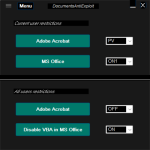
Looks like this is how it works best for me:

1657652230644.png

Will try this setup for a few days.
 
Last edited:
Thanks @Andy Ful for the more granular configuration of Adobe Acrobat (y)

Looks like this is how it works best for me:

View attachment 267972

Will try this setup for a few days.
You use PV + OFF settings for Adobe Acrobat. So, the settings are applied via Adobe Acrobat (Windows policies are skipped). The new documents are opened in the Protected View, and if you use <Enable All Features> the document is displayed in the default Adobe settings (which includes AppContainer). These settings are OK for responsible users.
 
I have a problem with Simple Windows Hardening in Win10 home. I cannot connect to my Western Digital WD TV Play after installation. I use iSedora to contact my WD. Tried turning off everything in SWD after installation but still not working. I uninstalled SWD but still no contact? Anyone have any good advice?
 
  • Like
Reactions: Andy Ful
I have a problem with Simple Windows Hardening in Win10 home. I cannot connect to my Western Digital WD TV Play after installation. I use iSedora to contact my WD. Tried turning off everything in SWD after installation but still not working. I uninstalled SWD but still no contact? Anyone have any good advice?

What is SWD?
Have you installed WD Digital TV Play and iSedora with Simple Windows Hardening already installed?
Did you use <View Blocked Events> in Simple Windows Hardening to see if anything was blocked?
 
  • Like
Reactions: Back3
What is SWD?

Have you installed WD Digital TV Play and iSedora with Simple Windows Hardening already installed?
Did you use <View Blocked Events> in Simple Windows Hardening to see if anything was blocked?
Sorry, I was a little quick here, I meant Simple Windows Hardening.
Yes, I had already installed WD TV Play Media Player and iSedora long before I installed Simple Windows Hardening today.
;)
 
Sorry, I was a little quick here, I meant Simple Windows Hardening.
Yes, I had already installed WD TV Play Media Player and iSedora long before I installed Simple Windows Hardening today.
;)
Did you use <View Blocked Events> in Simple Windows Hardening to see if anything was blocked?
 
I am thinking of using Voodooshield Free (Autopilot). How does it compare against SWH. Is SWH SRP easily bypassable? Should I use both?
SWH is designed to support the AV to fight fileless threats (shortcuts, scripts, scriptlets, weaponized documents), so you must rely on the AV for protection against EXE and MSI files. Some people use both SWH and VS, but it is probably not necessary. If you are worried about EXE and MSI files, then simply use the AV + VS and skip SWH.
 
Did you use <View Blocked Events> in Simple Windows Hardening to see if anything was blocked?
Yes, and I turned of everything that was blocked. I even turned of everything that was changed before I installed it, but I hade to reinstall a new image to get it to work.
 
  • Like
Reactions: Andy Ful
Yes, and I turned of everything that was blocked. I even turned of everything that was changed before I installed it, but I hade to reinstall a new image to get it to work.
What events were visible in <Blocked Events>?
 
I really don't remember. I should off curse have taken a PrintSceen but I forgot. I can try again using Shadow defender and see ;)
Please check if WD TV Play Media Player or iSedora uses SMB protocols (can be blocked by SWH).
 
The WD TV Play Media Player does. Is there a way to fix it?
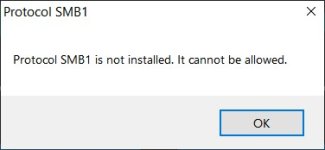
Yes. Allow SMB via Settings >> * SMB Protocols *.
But, SWH can block something else with Windows start, when the software related to WD TV Play Media Player is started. You cannot check it with Shadow Defender in shadow mode.
 
Yes. Allow SMB via Settings >> * SMB Protocols *.
But, SWH can block something else with Windows start, when the software related to WD TV Play Media Player is started. You cannot check it with Shadow Defender in shadow mode.
I could not turn it off:
 

Attachments

  • 2022-07-31_230640.jpg
    2022-07-31_230640.jpg
    10 KB · Views: 281
  • Like
Reactions: Andy Ful
Yes. Allow SMB via Settings >> * SMB Protocols *.
But, SWH can block something else with Windows start, when the software related to WD TV Play Media Player is started. You cannot check it with Shadow Defender in shadow mode.
I can set WD TV Play Media Player also in NFS mode, but I don't have Windows 10 Enterprise.
 
  • Like
Reactions: Andy Ful