Solved [Solved] Need Help - GPT Partition

IONx64

Level 1
Thread author
Verified
May 29, 2014
27
20
29
44
Hello friends,


I had such trouble in accer aspire laptop.


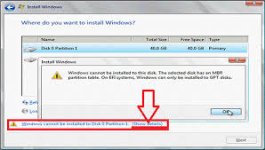
I wanted to install windows 7 on it and when i boot up it from from my installation media i had such trouble on stage of choose a partition drive for installing a windows. when i choose a drive for example first drive there was error :windows cann't install on GPT partition, see below scree shot too please.


what is that and how to solve it?


Thanks in advanced.
 

Attachments

  • download.jpg
    download.jpg
    11 KB · Views: 776
no i have not other image. there are 2 partition but same trouble on both one. thanks for replay.
 
Upvote 0
If you don't have any files in other drive or if you can delete the files in other drives.

This might solve your problem.

1. Boot from either your Windows 7 installation disc and press Shift + F10 when at either screen below.

Solution 3: Convert GPT disk to MBR disk via diskpart command

In the following case, I would like to convert disk 0 into MBR disk.

1. Open command prompt.

2. In the command prompt, type diskpart and press enter

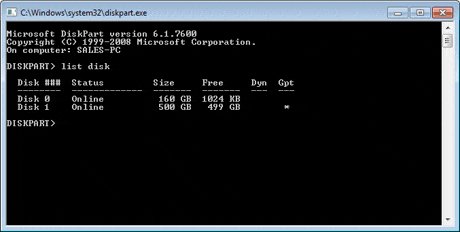
3. Type list disk and press enter.

convert-gpt-to-mbr-4-b.gif


4. Type select disk 0 and press enter.

5. Type clean. (This will wipe out your drive.)

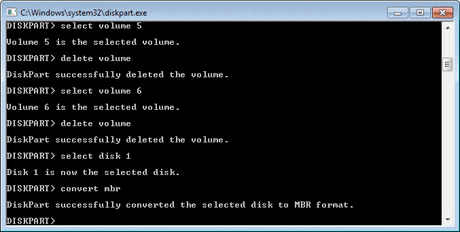
6. Type convert mbr and press enter.

convert-gpt-to-mbr-7-b.gif


11. Type exit and press enter.

I have Edited this method to make it easy & short.
@BoraMurdar
Source:
http://www.partition-tool.com/resource/GPT-disk-partition-manager/convert-gpt-disk-to-mbr-disk.htm
 
Last edited:
Upvote 0
again, you can boot from Hirens, and change the GPT Disk to MBR Disk.
Any modern (AOMEI, MiniTool, EASEUS) partition manager has that option...

But guys already helped you as I can see :)
 
Upvote 0