


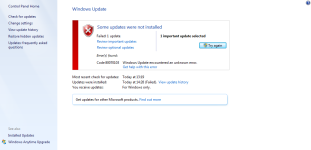
Some Updates were not installed
- Thread starter OutOfBounds
- Start date
You are using an out of date browser. It may not display this or other websites correctly.
You should upgrade or use an alternative browser.
You should upgrade or use an alternative browser.

I've had this happen before and this worked for me.
In an elevated command prompt, execute (Article):
1. Bring up an elevated (Administrator) command prompt
2. Execute the following commands sequentially:
a. fsutil resource setautoreset true c:\
b. cd %windir%\system32\config\txr
c. attrib -r -s -h *
d. del *
3.Type: Cd c:\windows\System32\SMI\Store\Machine
Type: Attrib –a –h –s *.TM*
Type: Del *.TM*
*** You may get access denied errors -- its ok for now ***
5) Restart in Safe Mode with Command Prompt. Redo the steps above in BOLD. Some files still will not delete. That's fine.
6) Restart in Normal Mode - run windows update with success.
In an elevated command prompt, execute (Article):
1. Bring up an elevated (Administrator) command prompt
2. Execute the following commands sequentially:
a. fsutil resource setautoreset true c:\
b. cd %windir%\system32\config\txr
c. attrib -r -s -h *
d. del *
3.Type: Cd c:\windows\System32\SMI\Store\Machine
Type: Attrib –a –h –s *.TM*
Type: Del *.TM*
*** You may get access denied errors -- its ok for now ***
5) Restart in Safe Mode with Command Prompt. Redo the steps above in BOLD. Some files still will not delete. That's fine.
6) Restart in Normal Mode - run windows update with success.

You can download the microsoft updates troubleshooter
http://aka.ms/diag_wu
http://aka.ms/diag_wu

You can also use the Windows Offline Update tool:
Refer to WSUS Offline Update - Update Microsoft Windows and Office without an Internet connection
Pretty sure I wrote a guide here at some stage about it.
Refer to WSUS Offline Update - Update Microsoft Windows and Office without an Internet connection
Pretty sure I wrote a guide here at some stage about it.
5
509322
Hi, i took my windows-7 laptop back to factory settings yesterday and done all the updates, but some are giving me an error message and failing
This is not unusual (actually it is expected behavior) due to Microsoft's buggy Windows update.
Generally, re-attempting to install a failed update several times - even a few hours or a day later will auto-resolve all by itself and the update will install. Something as simple as a minor networking issue will cause various Windows 7 updates to fail to install. If that does not work, then try the methods given by others above.
I have seen as many as 97 individual Windows updates fail to install on Windows 7 all at a single time out of 185 updates. And every single time I run updates on a clean install of Windows 7 there are always failed updates. Sometimes as few as 5 or so, sometimes more than 10+ reaching beyond 50 - but there are ALWAYS failed updates.
There are many guides online to solve the many Windows update failures online.

I also had problems with windows updates on my laptop with windows 7.
I opened a thread on the Sysnative Forums.
There is a special subforum on this board for this kind of problems:
Windows Update
... i'm frequently visiting this board: it has a very good reputation. This guys has helped me out with my machines some months ago: had some few problems with BSOD, Blackscreen and also with Windows Update.
I opened a thread on the Sysnative Forums.
There is a special subforum on this board for this kind of problems:
Windows Update
... i'm frequently visiting this board: it has a very good reputation. This guys has helped me out with my machines some months ago: had some few problems with BSOD, Blackscreen and also with Windows Update.
- Dec 4, 2014
- 3,504
- 1
- 19,047
- 4,479
- 52
The error indicates it's a driver issue. The following links may be of help.
https://support.microsoft.com/en-au...-when-you-use-the-windows-update-or-microsoft
[Solved] Windows Update Error 80070103 - Driver Easy
https://support.microsoft.com/en-au...-when-you-use-the-windows-update-or-microsoft
[Solved] Windows Update Error 80070103 - Driver Easy
Thanks for your kind help I tried again today and the updates installed with no problem. 

Hey i have found an easy way to fix this error. These following links Guide you
https://support.microsoft.com/en-au...-when-you-use-the-windows-update-or-microsoft
Windows Update Error 80070103
https://support.microsoft.com/en-au...-when-you-use-the-windows-update-or-microsoft
Windows Update Error 80070103
You may also like...
-

-
 Technology Microsoft: Some Windows PCs fail to shut down after January update
- Started by Brownie2019
- Replies: 23
-
-
Technology Microsoft fixes Media Creation Tool broken on some Windows PCs
- Started by Brownie2019
- Replies: 1
-
 Advice Request Help: Comodo 2025 - cmdguard.sys - boot fail with newer Nvidia drivers
- Started by Something-x2
- Replies: 33