

Something wrong with my system

Anupam

Level 21
Thread author
Verified
Well-known
Jul 7, 2014
1,017
2,322
1,968
Hi all,

Though looking into the subject you might guess that my system is not working fine, but that's not true. I could not find anything wrong with my system.

But not sure why emsisoft sometimes thowing pop-up saying my system is trying to connect to malicious host.
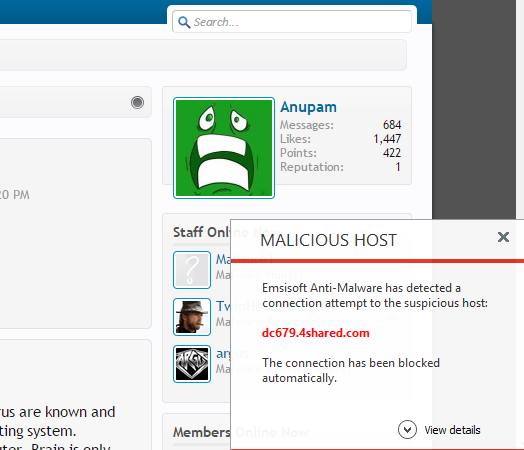

upload_2015-1-2_0-43-42.png


Any idea why I am getting this? Yesterday I plugged in one infected USB stick. Now I am afraid that something might be wrong.
 
  • Like
Reactions: Tani
it's a sub domain of 4shared.com. Someone may have uploaded any file on 4shared.com & that sub domain might have been used by that user & emsisoft thought it's a malicious site.
 
Last edited:
This is really not good. Quite a few malware types use connections to places like dropbox, 4shared, etc in order to either download other malicious files or to download and update the original malware file to something more recent (zero-day every day) in order to fool definition based security solutions.

What you need to do:
1). As suggested above go into the Emsisoft further details link to see what is asking for the outbound connection. Upload this file to VT and see what the results are (if you can't find it, it may have installed itself with hidden attributes).
2). Go into MSCONFIG to see what is autostarting on your computer. If you are getting these Firewall alerts without you doing anything you without doubt have an auto-starting baddie.
3). If you have Comodo Cleaning Eessentials on your computer (everyone really should), open up Killswitch to see if Comodo finds anything running that is either bad or unknown.

Please get back to us with your findings.

New Year- New Malware
 
This is really not good. Quite a few malware types use connections to places like dropbox, 4shared, etc in order to either download other malicious files or to download and update the original malware file to something more recent (zero-day every day) in order to fool definition based security solutions.

What you need to do:
1). As suggested above go into the Emsisoft further details link to see what is asking for the outbound connection. Upload this file to VT and see what the results are (if you can't find it, it may have installed itself with hidden attributes).
2). Go into MSCONFIG to see what is autostarting on your computer. If you are getting these Firewall alerts without you doing anything you without doubt have an auto-starting baddie.
3). If you have Comodo Cleaning Eessentials on your computer (everyone really should), open up Killswitch to see if Comodo finds anything running that is either bad or unknown.

Please get back to us with your findings.

New Year- New Malware
it could be schedule task the trigger it as well.

OP did you play with malwae packs, do you have VM running?
 
well in this case... remember that user uses third party websites to upload photos or media... many sites as 4shared uses many subdomain to give /distribute / their contents, so, at some point in time this site could be used to upload malware and that is why you receive the alert... and dont worry you dont have to go to emsi forum... moderators can tell you that this site has nothing to do with 4share, so dont panic... i am custom to see this...

you are not infected :D this is normal at least with emsi... but... is not a good idea to blacklist the whole subdomain just because only one page is distributing malware.

of course you wont lose any function of the forum....
 
  • Like
Reactions: nissimezra
Well seems there could be an application trying to connect on that sub domain and the behavior itself may be malicious. Does the alert appeared once only?
 
  • Like
Reactions: nissimezra
Ok Guys.

I checked my system witm MBAM free, Hitman Pro and herdprotect. System is clean.

This popup I was getting yesterday each time I was trying to open a new tab for Google Chrome. But today I am not getting any pop-ups.
Thought the reason is unknown, but seems like today I don't have the problem anymore.
 
Ok Guys.

I checked my system witm MBAM free, Hitman Pro and herdprotect. System is clean.

This popup I was getting yesterday each time I was trying to open a new tab for Google Chrome. But today I am not getting any pop-ups.
Thought the reason is unknown, but seems like today I don't have the problem anymore.
thats why i used MSE for years, 0 FALSE\POSITIVE
thats why i dont like BD engine
 
  • Like
Reactions: frogboy and donetao
Emsisoft has always been a bit more paranoid about domain filtering, not bad since I don't remember it giving me any issues with regular surfing more than seeing a couple of possible false positive warnings about third party domains. But it was so long ago IDK how emsisoft works on nowadays.
 
If it looks like a FP,walks like an FP and sounds like an FP it`s probably an FP.

I`d still do a full system scan with Eset online scanner,just incase.

Regards Eck:)
 
  • Like
Reactions: frogboy