Svoll's S10 Plus Config 2019

Last updated
Mar 29, 2019
Mobile brand
Samsung
Mobile model
Galaxy S10 Plus
Phone unlock
Biometric security
    • Fingerprint(s)
Stolen Device Protection
Security & Privacy Apps
Zemana Mobile (praying it doesn't give me license issue again)
Knox Developer Firewall and Add Block (Custom Block List)
Browser
CM Browser
File and Photo backup
Samsung + Google Cloud
Very interesting read from his tweets and thanks for letting me know.

With Knox, i have modified its permission to where it is only able to access internet and storage, I will do further testing if with Fiddler, but for now, I feel i will use Firefox until I am comfortable with the test results.

Side note: The testing was on Nov 2017, I hope CM browser cleans up the flaws.
 
Can the S10+ sets the android built-in Kill Switch?

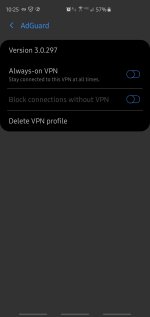
Settings => Wireless & networks => VPN, there should be a "Always-on-VPN" and/or a "Block connections without VPN" option setting

Sometimes it goes Connections => More connections something like that

If you have a VPN this will allow you to set a Kill Switch

Thanks

Note :- If you find the settings can post a screenshot?
 
Last edited:
Can the S10+ sets the android built-in Kill Switch?

Settings => Wireless & networks => VPN, there should be a "Always-on-VPN" and/or a "Block connections without VPN" option setting

Sometimes it goes Connections => More connections something like that

If you have a VPN this will allow you to set a Kill Switch

Thanks

Note :- If you find the settings can post a screenshot?
It should be on all Pie OS, here is screen shot
 

Attachments

  • Screenshot_20190329-222550_Settings.jpg
    Screenshot_20190329-222550_Settings.jpg
    124.1 KB · Views: 283
  • Like
Reactions: harlan4096
It should be on all Pie OS, here is screen shot
When you run your Windscribe VPN Adguard should not be able to run (and vice versa) because it creates a local VPN and andoird only supports one VPN at any one time

Some questions

1) BTW, where you get that VPN setting for I cannot find it in my Adguard Premium Nightly v3.0.303n. Is it in Android Pie itself?
2) Can you post the screenshot before that screenshot you posted?
3) Can you enable the 2 settings in the screenshot you posted and then run Windscribe VPN with your Adguard enabled?

Thanks
 
Last edited:
  • Like
Reactions: harlan4096
check under Connections/More connection settings/ VPN or just search for VPN when you are in the Settings App.

I usually only activate Windscribe when I am at a local starbucks or airport, the battery drain using a VPN not ideal for it to be on at all time, unless I manually assign the credentials on android.
 

You may also like...