System care antivirus is persistent

ommetaphobia

New Member
Thread author
May 28, 2013
1
0
1
40
Hello,

I am having a hard time getting rid of this thing and I`d like to avoid having to re-format if possible. It seems like it`s pretty severe though, so maybe that`s not possible.

Thank you
 

Attachments

Hi ommetaphobia and welcome to MalwareTips! :)

I'm Fiery and I would gladly assist you in removing the malware on your computer.

PLEASE NOTE: The first 3 posts of ALL new members require approval by mods/admins. Please be patient if you don't see your post immediately after submitting it.

Before we start:
  • Note that the removal process is not immediate. Depending on the severity of your infection, it could take a long time.
  • Malware removal can be dangerous. I cannot guarantee the safety of your system as malware can be unpredictable. It is possible that we might encounter situations where the only recourse is to re-format and re-install your operating system. Therefore, I would advise you to backup all your important files before we start.
  • Please be patient and stay with me until I give you the green lights and inform you that your PC is clean.
  • Some tools may be flagged by your antivirus as harmful. Rest assure that ALL the tools we use are safe, the detections are false positives.
  • The absence of symptoms does not mean your PC is fully disinfected.
  • If you are unclear about the instructions, please stop and ask. Following the steps in the order that I post them in is vital.
  • Lastly, if you have requested help on other sites, that will delay and hinder the removal process. Please only stick to one site.

<hr>

Open OTL. Under custom scan/fixes, copy and paste the following:

:OTL
O3 - HKCU\..\Toolbar\WebBrowser: (no name) - {D4027C7F-154A-4066-A1AD-4243D8127440} - No CLSID value found.
[2013/05/27 22:29:03 | 000,000,000 | ---D | C] -- C:\Users\Cassandra\AppData\Roaming\Microsoft\Windows\Start Menu\Programs\System Care Antivirus
[2013/02/08 16:09:57 | 000,000,148 | -H-- | C] () -- C:\Windows\AF683760.bin
[2012/07/14 19:11:12 | 000,000,596 | ---- | M] () -- C:\Users\Cassandra\AppData\Roaming\Mozilla\Firefox\Profiles\fo6pyd0t.default\extensions\{ada4b710-8346-4b82-8199-5de2b400a6ae}\defaults\printing\icons\@.png
[2013/05/27 22:29:03 | 000,002,050 | ---- | M] () -- C:\Users\Cassandra\Desktop\System Care Antivirus.lnk

:Files
ipconfig /flushdns /c

:Commands
[EMPTYTEMP]
[RESETHOSTS]

Then click Run Fix. Let your PC reboot to normal mode. A new log will be created automatically, post the content in the next reply.

Download Malwarebytes Anti-Rootkit from here to your Desktop
  • Unzip the contents to a folder on your Desktop.
  • Open the folder where the contents were unzipped and run mbar.exe
  • Follow the instructions in the wizard to update and allow the program to scan your computer for threats.
  • Make sure there is a check next to Create Restore Point and click the Cleanup button to remove any threats. Reboot if prompted to do so.
  • After the reboot, perform another scan with Malwarebytes Anti-Rootkit to verify that no threats remain. If there are threats, click Cleanup once more and reboot.
  • When done, please post the two logs in the MBAR folder(mbar-log.txt and system-log.txt)

Download TDSSkiller from here
  • Double-Click on TDSSKiller.exe to run the application
  • When TDSSkiller opens, click change parameters , check the box next to Loaded modules . A reboot will be required.
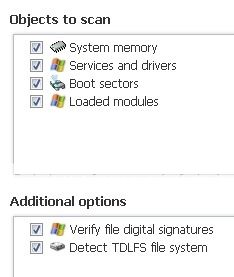
  • After reboot, TDSSKiller will run again. Click Change parameters again and make sure everything is checked.
    clip.jpg
  • click Start scan .
  • If a suspicious object is detected, the default action will be Skip, click on Continue. (If it saids TDL4/TDSS file system, select delete)
  • If malicious objects are found, ensure Cure (default) is selected, then click Continue and Reboot now to finish the cleaning process.

Attach the log after (usually C:\ folder in the form of TDSSKiller.[Version]_[Date]_[Time]_log.txt