
Question "system override" in Windows exploit protection

Please provide comments and solutions that are helpful to the author of this topic.

Tiamati

Level 12
Thread author
Verified
Top Poster
Well-known
Forum Veteran
Nov 8, 2016
585
2,499
1,068
Canada
Is it normal that Windows 10 exploit protection shows a lot of *.exe files with "system override"
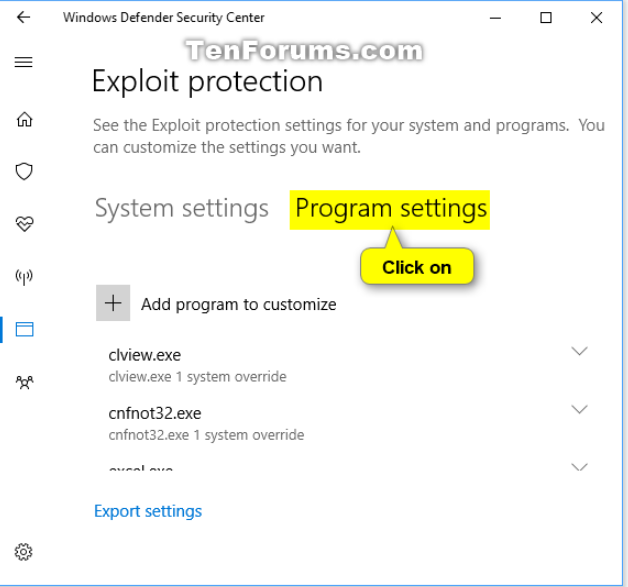
1692147603443.png


I don't remember making any change, but my system shows some files with system override. I tried to set Defender to default settings, but nothing changed. Do you know if this is ok? Can you explain how this work?

Tyvm!
 
  • Like
Reactions: piquiteco
It is not uncommon for Windows 10 exploit protection to show many *.exe files with "system override." This simply means that certain files have been granted additional privileges to bypass exploit protection mechanisms.

This setting is typically enabled automatically for certain system files that require elevated privileges to function properly. It allows these files to override exploit protection rules to ensure system stability and compatibility.

If you have not deliberately made any changes, it is likely that these overrides were applied during system updates or through other Windows processes. Restoring Windows Defender to default settings will not remove these system overrides.

In general, having system overrides for certain files is normal and nothing to worry about. It helps maintain a balance between security and system functionality.
 
It's normal, all windows 11 Installation have them, even fresh installs. Almost all entries just enable one rule (Mandatory ASLR).
Edit: For example if you install microsoft products or Adobe Products similar rules will be created automatically.
 
Last edited by a moderator: