
Question [TemplatePModPaths] in Templates.ini

Help answer the author's question with clear explanations and useful steps.

Mr.X

Level 9
Verified
Well-known
Forum Veteran
I've just installed Sbie+ 1.9.3

How to make these lines work in my red boxes?
Code:
[TemplatePModPaths]
#NormalKeyPath=HKEY_LOCAL_MACHINE\*
#NormalKeyPath=HKEY_CURRENT_USER\software\Microsoft\*
#NormalKeyPath=HKEY_CURRENT_USER\software\WOW6432Node\Microsoft\*
#NormalKeyPath=\REGISTRY\USER\*_Classes\*
WriteKeyPath=\REGISTRY\USER\*
#
NormalFilePath=%SystemRoot%\*
NormalFilePath=%SbieHome%\*
NormalFilePath=%ProgramFiles%\*
NormalFilePath=%ProgramFiles% (x86)\*
# shell & ui
NormalKeyPath=HKEY_CURRENT_USER\SOFTWARE\Microsoft\Windows\CurrentVersion\Themes\Personalize\*
NormalKeyPath=HKEY_CURRENT_USER\SOFTWARE\Microsoft\Windows\CurrentVersion\Explorer\User Shell Folders\*
NormalKeyPath=HKEY_CURRENT_USER\SOFTWARE\Microsoft\Windows\CurrentVersion\Explorer\Shell Folders\*
NormalKeyPath=HKEY_CURRENT_USER\SOFTWARE\Classes
NormalKeyPath=HKEY_CURRENT_USER\SOFTWARE\Microsoft\Windows\CurrentVersion\ApplicationAssociationToasts
NormalKeyPath=HKEY_CURRENT_USER\SOFTWARE\Microsoft\Windows\CurrentVersion\Explorer\Advanced
NormalKeyPath=HKEY_CURRENT_USER\SOFTWARE\Microsoft\Windows\CurrentVersion\Explorer\FileExts
NormalKeyPath=HKEY_CURRENT_USER\SOFTWARE\Microsoft\Windows\CurrentVersion\FileAssociations
NormalKeyPath=HKEY_CURRENT_USER\SOFTWARE\Microsoft\Windows\Shell\Associations


Windows 10 x64 21H2 Education en-US | Sandboxie-Plus > Container in a RAM disk | Only portable apps sitting on a non-system drive
 
Last edited:
A red box shoudl automatically include the TemplatePModPaths so it should be working already, you can inspect using task explorer whcih paths exacly were configured for any given sandboxed process
 
That's exactly what I assumed. In fact, I think I started this thread with the wrong question. See, problem is my red boxes are having issues opening urls in the default browser. Troubleshooting right now to learn what the problem might be...

Windows 10 x64 21H2 Education en-US | Sandboxie-Plus > Container in a RAM disk | Only portable apps sitting on a non-system drive
 
Last edited:
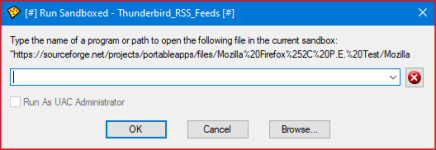
When I'm reading a rss feed and click on link to open in the default browser, I get:
e.png

Windows 10 x64 21H2 Education en-US | Sandboxie-Plus > Container in a RAM disk | Only portable apps sitting on a non-system drive
 
Last edited:
OK, doing trial and error with the lines I saved from my previous config prior to the release 1.9.3, I found the missing line to fix my issue:
Code:
NormalKeyPath=*\UrlAssociations\*

Windows 10 x64 21H2 Education en-US | Sandboxie-Plus > Container in a RAM disk | Only portable apps sitting on a non-system drive
 
Last edited:
Ok if you can find out a full path for *\UrlAssociations\* i can add it to the next build to the TemplatePModPaths section
 
Ok if you can find out a full path for *\UrlAssociations\* i can add it to the next build to the TemplatePModPaths section
Full path "wildcardless" at the beginning, wildcard at the end:

Code:
NormalKeyPath=HKEY_CURRENT_USER\Software\Microsoft\Windows\Shell\Associations\UrlAssociations\*


Windows 10 x64 21H2 Education en-US | Sandboxie-Plus > Container in a RAM disk | Only portable apps sitting on a non-system drive
 

MalwareTips community

Join the discussion

Create a free account to reply to this thread, ask your own questions and get help from the community.

  • Reply and ask questions
  • Get alerts when someone answers
  • Free malware removal help

Join 75,669 members who help each other for free, since 2010.

Create free account
or continue with

Recently browsing

Members and guests who viewed this thread in the last 5 minutes

Back
Top