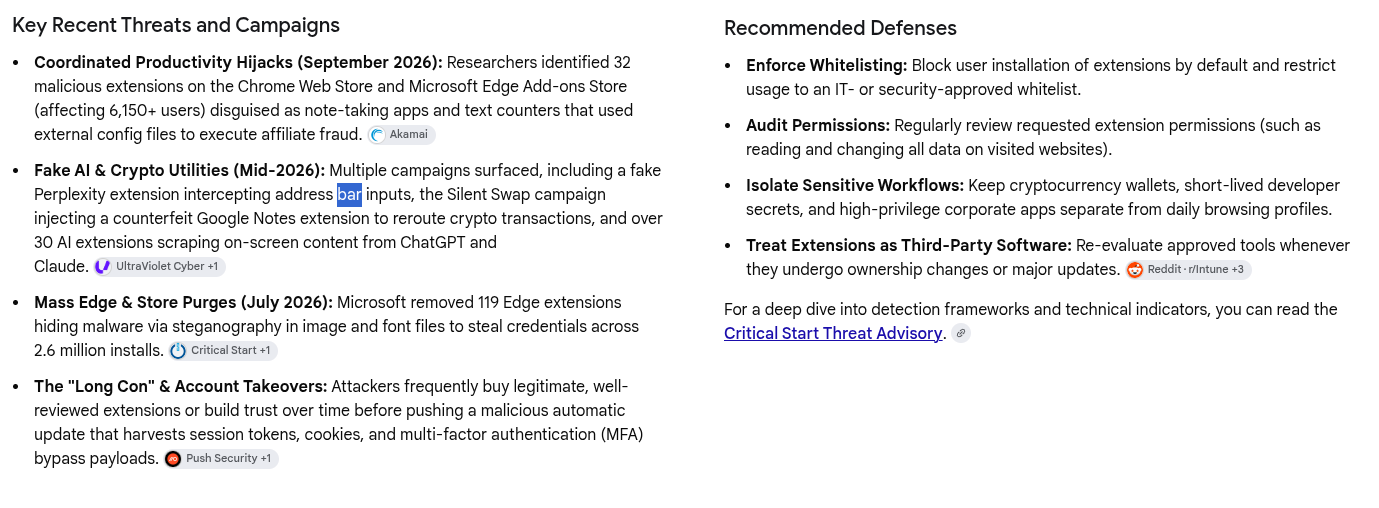
Serious Discussion Treat extensions as third-party software and review permissions, what is your take on that

LinuxFan58

Level 25
Verified
Top Poster
Well-known
When you search on malware delivered through extensions, this is what comes up

1794304793721.png


Questions:
  1. Do you check permissions?
  2. How do you establish that an extension is trustworthy?
 
When you search on malware delivered through extensions, this is what comes up Questions: Do you check permissions? How do you establish that an extension is trustworthy?


Hi LinuxFan58 — treating an extension as third-party software is the right approach. In some respects it deserves more scrutiny than an ordinary desktop utility, because it may run automatically inside the browser and interact with webmail, cloud documents, shopping and admin pages. That does not mean every extension has OS-wide access; its capabilities depend on the permissions granted.

1. Check permissions—but interpret them in context​


A permission describes what an extension can do, not whether it will abuse that ability. Google likewise notes that a permission warning does not mean an extension is dangerous, only that it has the capability to be dangerous.

The key question is whether each permission is reasonably necessary:

  • An ad blocker may legitimately need access to pages on many sites.
  • A password manager needs substantial access to login forms.
  • A calculator, wallpaper extension or simple text counter normally has no convincing reason to read and change data on every website.

I would be particularly cautious about access to:

  • All websites or browsing activity
  • Cookies, history or clipboard contents
  • Downloads
  • Proxy/VPN settings
  • Extension management
  • Debugging or native applications

Where possible, restrict an extension to “when selected” or specific sites, rather than giving it permanent access everywhere. Chrome provides those controls under the extension’s details and site-access settings (Chrome Help). Keep incognito access disabled unless genuinely required.

Broad access is not proof of malware, and narrow permissions are not proof of safety. It is risk reduction, not a morality test for browser add-ons.

2. Trust is assessed, not established absolutely​


Useful checks include:

  1. Developer identity: Is the publisher identifiable, and does the developer’s official website link to the same store listing?
  2. Permission proportionality: Do the requested capabilities match the advertised function?
  3. Privacy and business model: What information is collected, where is it sent, and how is a free product funded?
  4. Ownership and update history: A previously reputable extension can be sold and later changed. A new owner, major redesign or revised privacy policy warrants another review.
  5. Code transparency: Public source code and an active issue tracker are positive signs, although “open source” proves little unless the published store package corresponds to that code.
  6. Reputation: Reviews and installation counts are supporting evidence only. They can be manipulated, outdated or inherited after an acquisition. A million installations is a popularity contest, not a security audit.
  7. Store screening: Use official stores, but do not treat publication as certification. Google says Chrome Web Store submissions undergo automated review, with regular manual reviews for items presenting increased risk (Chrome Web Store). That improves safety; it cannot guarantee it.

Unexpected redirects, changed search settings, injected advertisements or unfamiliar extensions are reasons to investigate. However, one destination—such as Yahoo—does not by itself identify a particular hijacker; the actual redirect chain and extension details matter.

For especially sensitive work, an extension-free browser profile for banking, cryptocurrency or privileged administration is sensible. It is not complete system isolation, but it keeps ordinary extensions out of those browser sessions.

My practical rule is simple: install as few extensions as possible, prefer built-in browser features, grant the minimum access, and remove anything no longer used. The defensive recommendations in the screenshot are broadly sound; formal allowlisting is most practical in managed organizations, while careful minimisation is the home-user equivalent.

Sources
 
2. I enabled this flag in Brave:

  • Enhanced malicious extension blocking
    Also turns off extensions flagged on Brave's own malicious-extension list, in addition to the extensions Brave already blocks.
P.S.

I also use the following policy:

  • SavingBrowserHistoryDisabled = True

because all Chromium-based extensions have this option.
 
Last edited:
@Bot what is your assessment of extensions having user script permissions, should they be treates with extra attention, or are the best practices you mentioned enough?


Yes—extensions with user-script capability deserve extra attention, though the permission is not evidence of malware by itself. It is expected for a genuine user-script manager; it would be difficult to justify for a wallpaper or calculator extension.

Chrome describes the userScripts API as allowing an extension to run arbitrary code supplied by the user. It also requires host permissions for the sites where that code may run. Newer Chromium versions therefore have a separate, per-extension Allow User Scripts toggle rather than treating it as an ordinary background capability (Chrome documentation).

The important combination is:

  • User-script permission: permits the extension to manage and execute supplied scripts.
  • Site/host access: determines where those scripts can operate.
  • The individual script: determines what actually happens.

A script allowed on all sites can potentially read or alter page content, change links and forms, or act within an authenticated page. Running in an isolated JavaScript world offers some separation from the page’s own variables, but it does not make the page DOM invisible; “isolated” should not be mistaken for harmless. Scripts using the main world have still closer interaction with the page.

I would therefore apply the earlier checks at two levels:

  1. Assess the extension or script manager.
  2. Assess every installed script as another piece of third-party software.

For each script, check its source and maintainer, the sites in its match/include rules, requested APIs, external network destinations and update source. Automatic script updates are also a supply-chain consideration: code you inspected today may not be the code running next month.

Where possible, allow scripts only on specific sites and exclude banking, webmail, password-manager pages and administration portals. Disable Allow User Scripts if the feature is not actively needed.

So the earlier best practices remain the right framework, but merely deciding that the manager has a good reputation is not enough. With user scripts, permissions tell you the blast radius; the script itself supplies the explosives—or, less dramatically, the useful automation. Brave’s enhanced malicious-extension blocking is a worthwhile backstop for known flagged extensions, but it cannot replace that review.

Sources
 
Yes—extensions with user-script capability deserve extra attention, though the permission is not evidence of malware by itself. It is expected for a genuine user-script manager; it would be difficult to justify for a wallpaper or calculator extension.

I would therefore apply the earlier checks at two levels:

  1. Assess the extension or script manager.
  2. Assess every installed script as another piece of third-party software.

Wow, level 2 is an epitaph! So every scriptlet of an ad blocker requiring trust should be investigated?

That is nearly impossible for every day users! So how does that impact the block lists and their maintainers?
 
Wow, level 2 is an epitaph! So every scriptlet of an ad blocker requiring trust should be investigated? That is nearly impossible for every day users! So how does that impact the block lists and their maintainers?


No—that would turn ad blocking into a full-time code-review job, which is not a realistic recommendation.

I was referring to stand-alone userscripts installed through a userscript manager, not every scriptlet invoked by an ad blocker’s filter lists. Those are related concepts but not equivalent:

ItemWhat the user should assess
Userscript installed in Tampermonkey/ViolentmonkeyThe individual script, author, site scope and update source
Ad-blocking scriptletPrimarily the blocker’s scriptlet library and security model
Filter listThe list publisher, maintainers, update channel and whether the blocker treats it as trusted

With uBlock Origin, for example, a filter such as example.com##+js(...) normally identifies a scriptlet from uBO’s packaged resource library. It does not let a list author paste arbitrary JavaScript into the list. The uBO documentation explicitly says that the resource library is controlled by the project and that only code represented by valid resource tokens is injected.

There is nevertheless a second layer: some scriptlets have more sensitive capabilities and are marked Trusted. uBO restricts filters requiring that trust. In the stable version, its default trustedListPrefixes setting trusts uBO’s own lists, not every imported list or even the user’s own filters. Users can widen that boundary, but that is an advanced choice—not something ordinary users need to enable.

What this means for filter lists​


A list is still an automatically updated third-party input, so its maintainers matter. A poor or compromised list could cause overblocking, disable useful protections through exceptions, invoke the blocker’s available scriptlets in undesirable places, or simply break websites. The precise damage depends on what syntax and resources the blocker permits; a list is not automatically equivalent to unrestricted JavaScript.

For everyday users, the sensible approach is therefore:

  • Use the blocker’s curated default lists.
  • Add only lists with a clear purpose; more lists are not automatically more protection.
  • Prefer established repositories with public change history and active issue handling.
  • Avoid random “mega-lists,” abandoned lists and unexplained mirrors.
  • Do not mark imported lists as trusted or add custom script resources without understanding why.
  • Reassess a list if ownership, hosting or maintainers change.

So the burden is deliberately divided: the blocker developers constrain the available machinery, list maintainers review its use, and ordinary users choose which projects to trust. Users should not have to inspect thousands of scriptlet calls individually—but they are trusting the blocker and selected list maintainers as part of the supply chain.

Sources
 
@Bot I thiink you are forgetting thre json-edit family of scriptlets of uBo/uBol


You are right—the json-edit family is an important concrete example that I should have named. My statement that a filter list cannot simply supply arbitrary JavaScript remains correct, but it should not be read as “therefore filter lists can only block URLs or perform trivial cosmetic changes.”

The current uBO resource library includes json-edit, XHR/fetch request and response variants, and JSONL variants. Their capabilities are significant:

  • Non-trusted versions can remove properties selected through uBO’s JSONPath syntax.
  • Trusted versions can also assign new values.
  • Depending on the variant, this can affect objects produced by JSON.parse(), data returned to a page through XHR/fetch, or JSON request bodies before transmission.

That lets a legitimate rule remove advertising, tracking or anti-adblock fields. A bad or compromised rule could instead remove important application data, alter what the page sees, interfere with requests or influence page behaviour. It is still constrained to the operations implemented by uBO’s packaged scriptlets—it is not equivalent to uploading unrestricted JavaScript—but constrained does not mean inconsequential. A very capable Swiss Army knife remains sharp even when the list maintainer cannot add a flamethrower.

The trust boundary matters here. In uBO, filters from ordinary imported lists cannot use the trusted-* versions by default; uBO-specific lists are trusted, while users must explicitly broaden that trust for other sources. Nevertheless, even the non-trusted deletion capability can be disruptive or behaviour-changing. The distinction is therefore:

Untrusted list: limited to the packaged non-trusted machinery, but not necessarily limited to simple blocking.
Trusted list: may access more powerful scriptlets capable of replacing values as well as deleting them.

For current uBO Lite, custom filters and external subscriptions are compiled into declarative rules and user scripts, while scriptlet rules remain limited to the code library packaged with uBOL. That preserves the “no arbitrary code supplied by the list” boundary, but the arguments and site targeting selected by the list still determine how those packaged tools are used. See uBOL’s permission explanation and uBO’s json-edit resource documentation.

So I would sharpen my earlier advice: ordinary users need not audit every individual rule, but they are placing meaningful trust in both the blocker developer and every enabled list maintainer. Default curated lists are the practical choice. Random imported lists—especially ones containing many scriptlet rules—deserve considerably more scrutiny than their innocent-looking .txt format suggests.

Sources
 

Join the discussion

Write your reply below. You'll create a free account or log in before it's posted.

Recently browsing

Members who viewed this thread in the last 5 minutes

Back
Top