Advice Request Trend Micro - Question about virus definition updates

Please provide comments and solutions that are helpful to the author of this topic.
Status
Not open for further replies.

amico81

Level 21
Thread author
Verified
Top Poster
Well-known
Forum Veteran
Jan 10, 2017
1,061
5,831
1,968
Germany
I'm a new Trend Micro -User and i don't understand the info about the virus definition updates.

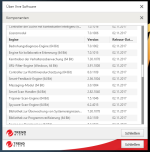
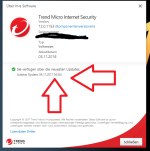
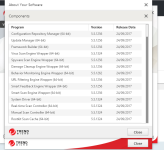
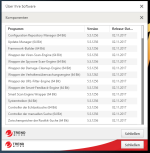
I get the info in the main screen that the program is up to date. But if i take a look at the components, i see

that the single components have another date...at the moment 2 days before.

Is it normal for Trend Micro?
 

Attachments

  • tm1.PNG
    tm1.PNG
    55.3 KB · Views: 886
  • tm2.PNG
    tm2.PNG
    56.9 KB · Views: 994
  • tm3uptodate.PNG
    tm3uptodate.PNG
    62.7 KB · Views: 996
I would say that's normal. I assume that virus definition updates are distinct from engine/component updates. But I'm not totally sure with Trend Micro's. :)

When was Trend Micro's latest program version released? Two days ago? Never mind. It's not. The latest version was released on Sept. 13, 2017.
 
Hello,

from experience with TrendMicro Products / Office Scan / Worry Free and Consumer products - Component Updates really mean part of module updates. (Parts of the Engine) Every component is to be seen as a separate entity. ;)

Signature updates are a separate part from each module and are called pattern files.

Location of pattern files on Trendmicro.com : Trend Micro Software Download Center

Like this if it does not update or it failed you can always manually add them to your system. :D

Best regards
Val.
 
I am used to see the date of signatures updates from other products. so I find it a pity that i cant see it @ Trend Micro.
 
It is normal, it updates :
1526212215520.png

These are the definitions. The other are the core components.
I tested it alot and the detection rate is very very good.
 
  • Like
Reactions: elquenunca
Status
Not open for further replies.