

Like Bing and other search engines, if you use their Search services your search history will be saved, whether you have a registered account or not.
You can switch this feature off, by visiting https://ssl.bing.com/profile/history
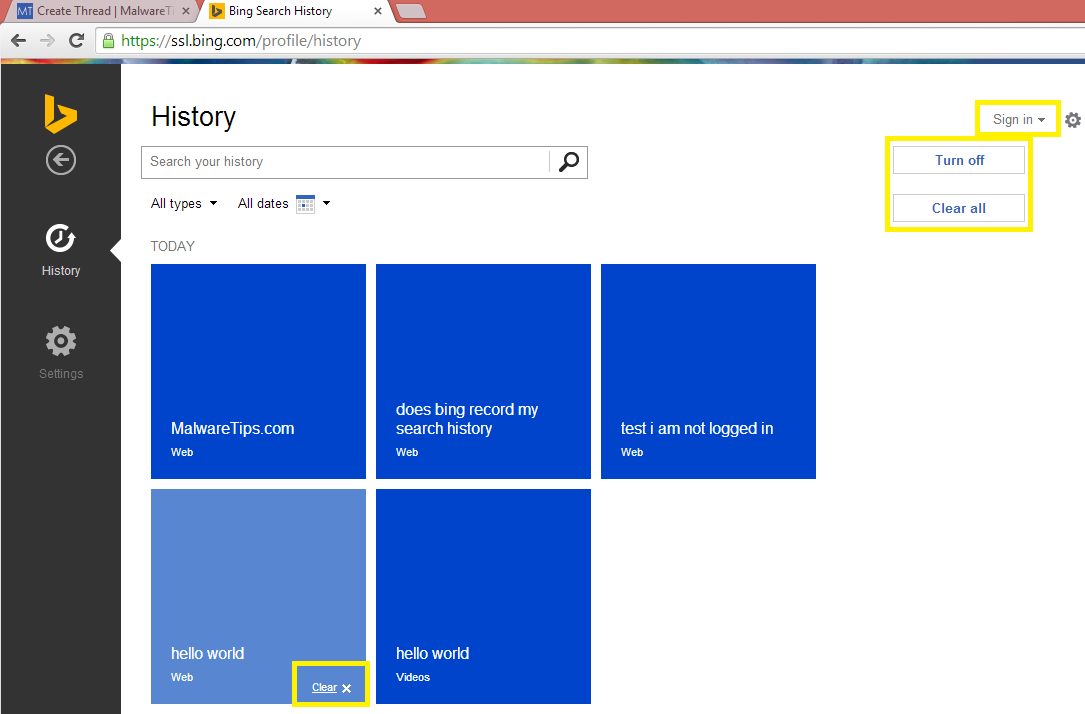
There are TWO options; Turn Off/On and Clear All.
Clear All will remove any related searches made on Bing.com
Turn Off will set Bing to NOT remember your Search History
(Not tested: If you have no MS account and clear the Cookies, you may lose this setting).

Even if you are NOT logged into Bing.com, your Search History may be saved. Luckily, this can be disabled too. Also individual settings to clear certain history too.
Hope this is helpful, whether you use Bing or not.
You can switch this feature off, by visiting https://ssl.bing.com/profile/history
There are TWO options; Turn Off/On and Clear All.
Clear All will remove any related searches made on Bing.com
Turn Off will set Bing to NOT remember your Search History
(Not tested: If you have no MS account and clear the Cookies, you may lose this setting).
Even if you are NOT logged into Bing.com, your Search History may be saved. Luckily, this can be disabled too. Also individual settings to clear certain history too.
Hope this is helpful, whether you use Bing or not.


