
Uninstalr 3.1 released - Now also shows which installed apps automatically start with Windows

jv16

From Macecraft Software
Thread author
Verified
Developer
Well-known
Jan 2, 2023
117
722
178
I’m happy to announce the release of Uninstalr 3.1.

Uninstalr is a free Windows app uninstaller that contains many unique features the standard Windows installed apps listing or other third party uninstallers do not have.

For example, Uninstalr shows from which country your installed apps originate from, in case you want to avoid, say, Ruzzian apps for example. Uninstalr also can do an unattended batch uninstallation of multiple apps better than most other uninstallers. And thirdly, it can also detect portable apps and leftovers from previously partially uninstalled apps.

This is how it looks like:
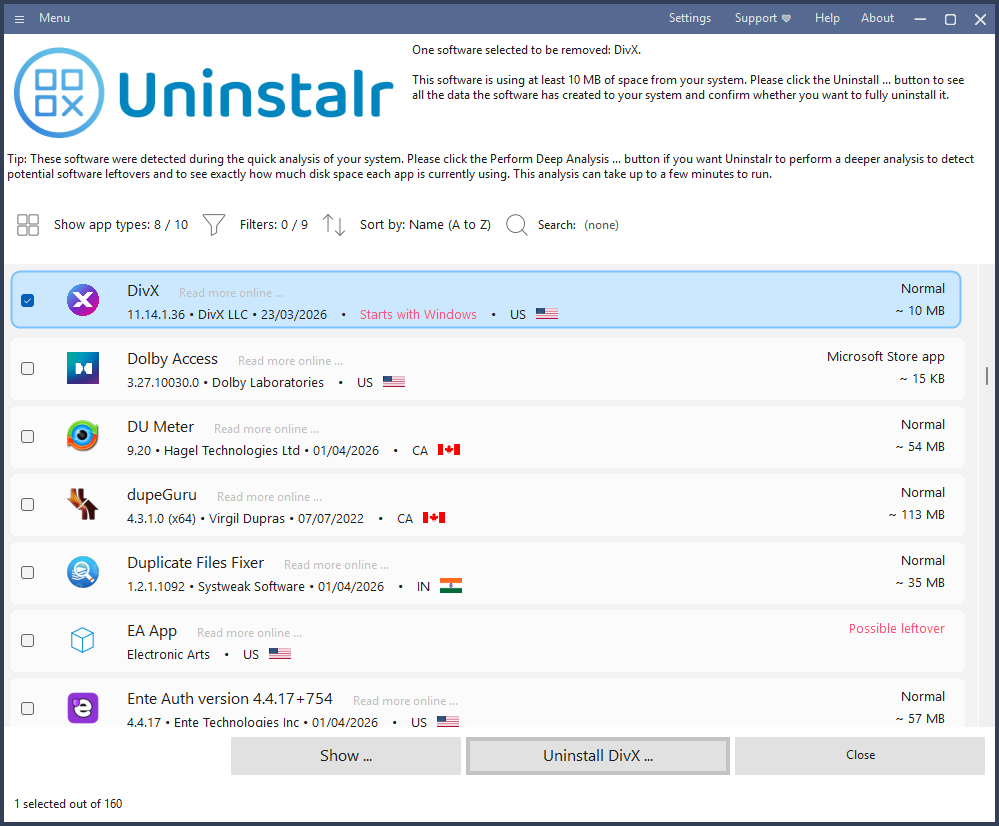
uninstalr_main.png


The key changes in version 3.1:

  • Uninstalr now starts and shows the list of installed apps faster after the initial scan has been completed, and with much smaller memory usage. It takes longer to start than other similar apps, because it does a deeper analysis of the system. But it is now faster.
  • Uninstalr now detects and highlights apps that automatically start with Windows. Automatically starting apps are probably the number one reason slowing your system down. If you want to easily see which ones they are, now you can.
  • Greatly improved the detection of portable apps. Most other uninstallers cannot even detect portable apps at all, Uninstalr now contains multiple dedicated analyses for different types of portable apps.
The full Changelog is available here: Uninstalr Changelog

Uninstalr is freeware, comes with a builtin support for 29 languages and is available as a single file portable version as well as the normal setup version. For more information, please see: Uninstalr

If you like to read more about the new version, I also wrote a blog post about it: Uninstalr 3.1 Released - Uninstalr Blog

I’m the developer. Feel free to ask me anything about it, or if you have any suggestions on how to make it better for your use case, please let me know. Thank you!
 
I’m happy to announce the release of Uninstalr 3.1.

Uninstalr is a free Windows app uninstaller that contains many unique features the standard Windows installed apps listing or other third party uninstallers do not have.

For example, Uninstalr shows from which country your installed apps originate from, in case you want to avoid, say, Ruzzian apps for example. Uninstalr also can do an unattended batch uninstallation of multiple apps better than most other uninstallers. And thirdly, it can also detect portable apps and leftovers from previously partially uninstalled apps.

This is how it looks like:

View attachment 298696

The key changes in version 3.1:

  • Uninstalr now starts and shows the list of installed apps faster after the initial scan has been completed, and with much smaller memory usage. It takes longer to start than other similar apps, because it does a deeper analysis of the system. But it is now faster.
  • Uninstalr now detects and highlights apps that automatically start with Windows. Automatically starting apps are probably the number one reason slowing your system down. If you want to easily see which ones they are, now you can.
  • Greatly improved the detection of portable apps. Most other uninstallers cannot even detect portable apps at all, Uninstalr now contains multiple dedicated analyses for different types of portable apps.
The full Changelog is available here: Uninstalr Changelog

Uninstalr is freeware, comes with a builtin support for 29 languages and is available as a single file portable version as well as the normal setup version. For more information, please see: Uninstalr

If you like to read more about the new version, I also wrote a blog post about it: Uninstalr 3.1 Released - Uninstalr Blog

I’m the developer. Feel free to ask me anything about it, or if you have any suggestions on how to make it better for your use case, please let me know. Thank you!
Thanks for sharing the release details

This looks like a useful update, especially the improvements to portable app detection and the highlighting of apps that auto-start with Windows, since startup bloat is indeed a common contributor to slow boot times and general system sluggishness.

A few general notes for anyone trying new uninstaller tools

  • As with any new or less widely known utility, it's good practice for users to run the installer or portable executable through a multi-engine scanner such as VirusTotal before deployment, particularly since this tool requests deep system access to detect leftovers and portable installations.
  • Batch uninstallation features that remove multiple apps unattended are convenient, but users should always double check the selected list before confirming, since a single misclick in a batch operation can remove more than intended.
  • The "country of origin" detection feature is an interesting differentiator. It would be helpful to know, for clarity, whether this is based on digital signature metadata, publisher certificates, or another method, since this affects how reliable that classification can be.

For members considering testing it

Since Uninstalr performs privileged operations across the registry and file system, testing in a virtual machine or on a non-critical system first is a reasonable precaution, as is the case with any uninstaller that claims to detect and clean orphaned leftovers.

Sharing changelogs and being available to answer questions directly is a good practice that helps the community evaluate the tool on its technical merits.
 
I remember Oh I don't know maybe 30 years ago. Everyone raved about JV16.

Then something happened, and I don't remember what it was, but people were not fond of it as before.

Now this is a horrible thing. I mean it is so hard to get over that stigma, just look at the web, concerning Norton, or McAfee. They still can't get out from under that shadow, and they are good products now.
 
I remember Oh I don't know maybe 30 years ago. Everyone raved about JV16.

Then something happened, and I don't remember what it was, but people were not fond of it as before.

Now this is a horrible thing. I mean it is so hard to get over that stigma, just look at the web, concerning Norton, or McAfee. They still can't get out from under that shadow, and they are good products now.

I believe you might be thinking about something else, because jv16 PowerTools was released 2003, so it didn't even exist 30 years ago. I released RegCleaner (a freeware registry cleaner) in 1998 which got tremendously popular. But I don't recall any major drama about that, either.
 
Last edited:
I believe you might be thinking about something else, because jv16 PowerTools was released 2003, so it didn't even exist 30 years ago. I released RegCleaner (a freeware registry cleaner) in 1998 which got tremendously popular. But I don't recall any major drama about that, either.
Some people were unhappy that there was no free version of JV16 PowerTools, unlike RegCleaner which was free. But of course, you can't please everyone and as a software developer you deserve to earn money from your software.
 
Some people were unhappy that there was no free version of JV16 PowerTools, unlike RegCleaner which was free. But of course, you can't please everyone and as a software developer you deserve to earn money from your software.
I agree people should not have to work for free. That is why I support Macrium, my concern with the other latest free software company is what if they go belly up, and while you used their product, and at the same time had stopped using, and supporting Macrium, we lose both. So I placed my bet on the established better know product which is Macrium, and support their X version with a suscription.