



I’m happy to announce the release of Uninstalr 3.1.
Uninstalr is a free Windows app uninstaller that contains many unique features the standard Windows installed apps listing or other third party uninstallers do not have.
For example, Uninstalr shows from which country your installed apps originate from, in case you want to avoid, say, Ruzzian apps for example. Uninstalr also can do an unattended batch uninstallation of multiple apps better than most other uninstallers. And thirdly, it can also detect portable apps and leftovers from previously partially uninstalled apps.
This is how it looks like:
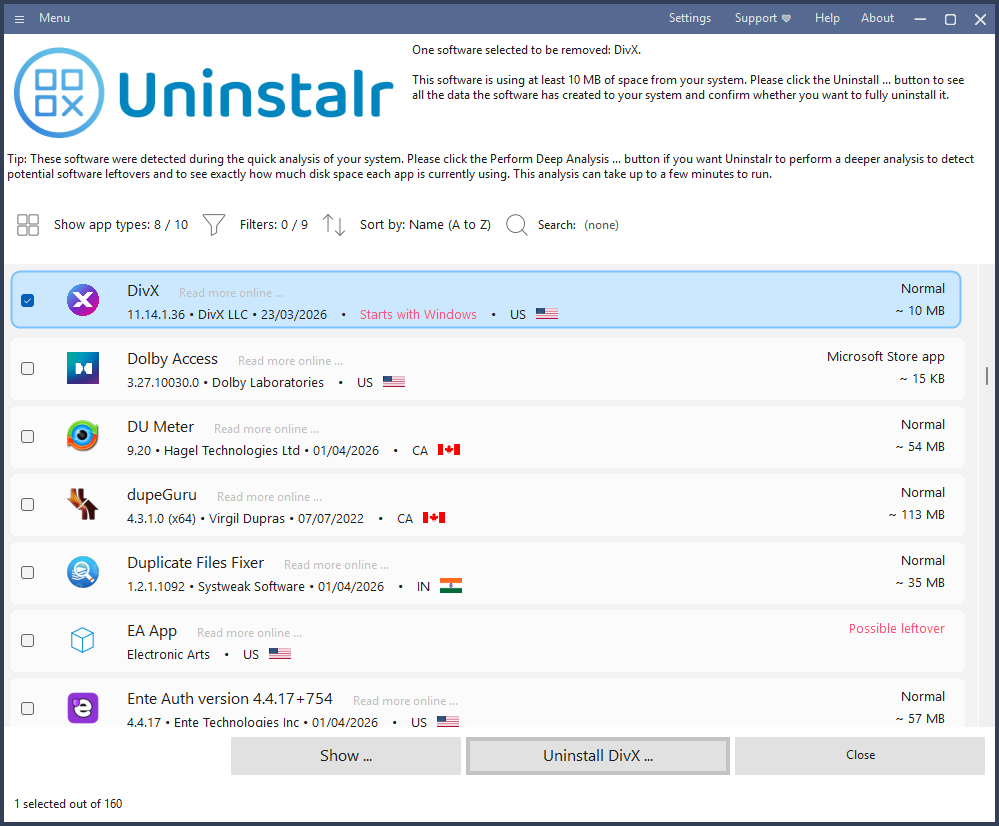
The key changes in version 3.1:
Uninstalr is freeware, comes with a builtin support for 29 languages and is available as a single file portable version as well as the normal setup version. For more information, please see: Uninstalr
If you like to read more about the new version, I also wrote a blog post about it: Uninstalr 3.1 Released - Uninstalr Blog
I’m the developer. Feel free to ask me anything about it, or if you have any suggestions on how to make it better for your use case, please let me know. Thank you!
Uninstalr is a free Windows app uninstaller that contains many unique features the standard Windows installed apps listing or other third party uninstallers do not have.
For example, Uninstalr shows from which country your installed apps originate from, in case you want to avoid, say, Ruzzian apps for example. Uninstalr also can do an unattended batch uninstallation of multiple apps better than most other uninstallers. And thirdly, it can also detect portable apps and leftovers from previously partially uninstalled apps.
This is how it looks like:
The key changes in version 3.1:
- Uninstalr now starts and shows the list of installed apps faster after the initial scan has been completed, and with much smaller memory usage. It takes longer to start than other similar apps, because it does a deeper analysis of the system. But it is now faster.
- Uninstalr now detects and highlights apps that automatically start with Windows. Automatically starting apps are probably the number one reason slowing your system down. If you want to easily see which ones they are, now you can.
- Greatly improved the detection of portable apps. Most other uninstallers cannot even detect portable apps at all, Uninstalr now contains multiple dedicated analyses for different types of portable apps.
Uninstalr is freeware, comes with a builtin support for 29 languages and is available as a single file portable version as well as the normal setup version. For more information, please see: Uninstalr
If you like to read more about the new version, I also wrote a blog post about it: Uninstalr 3.1 Released - Uninstalr Blog
I’m the developer. Feel free to ask me anything about it, or if you have any suggestions on how to make it better for your use case, please let me know. Thank you!


