Question virus scan results meaning and is the data safe?

Please provide comments and solutions that are helpful to the author of this topic.

waens

New Member
Thread author
Jun 7, 2025
2
3
2
Hi!
I‘m so sorry if this question is in the wrong channel, but I couldn’t find anything better fitting.
There’s a old version of a game you can play, but there’s a lot of discussion going on if the data contains spywear/malware etc.
The data is a .zip and located in a mega.nz cloud, because it’s a .zip and I can’t tell what’s in there and I‘m too afraid to download it. I’ve tried to search for some virus scans made by other people and I‘m wondering if anyone could explain the meaning of the detections and if they could be false positive detections?
I’ve also heard that some malware or spywear is so hard to detect that the virus scanners can not find them, so even if the data is clean how can I know if it contains something malicious?
Threat Insights Portal
those are the links of 2 virus scans done, one of the zip, one of the launcher, I tried to scan the zip on my phone but it is too big for every virus scanner so I can’t tell if the first link is the correct data.
the second one is one of the old data, it’s almost one year old and the developers changed the launcher a few times which resulted in less detections, but I couldn’t find those.
I would be more than grateful if anyone could explain those detections and maybe even tell me more about malware that you can’t detect that easy, which can result in selling and stealing your data.
Seeing forward to your responses!
 
Hi there!

The links you provided are reports from VirusTotal and Threat Insights Portal, which are platforms that use multiple antivirus engines to analyze files for potential threats. The detections you see are the potential threats identified by these engines.

False positives can occur when a benign file or behavior is incorrectly identified as malicious. This can be due to the heuristic analysis of the antivirus software, which tries to identify unknown viruses by looking for known malicious behavior.

As for undetectable malware, it's true that some are designed to evade detection by antivirus software. These are often sophisticated threats created by skilled hackers. However, most consumer-grade malware is detectable by good antivirus software.

In your case, if the file has multiple detections across different antivirus engines, it's generally safer to assume that it's potentially harmful. If you're unsure, it's best not to download the file.

Remember, no antivirus software can guarantee 100% detection of all threats, so it's important to also practice safe browsing habits.
 
Download bsso.zip, extract, then upload the exe file inside to VT.
AV engine will face difficulty detecting threats inside password-protected zip files.
Remeber, do not run any files inside the extracted folder.
 
Hi!
I‘m so sorry if this question is in the wrong channel, but I couldn’t find anything better fitting.
There’s a old version of a game you can play, but there’s a lot of discussion going on if the data contains spywear/malware etc.
The data is a .zip and located in a mega.nz cloud, because it’s a .zip and I can’t tell what’s in there and I‘m too afraid to download it. I’ve tried to search for some virus scans made by other people and I‘m wondering if anyone could explain the meaning of the detections and if they could be false positive detections?
I’ve also heard that some malware or spywear is so hard to detect that the virus scanners can not find them, so even if the data is clean how can I know if it contains something malicious?
Threat Insights Portal
those are the links of 2 virus scans done, one of the zip, one of the launcher, I tried to scan the zip on my phone but it is too big for every virus scanner so I can’t tell if the first link is the correct data.
the second one is one of the old data, it’s almost one year old and the developers changed the launcher a few times which resulted in less detections, but I couldn’t find those.
I would be more than grateful if anyone could explain those detections and maybe even tell me more about malware that you can’t detect that easy, which can result in selling and stealing your data.
Seeing forward to your responses!
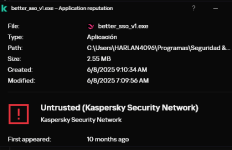
Definitely malicious.

 
Hello,

New malicious software was found in the attached file. Its detection will be included in the next update.

UDS:Trojan.Win64.Agent.a

Thank you for your help.

Best regards, Malware Analyst
1749372777086.png
 
Last edited:
Download bsso.zip, extract, then upload the exe file inside to VT.
AV engine will face difficulty detecting threats inside password-protected zip files.
Remeber, do not run any files inside the extracted folder.
I wouldnt even download files that may be infected to begin with even if i dont execute them, unless you are a security person tbh.
 
Last edited:
I wouldnt even download files that may be infected to begin with if i dont execute them, unless you are a security person tbh.
I am not a malware tester; but I download samples from Malwarebazaar, unpack, scan, and then delete, without running any, and never get infected.
You cannot get infected by downloading file without execution.
 
I am not a malware tester; but I download samples from Malwarebazaar, unpack, scan, and then delete, without running any, and never get infected.
You cannot get infected by downloading file without execution.
Although you say you are not a malware tester, performing a static analysis of malware is not very useful, especially if the malware is old and already known to most AVs, starting with MD. The interesting thing is to see new 0-day malware in action, as this is how you test the efficiency of an AV that acts based on behavior and heuristic analysis. If your AV did not detect malware in that file, it does not mean that it is infected; it will only be detected when it is executed. The way you do it, analyzing statically, does not always lead to an accurate conclusion. Hackers and criminals always use various obfuscation techniques to make it difficult for security analysts to analyze their malware before spreading it on the web. The malware you download is already known to AVs. Although it is new, it is not actually 0-day malware. The website is public, and anyone can download samples from it, which are even indexed by search engines. It is worth noting that you are using K and still have KSN active, I suppose. K's strength also comes from the cloud, from KSN, and then from application control, which only kicks in when the malware is executed. Have you watched @Shadowra's test videos? If you have, then you know how it works. He scans the folder with hundreds of samples, and any malware detected by the AV is eliminated right away. Shadowra then tests the remaining samples one by one to see if the AV will detect them when they are executed. It wouldn't make much sense for it to execute the malware if the AV already detected it during the scan. The interesting thing is the execution, which is when the malware comes into action, so that the AV will show whether it is capable of blocking the execution of the malware and whether the AV will prevent it from infecting the computer. This would be a correct approach to testing malware, even though you say you are not a malware tester.
 
Although you say you are not a malware tester, performing a static analysis of malware is not very useful, especially if the malware is old and already known to most AVs, starting with MD. The interesting thing is to see new 0-day malware in action, as this is how you test the efficiency of an AV that acts based on behavior and heuristic analysis. If your AV did not detect malware in that file, it does not mean that it is infected; it will only be detected when it is executed. The way you do it, analyzing statically, does not always lead to an accurate conclusion. Hackers and criminals always use various obfuscation techniques to make it difficult for security analysts to analyze their malware before spreading it on the web. The malware you download is already known to AVs. Although it is new, it is not actually 0-day malware. The website is public, and anyone can download samples from it, which are even indexed by search engines. It is worth noting that you are using K and still have KSN active, I suppose. K's strength also comes from the cloud, from KSN, and then from application control, which only kicks in when the malware is executed. Have you watched @Shadowra's test videos? If you have, then you know how it works. He scans the folder with hundreds of samples, and any malware detected by the AV is eliminated right away. Shadowra then tests the remaining samples one by one to see if the AV will detect them when they are executed. It wouldn't make much sense for it to execute the malware if the AV already detected it during the scan. The interesting thing is the execution, which is when the malware comes into action, so that the AV will show whether it is capable of blocking the execution of the malware and whether the AV will prevent it from infecting the computer. This would be a correct approach to testing malware, even though you say you are not a malware tester.
I download samples not older than 24 hours age.
I use scripts mainly; executables are usually detected by AV; even Panda can detect them 😁
I care more about pre-execution detection; if detected on-execution or post-exectution, it is over; I will reinstall Windows.

I know on-exectuion or post-execution detection is still important to avoid data encryption or exfiltration, but I have no valuable data to jeopardize; the photos of flowers and movies and be redownloaded; even social media accounts can be recreated; I have very few friends on FB 🥲


When you have nothing to lose, you do not care.
 
I download samples not older than 24 hours age.
I use scripts mainly; executables are usually detected by AV; even Panda can detect them 😁
I care more about pre-execution detection; if detected on-execution or post-exectution, it is over; I will reinstall Windows.
I understand, yes, but a backup image of the system would be welcome, as you could restore your system more quickly. :)
I know on-exectuion or post-execution detection is still important to avoid data encryption or exfiltration, but I have no valuable data to jeopardize; the photos of flowers and movies and be redownloaded; even social media accounts can be recreated; I have very few friends on FB 🥲
Data exfiltration is more concerning. My computer doesn't have much important stuff on it either, just my PM. I also don't use internet banking or make purchases on my computer or laptop. Only on my cell phone. I have two smartphones, one for me to use on the street and another for banking apps. ;)
When you have nothing to lose, you do not care.
You think about it, sometimes you do, don't forget your router, if it gets compromised, you may not even notice. Although it's clear that you are quite cautious. (y)
 
backup image of the system would be welcome, as you could restore your system more quickly
Reinstall of Windows is faster for me; I have just few programs to reinstall.
just my PM
What PM stands for?
I have two smartphones, one for me to use on the street and another for banking apps
Smart move; but which is more vulnerable? Android or Windows?
Although it's clear that you are quite cautious
Cautious, but lazy
Awesome Goal GIF by JustViral
 
Last edited: