Setup PCPC setup
just installed the new version no problems


Open MalwareTips from your Home Screen or desktop. Follow discussions, find answers and pick up where you left off.
If you cannot find an install option, update your browser or use its bookmark option to keep MalwareTips close.
After installation, open the app and sign in. Enable push notifications in Preferences if you want alerts. On iPhone and iPad, push requires a Home Screen web app and iOS or iPadOS 16.4 or later.
Sign in to manage notificationsInstallation is optional. Your notification settings stay under your control.
 Thread starter
danb
Thread starter
danb

What is the main advantage of having voodooshield running beside for e.g. Eset Smart Security Premium? Isnt that too much? I don't know much on this but thought to ask. Thankkyou.Installed over v7.42 without issue. Pro licence automatically carried across.

Might depend on what settings you are using on ESET.What is the main advantage of having voodooshield running beside for e.g. Eset Smart Security Premium? Isnt that too much? I don't know much on this but thought to ask. Thankkyou.
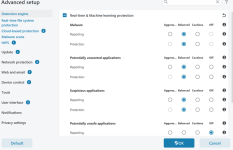
No, I never mess with default settings in the ESET in regard to HIPS. The same about increases the number of alerts ESET gives me. I think you mean the Advanced Settings>Detection engine section where you can set ESET to alerts?interactive HIPS
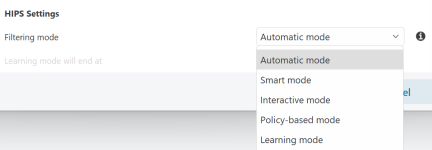

Automatic.Which mode, do you personally recommend?
[KB3755] Host-based Intrusion Prevention System (HIPS) – Advanced setup (15.x–16.x)HIPS settings
Filtering Mode – There are five filtering modes you can select to change how HIPS filters system activity. The modes are:
Automatic mode: This is the default setting. In this mode, operations are enabled except for those that are blocked by pre-defined rules that protect your system.
Smart mode: You will only receive notifications about suspicious system events.
Interactive mode: Only recommended for advanced users. You will receive notifications that prompt you to Allow or Deny each operation detected. Select the Create rule check box to save your response as the rule for a given operation. Selecting the check box next to Temporarily remember this action for this process will cause the action (Allow/Deny) to be remembered until HIPS rules are changed, the HIPS filtering mode is changed, the HIPS module is updated or your computer is restarted.
Policy-based mode: Operations not defined by a rule are blocked. See HIPS – Advanced setup for more details.
Learning mode: In Learning mode, operations are enabled and a rule is created after each operation. Rules created in this mode can be viewed in the Rule editor, but their priority is lower than the priority of rules created manually or rules used in Automatic mode.
Selecting Learning mode enables the Learning mode will end at option. When the specific time period passes, the Learning mode is disabled. The maximum time period is 14 days. After this time period has passed, you will be prompted to edit the rules and select a different filtering mode.
Automatic or Smart.No, I never mess with default settings in the ESET in regard to HIPS. The same about increases the number of alerts ESET gives me. I think you mean the Advanced Settings>Detection engine section where you can set ESET to alerts?
View attachment 274573
The section above you mean ? Also, HIPS setting is set to Automatic mode. Which mode, do you personally recommend? Thank you.
View attachment 274574
Yes, I also noticed that Automatic mode is best for me, then I will install voodooshield.
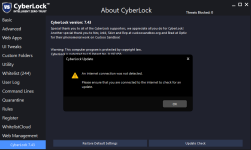
It will always be VoodooShield here, AFAIC.Maybe @danb can make a new sub-forum for CyberLock. How about it?


Members who viewed this thread in the last 5 minutes

