Watched icon on Post

Status
Not open for further replies.

hakah

Level 7
Thread author
Verified
Well-known
Forum Veteran
Apr 19, 2014
303
465
569
69
Hong Kong
Can any Staff Member explain the purpose of putting Watched Icon on post in Forum? Does it mean Special Attention required or anything else? On what circumstances is that Icon to be given to the Post?
Thanks!
 
Are you referring to the spectacles?
upload_2014-5-19_11-41-23.png


After replying to any thread, it automatically gets added to your Watched Threads. You'll get notifications for when a new reply is made, you're tagged in a post, or thread has been re-located.

You can remove threads from your Watch list, by opening the thread and clicking on Unwatch Thread.
upload_2014-5-19_11-44-53.png


You'll get a confirmation pop-up like so:
upload_2014-5-19_11-45-27.png
 
No, I mean my post of Malware found on System Registry Files on Malware Removal Assistance!
 
Now there is no need to make a screenshot for it. This post is already given a watch icon with spectacles shown next to the title of the Post. I don't know what is the meaning of this icon. Can any Staff Member explain it? Thanks!
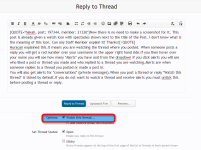
 
Now there is no need to make a screenshot for it. This post is already given a watch icon with spectacles shown next to the title of the Post. I don't know what is the meaning of this icon. Can any Staff Member explain it? Thanks!
Huracan explained this.It means you are watching the thread where you posted. When someone posts a reply you will get a red number over your username in the upper right hand side.If you then hover over your name you will see how many "Alerts" you have and from the dropdown if you click alerts you will see who liked a post or thread you made and who replied to a thread you are watching.Alerts are when someone replies to a thread you posted or made a post in.
You will also get alerts for "conversations" (private messages).When you post a thread or reply "Watch this thread" is ticked by default.If you do not want to watch a thread and receive alerts you must untick this before posting a thread or reply.

Ashampoo_Snap_2014.05.19_07h11m32s_001_.png

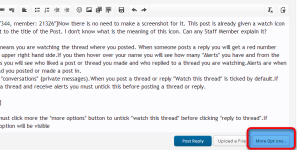
when posting a reply you must click more the "more options" button to untick "watch this thread" before clicking "reply to thread".

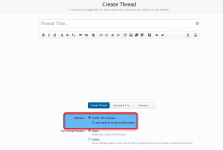
Ashampoo_Snap_2014.05.19_07h18m51s_002_.png

If posting a new thread this option will be visible from the start.Which you can untick before clicking "Create Thread"

Ashampoo_Snap_2014.05.19_07h20m35s_003_.png

As Huracan explained with a screenshot,you can unwatch a thread at any time by clicking "unwatch thread" in the upper right hand corner above the first post of any thread.
 
Last edited:
Huracan / exterminator20 : Thanks for the detailed explanation and illustration on suject matter !
 
  • Like
Reactions: Exterminator
Status
Not open for further replies.