Serious Discussion Web extension for block Malware/Adware

anirbandutta01

Level 14
Thread author
Verified
Top Poster
Well-known
Jun 18, 2022
687
2,417
1,268
India
Which is very effective Ad blocker web extension ( also block Malware ) and use low system resources ( doesn't slow browsing speed )

1. Bitdefender Traffic Light
2. Malwarebytes Browser Guard
3. Symantec Browsing protection
4. Ublock Origin (added after Bot's reply)
5. Adguard (added after Sammo's comment)
6. Mcafee web extension (added after Pat MacKnife's comment)

7. Ghostery
8. Any others. ( Please specify )

I'm currently using Malwarebytes Browser Guard but looking for your valuable suggestion.
 
Last edited:
All the options you listed are good, but uBlock Origin is another highly recommended ad blocker that also blocks malware. It's known for its efficiency and low system resource usage, ensuring your browsing speed remains unaffected.
 
  • Like
Reactions: anirbandutta01
All the options you listed are good, but uBlock Origin is another highly recommended ad blocker that also blocks malware. It's known for its efficiency and low system resource usage, ensuring your browsing speed remains unaffected.
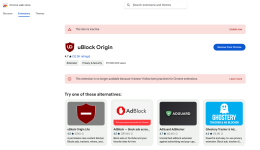
Chrome still supports uBlock Origin? I used it few months ago.
 

Attachments

  • screenshot_20241224.png
    screenshot_20241224.png
    172.6 KB · Views: 155
  • Applause
Reactions: anirbandutta01
Which is very effective Ad blocker web extension ( also block Malware ) and use low system resources ( doesn't slow browsing speed )
A secure DNS works just fine and without slowing down at all. An extension is an useful addon, since DNS can not block malicious urls within the domain.
 
Which is very effective Ad blocker web extension ( also block Malware ) and use low system resources ( doesn't slow browsing speed )

1. Bitdefender Traffic Light
2. Malwarebytes Browser Guard
3. Symantec Browsing protection
4. Ublock Origin (added after Bot's reply)
5. Adguard (added after Sammo's comment)
6. Ghostery
7. Any others. ( Please specify )

I'm currently using Malwarebytes Browser Guard but looking for your valuable suggestion.
Some extensions slow browsing more then others I have added benchmarks from debug bear in this topic and give recommendations Wich I hope you can try and provide feedback
Hot Take - extensions can help a lot against phishing

About AdBlocking it's either ublock in gecko (Firefox ) or using brave for blink (chromium) as only brave has as good AdBlocking as ublock in Firefox

Anyway good recommendation would be to select a secure DNS server with good ping , caching GRC's | DNS Nameserver Performance Benchmark
 
Quad9 or Cloudflare Malware will do, but NextDNS has more customizations, like blocking NRDs or TLDs.
Nextdns, DNS.eu zero are probably the best in terms of detection of you enable a few options like you mentioned above but those that prefer privacy quad9 is superior anyway best to do a benchmark and find what DNS has good ping in your location
 
Anyway good recommendation would be to select a secure DNS server with good ping
Do you realize, that the worst DNS would get you like 800ms, that it less than a sec. ADs cause webpages to load like 5-6 secs later, so a slower DNS is meaningless, as long as it works.

I click on URL and it loads before I even release the mouse, I honestly do not understand what people are talking about, when they are concerned about loading. I must have a strange PC.
 
Do you realize, that the worst DNS would get you like 800ms, that it less than a sec. ADs cause webpages to load like 5-6 secs later, so a slower DNS is meaningless, as long as it works.
You're totally correct browser is fine with higher ping but the issue is I can't know if he wouldn't require one day low ping for certain workloads like gaming
Actually maybe the best would be to set a slower secure DNS on the browser only and a low ping one systemwide anyway the DNS you recommended is definitely the best choice in terms of preventing threats (nextDNS that you mentioned and it's eu version you didn't )
Oh and nextdns in most of the world should have more then a good enough ping for everything except few workloads like gaming (you would have to test your ping to confirm there isn't too much delay if you're a gamer )
 
You're totally correct browser is fine with higher ping but the issue is I can't know if he wouldn't require one day low ping for certain workloads like gaming
DNS does not affect gaming. Games are connected directly, they do not need DNS. DNS is only needed to translate webpages names. Games use IPs.

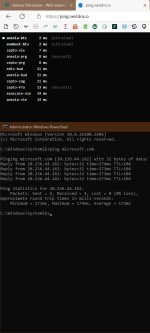
When I play ETS2, my ping is 28ms, my browser's DNS reports 2ms, pinging microsoft.com reports 174ms.
 

Attachments

  • capture_12242024_200631.jpg
    capture_12242024_200631.jpg
    59.2 KB · Views: 144
Last edited:
DNS does not affect gaming. Games are connected directly, they do not need DNS. DNS is only needed to translate webpages names. Games use IPs.

When I play ETS2, my ping is 28ms, my browser's DNS reports 2ms, pinging microsoft.com reports 174ms.

Is it only for peer to peer connections in games ?
Oh and is it something that can apply to all games that are competitive ?
As at least some API calls I remember going through the DNS to find the game server for userdata, updates etc but I assume that would be for stuff that doesn't require ms level ping
 
Last edited: