


Troubleshoot Weird Icons In Windows 7
- Thread starter killpointik
- Start date
You are using an out of date browser. It may not display this or other websites correctly.
You should upgrade or use an alternative browser.
You should upgrade or use an alternative browser.
Y
yigido
Please copy the strings below and paste them into a textpad and save it as .bat file..not .txt
Then run it..
Then run it..
Code:
@echo off
cls
echo Explorer islemi kisayol simgesi veritabanini silmek icin kapatilmasi gerekiyor.
echo Devam etmeden önce tüm islemlerinizi kapatin!
pause
taskkill /IM explorer.exe /F
echo Kisayol simgesi veritabanini siliniyor...
If exist %userprofile%\AppData\Local\IconCache.db goto delID
echo Bir önceki kisayol simgesi veritabani bulunamadi...yeni bir veritabani olusturuluyor
goto :main

:delID
cd /d %userprofile%\AppData\Local
del IconCache.db /a
pause
echo Kisayol simgesi veritabani basariyla silindi.
goto main

:main
echo Kisayol simgesi veritabani olusturulmasi icin Windows'un yeniden baslatilmasi gerekiyor.
echo Yeniden baslat? (Y/N):
set /p choice=
If %choice% == y goto end
echo Yeniden baslatma iptal edildi...bu pencereyi kapatin
explorer.exe

:end
shutdown /r /t 0
exit
Upvote
0

Have you run the bat file by right click and "run as admin..." ?iygido: w/help tried it and nothing....only restarted PC
DardiM: what is solution?
- Manually go here :
%userprofile%\AppData\Local\
show hidden files => IconCache.db
- Maybe under windows 7 it is localized on another path, will check
Try here :
%localappdata%\
http://www.sevenforums.com/tutorials/49819-icon-cache-rebuild.html
Last edited:
Upvote
0
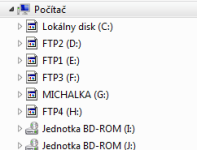
First off, do you even have drives FTP1, FTP2, FTP3, FTP4 on your system ?
Screenshot is showing 6 partitions\drives plus 2 DVD drives.
That's what i'm saying.
Upvote
0
DardiM: yes right click like ADMIN: w/success
hjblx: yes its my HDDs on my machine
it was my mount drives for iso music: nothing problem now. unmounted

i didnt nothing with partitions on my drives.....ill go try rebuild with this link
http://www.sevenforums.com/tutorials/49819-icon-cache-rebuild.html
hjblx: yes its my HDDs on my machine
it was my mount drives for iso music: nothing problem now. unmounted
i didnt nothing with partitions on my drives.....ill go try rebuild with this link
http://www.sevenforums.com/tutorials/49819-icon-cache-rebuild.html
Upvote
0
blah: didnt work
OPTION 1: didnt work
OPTION 2: this command not valid :
found AVG_REMOVER ..... very strange folder :O cant uninstall it ... damn it...wtf is it?
OPTION 1: didnt work
OPTION 2: this command not valid :
- DEL "%localappdata%\Microsoft\Windows\Explorer\iconcache*" /A
found AVG_REMOVER ..... very strange folder :O cant uninstall it ... damn it...wtf is it?
Upvote
0
DardiM: yes right click like ADMIN: w/success
hjblx: yes its my HDDs on my machine
it was my mount drives for iso music: nothing problem now. unmounted
i didnt nothing with partitions on my drives.....ill go try rebuild with this link
http://www.sevenforums.com/tutorials/49819-icon-cache-rebuild.html
Try to do it "manually" :
- Go to %userprofile%\AppData\Local
example : C:\Users\DardiM\AppData\Local
- Disable hiding files :
"Open File Explorer > Folder Options > Views to show Hidden System Files"
=> IconCache.db file must appears
- Delete IconCache.db manually
- Restart your PC
If the above method doesn't work :
(1) Kill Explorer.exe process :
- Click Start button
- Hold down Ctrl+Shift & Right click
- Click on empty area in the Start Menu
- Click “Exit Explorer”.
- Hold down Ctrl+Shift & Right click
- Click on empty area in the Start Menu
- Click “Exit Explorer”.
(2) Open the command prompt window :
- Type each of the following and after every command, hit the Enter button:
(3) If the both precedent methods don't solve your issue :cd /d %userprofile%\AppData\Local
attrib –h IconCache.db
del IconCache.db
start explorer
attrib –h IconCache.db
del IconCache.db
start explorer
=> That are the only methods I know for windows 7 
=> your problem doesn't rely with IconCache.db
=> your problem doesn't rely with IconCache.db
Last edited:
Upvote
0

For simplicity you could download and run this tool - it just automates the process you're trying to do manually.
Download: http://www.thewindowsclub.com/rebuild-corrupt-icon-cache-with-icon-cache-rebuilder
Icon Cache Rebuilder
With Icon Cache Rebuilder, a user simply loads the application and once the IconCache.db is located will allow a user to click Rebuild to remove the file and restart Explorer.
Once this is done will allow a user to Restart their computer and once logged on the IconCache.db will be re-created.
Download: http://www.thewindowsclub.com/rebuild-corrupt-icon-cache-with-icon-cache-rebuilder
Upvote
0
PARANOID MOD ONFor simplicity you could download and run this tool - it just automates the process you're trying to do manually.
Download: http://www.thewindowsclub.com/rebuild-corrupt-icon-cache-with-icon-cache-rebuilder
"simplicity" <=> "security".
"it just automates the process you're trying to do manually" => are you 100 % sure it doesn't do other stuff ?
(I verified the scripts on above posts)
(When something so basic can be done with clear parts, it is always most secure, from my point of view)
PARANOID MOD OFF "it just automates the process you're trying to do manually" => are you 100 % sure it doesn't do other stuff ?
(I verified the scripts on above posts)
(When something so basic can be done with clear parts, it is always most secure, from my point of view)
Last edited:
Upvote
0

@BoraMurdarDon't worry @DardiM , program is completely safe to use. It just automates commands packed in a GUI
Code:cd /d %userprofile%\AppData\Local attrib –h IconCache.db del IconCache.db start explorer
I expected it to be safe but how can you be sure it's actually executing those commands?
Upvote
0

System Explorer / History Tab@BoraMurdar
I expected it to be safe but how can you be sure it's actually executing those commands?
Upvote
0
You may also like...
-
 How to Add Icons to the Context Menu Items in Windows 11
- Started by lokamoka820
- Replies: 9
-

-
 Troubleshoot Hi, does anyone knows which component might make this noise ?
- Started by fedor345
- Replies: 7
-
 Serious Discussion WordPress site acting weird again, possible malware? need 2nd opinion
- Started by biteanderer
- Replies: 2
-
 Expired SwifDoo Christmas 2025: PDF 18 Software Programs for free
- Started by Brownie2019
- Replies: 1