
Going backwards?I was all Edge.
Moved to all Chrome.
Considering all Firefox.


Open MalwareTips from your Home Screen or desktop. Follow discussions, find answers and pick up where you left off.
If you cannot find an install option, update your browser or use its bookmark option to keep MalwareTips close.
After installation, open the app and sign in. Enable push notifications in Preferences if you want alerts. On iPhone and iPad, push requires a Home Screen web app and iOS or iPadOS 16.4 or later.
Sign in to manage notificationsInstallation is optional. Your notification settings stay under your control.
Going backwards?I was all Edge.
Moved to all Chrome.
Considering all Firefox.

Haha, I did start on Firefox.Going backwards?


Take a look at DuckDuckGo Privacy Browser (beta) for Mac. Whilst it doesn’t allow 3rd party extensions, it does block more than stock Safari 16 with it’s own anti-tracker and mild ad-blocker. Duck Player also acts as an Ad-blocker for YouTube videos, however I’ve only managed to make it work on desktop.Safari on all devices. If Windows, I would use Edge which is built-in.
Although it's not defined as a privacy browser, Edge for Android has integrated Adblock Plus to allow users to block Ads.… Firefox is more privacy oriented and offers adblock extensions on Android
Currently, DuckDuckGo Privacy Browser on iOS lacks a killer feature found only on the Android version, that is, App Tracking Protection. Install and forget privacy.DuckDuckGo everywhere IGo...
Yes, I tried Edge on Android, but there was something which irritated me, I forgot what, so I am installing it now to giive it a go again.Although it's not defined as a privacy browser, Edge for Android has integrated Adblock Plus to allow users to block Ads..
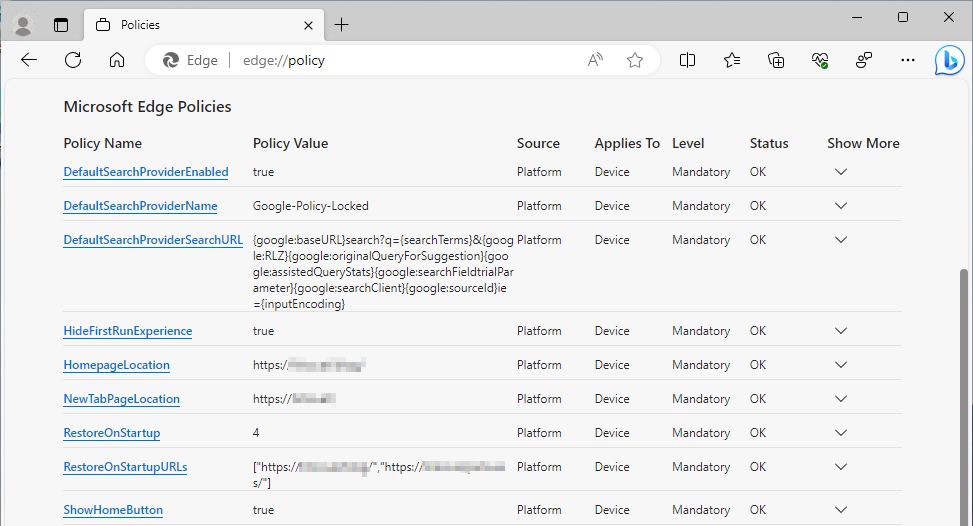
Very interesting. Is there a guide?Edge all the way, because of sync of bookmarks, passwords and MSA. While Edge is not the most convenient browser, it is the most secure, it has to be, because enterprise clients are MS's top priority. Privacy is also on par for legal reasons, though many invasive features are enabled by default (like the subtle Bing), they can be disabled via policies, which stick after an update.
Funny you mention it right now. Many enterprise customers got upset after MS has decided to ignore hard coded policies. I guess MS is capable screwing up even impossible.Very interesting. Is there a guide?
The upshot is that Edge 116 is pushing consumer-level features at our users, when we have specifically set those to be disabled in group policy. I hope it's obvious that this is unacceptable, and untrustworthy behaviour.
We've already rolled back to 115.0.1901.203, and need to know - actually quite urgently - whether this is a bug or an intended change. As I said previously, if it IS an intended change
a) Microsoft ought to reconsider ASAP, and at the very least provide an option to override it; and
b) Microsoft ought to be honest about it, because the current assumption in chatter across the Internet at the moment is that it's a bug.
Edge has no future in our organisation if it's going to start ignoring specified policy in order to push consumer features at our users.
 techcommunity.microsoft.com
Members who viewed this thread in the last 5 minutes


