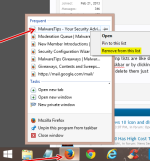
Jump lists are like shortcuts to the files you use from within a program.You can access them by right clicking(arrow) on a program button on the taskbar or by clicking the arrow next to a program name on the start menu.Then click the item you want to go to.
To delete them just right click(arrow) the files and click delete from the dropdown menu.
Unless you right click these items you wouldnt even know they are there otherwise just right click the items and click delete if you want to remove items from them
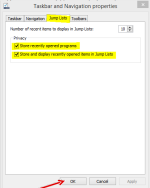
To disable jumplists
Right click the taskbar
Select jumplists
untick the highlighted boxes and click ok
Windows jumplist is an existed feature way back on WIndows 7 which very useful for direct opening of certain documents, files within the software you use. No need to use any CMD batch in order to clear them, just manual do it
Don't know what OS your running but Windows 7 and 8 take a different approach to turning this off. I myself have Windows 7 turn off start menu history and jump list.
Some applications give you the option to disable Jumplists, for example CCleaner. If you use IE and a pin a favourite site (that supports JL), it will appear in the taskbar upon right-clicking the icon.
@dragonmew What do you not like about it? Jumplists have been present since Windows 7, circa 2009.
Most notably they provide quick functions of a website or program, ex: CCleaner.






 WinRAR path traversal flaw still exploited by numerous hackers

