Serious Discussion What is Android System Intelligence? How It Works

Ink

Administrator
Verified
Here is a summary of the current web page context:
  • Android System Intelligence: An app that enables smart and personalized features on your Android phone using machine learning and Private Compute Core.
  • Smart features: App predictions, Assistant Voice Typing, Live Caption, Live Translate, Notification Management, Now Playing, Screen Attention, Smart Autorotate, Smart Text Selection, etc.
  • How to disable or clear data: Go to Settings > Apps > Android System Intelligence > Disable or Clear data. You can also change app permissions from the same menu.
  • Why you don’t want to disable it: Disabling Android System Intelligence will remove many of the smart and personalized features from your Android phone and degrade your user experience.
Read more: Here's How Android System Intelligence Really Works - SlashGear
 
Is it a part of Google app? Cause I don't have it, and I don't remember uninstalling/disabling it. I have disabled Google app though.
PS android 11
No, they are system apps.

Play Store links:

Contrary to popular belief, Android System Intelligence isn’t a new app per se. It’s a rebrand of an older app called “Device Personalization Services,” which was launched with Android 9 Pie back in August 2018.
 
No, they are system apps.

Play Store links:


For both links I am getting this "We're sorry, the requested URL was not found on this server." I tried searching for it on play store couldn't find it. Maybe something to do with Realme UI.
 
For both links I am getting this "We're sorry, the requested URL was not found on this server." I tried searching for it on play store couldn't find it. Maybe something to do with Realme UI.
Both links work if you're logged into a Google account when viewing from the browser, or open in Play Store.

Download file to PC or high-end Mobile to find if your device is supported.
 
Last edited:
Both links work if you're logged into a Google account when viewing from the browser, or open in Play Store.

Download file to PC or high-end Mobile to find if your device is supported.
Link didn't work on desktop Edge browser for me, even though I was logged in.
Then I tried it on mobile, play store opens the link but page says "Your device isn't compatible with this version of app", even though my device is in the list of compatible devices. Weird.
 
Is it a part of Google app? Cause I don't have it, and I don't remember uninstalling/disabling it. I have disabled Google app though.
PS android 11
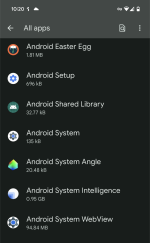
On your phone, swipe down, go into settings, apps, see all apps, tap the hamburger menu in the top right hand corner select "show system" scroll Down through apps and look for it.

1000001912.png
 

MalwareTips community

Join the discussion. It's free.

Create an account to reply to this thread, ask your own questions and get help from people who know security.

  • Reply and ask your own questions
  • Get an alert when someone answers
  • Free malware removal help from volunteers

Free account

Antimalware18 stonjean633 Jonny Quest oldschool 75,723 members since 2010
or
Have malware? Get free help

Recently browsing

Members and guests who viewed this thread in the last 5 minutes

Back
Top