

What's you Favorite Live Boot CD?

Status
Not open for further replies.

donetao

Level 20
Thread author
Verified
Sep 7, 2014
968
1,272
1,866
87
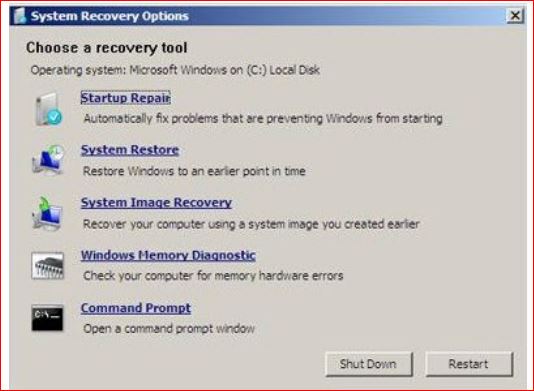
Hi My favorite is the W7 system repair CD. There are ton's of them. What's your favorite and how do you use it?? I use this to get to the W7 rescue features. I can't get to them on my model through safe mode, so i have to have this CD. Also good to have if your system won't boot.

http://windows.microsoft.com/en-us/windows7/create-a-system-repair-disc
Capture48.JPG
 
Hi @BoraMurdar Thanks for your reply! Hiren's Boot CD is a excellent live CD. I have one, but I have never used it.
What tool in Hiren's is your favorite??
 
  • Like
Reactions: nissimezra
Hi @BoraMurdar Thanks for your reply! Hiren's Boot CD is a excellent live CD. I have one, but I have never used it.
What tool in Hiren's is your favorite??
Well, data recovery tools and Macrium Reflect PE Edition, in it. Mostly :)
Also, some of boot fixing tools. It's really great.
 
  • Like
Reactions: donetao
Thanks! @BoraMurdar ;) Just a little off topic. There are live CD's to test your RAM,HD and live CD's to remove malware if your PC is so badly infected that it won't boot. Many of these are in Hiren's and ultimate Boot CD. If you can't boot with a live CD, you're probably in deep dudu:D:D
Why would you want to start replacing hardware to trouble shoot when you have all these great
software free programs to trouble shoot your PC??
 
Last edited:
  • Like
Reactions: nissimezra
Thanks!;) Just a little off topic. There are live CD's to test your RAM,HD and live CD's to remove malware if your PC is so badly infected that it won't boot. Many of these are in Hiren's and ultimate Boot CD. If you can't boot with a live CD, you're probably in deep dudu:D:D
Why would you want to start replacing hardware to trouble shoot when you have all these great
software free programs to trouble shoot your PC??
Because sometimes it can be simple. Like say your computer will not boot up, you open the case, find you have two sticks of ram, pull one, it still will not boot, replace that one pull the other, now the system boots, it was a bad ram stick..
 
Because sometimes it can be simple. Like say your computer will not boot up, you open the case, find you have two sticks of ram, pull one, it still will not boot, replace that one pull the other, now the system boots, it was a bad ram stick..
Hi @illumination Great tip.I have actually done that. The stick was not bad and I guess just reseating it fixed the problem.
I do like my Memtest86+ live CD however,even though W7 has that feature in the system repair CD;)
Good tip! Thanks!
 
  • Like
Reactions: nissimezra
2r70vif.jpg

I have quite a few but I often use ERD Win 7 and Hiren's 10
 
Status
Not open for further replies.

You may also like...