F
ForgottenSeer 97327
I am happy for you, but is a nonsense test. I am using a Windows PC, so will never encounter OPPO or Xiami OEM trackers


Open MalwareTips from your Home Screen or desktop. Follow discussions, find answers and pick up where you left off.
If you cannot find an install option, update your browser or use its bookmark option to keep MalwareTips close.
After installation, open the app and sign in. Enable push notifications in Preferences if you want alerts. On iPhone and iPad, push requires a Home Screen web app and iOS or iPadOS 16.4 or later.
Sign in to manage notificationsInstallation is optional. Your notification settings stay under your control.
I am happy for you, but is a nonsense test. I am using a Windows PC, so will never encounter OPPO or Xiami OEM trackers

Yes, the rule has a limited effect, what I've already said in my post Need Advice - What are your Site Permission settings for daily browsing?@Jan Willy
I had read you globally blocked eval with *##+js(noeval). I liked the idea, but tested it on the link you provided, but it does not block the new Function () which more or less does the same (so it is a half baked solution). I think youare probabl better of disabling JIT or using Netcraft. When you use Edge and have enabled super duper mode, you also disable JIT . This also reduces memory not writeable area and prevents most of the EVAL string attacks. Your post was also the reason I was playing with the new Netcraft extension (because it blocks some client side XSS vulnerabilities).
I also noticed that some websites like Megekko.nl use eval command. I guess they use server side strings to make some parts of their website dynamic (which is okay because everything get compiled when page loads, also when JIT is enabled).

 chrome.google.com

https://raw.githubusercontent.com/yokoffing/filterlists/main/privacy_essentials.txtCould share the link of that privacy essential filter?

You're welcome. I also added LennyFox's video list and reinserted Fanboys Enhanced Tracking lists. With my current setup most of the filters in Fanboys list are actually used (vs using it with default lists where many of its filters are superfluous). So now my setup is as follows:@oldschool, tkanks for the links, I noticed yokoffing is also including LennyFox ubo medium mode.
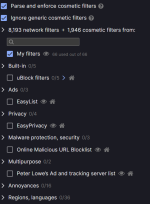
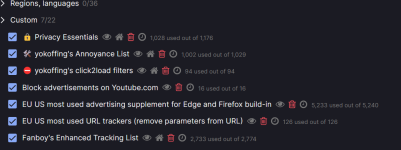
I was playing with the new Netcraft extension (because it blocks some client side XSS vulnerabilities).
 See thread : Using two profiles for more privacy and security.
It isn't, but Fanboy's "Problematic Sites" (a subset of the latter) still is: https://www.fanboy.co.nz/fanboy-problematic-sites.txt
Do you mean Easy Privacy or uBO's Privacy list?think uBO's built-in privacy list covers what the ETL did, but it uses different techniques like neutering tracking scripts to prevent breakage, so a direct
The uBO Privacy list, but also the uBO Unbreak list when used with e.g. the Peter Lowe 'Ad and tracking server' list. Many anti-adblock fixes are also in the uBO Ads list.Do you mean Easy Privacy or uBO's Privacy list?
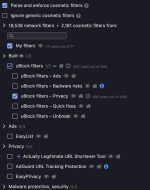
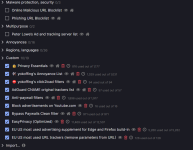
It's a pity that AG's ads filter isn't optimally tuned to uBO. It shows 23 errors. Perhaps not essential, but it could be the impact of the increased complexity of filter rules.The issue is that ABP-standard format is just not that advanced as uBO or AG advanced functionality.

The Online Malicious URL Blocklist has an update frequency of 1 day:Considering uBO default update cycle those malware protection lists are pretty useless, I would endorse @oldschool's advice to dump them.
From the uBO Wiki:! Title: Online Malicious URL Blocklist ! Updated: 2023-08-20T00:08:16Z ! Expires: 1 day (update frequency) ! Homepage: https://gitlab.com/malware-filter/urlhaus-filter ! License: https://gitlab.com/malware-filter/urlhaus-filter#license ! Source: https://urlhaus.abuse.ch/api
Auto-update filter lists
If you check this option, uBO will automatically update the currently selected filter lists at regular intervals. This option is checked by default (recommended).
Filter lists are automatically updated according to:
- the Expires directive if present in the filter list header (After 1.47.3b5, uBO supports an update period below 1-day).
- or the
updateAfterattribute if found in the list entry inassets.json- or every 5 days by default.
Indeed, I saw that and won't use it for that reason. Your suggestion to use Easy List & Privacy minified instead seems like a good one.It's a pity that AG's ads filter isn't optimally tuned to uBO. It shows 23 errors. Perhaps not essential, but it could be the impact of the increased complexity of filter rules.
This is beside the point that testing shows them to be pretty ineffective.
Members who viewed this thread in the last 5 minutes


