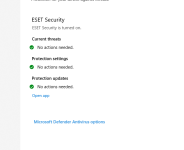
Advice Request Why does windows defender come up if I am using ESET

Please provide comments and solutions that are helpful to the author of this topic.

RemarkableTyrannosaurus

Level 1
Thread author
Jul 31, 2022
29
59
29
Salt Lake City
Windows Defender pops up randomly and asks me If I want to allow access when I am playing games or really doing anything. eg. https://i.stack.imgur.com/DHcZh.png
If I have ESET enabled should I have all other windows defender settings disabled?
 

Attachments

  • firewall.png
    firewall.png
    220.6 KB · Views: 314
  • eset 2. png.png
    eset 2. png.png
    46.6 KB · Views: 321
  • Like
Reactions: micasayyo
Hello :)

NEVER use 2 antivirus ! These antiviruses can enter in conflict and cause rather important dysfunction.

If you use Eset, Windows Defender should be disabled. If it is not the case, I recommend you to use DefenderControl available here (deactivate the protections in real time, the file is detected as harmful, but is not malicious, I reassure you)

 
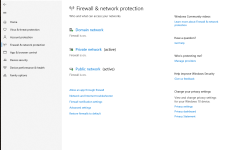
Microsoft Defender is turned off, but Microsoft Firewall is only still enabled.

My guess is Either Microsoft Windows failed to complete the action or detection of third-party security solution or ESET didn't ping Windows to disable it. You can manually disable it without any software needed to download. Simply click on each network domain, private and public. And tick the firewall component for that network off. Once all three are disabled, the firewall is disabled.

However, only do this if your security solution has an in-built firewall module, or you install a third-party firewall, otherwise leave Windows Firewall enabled.
 
Looks like you use ESET NOD32 and in that case it's normal since NOD32 doesn't have firewall. Windows Firewall blocks and notifies you only when an app's inbound connection is blocked. If your game needs it then allow it, otherwise ignore since it should notify only once.
 

You may also like...