Windows 10 Bug? Bluetooth is ON after restart.

Status
Not open for further replies.

Venustus

Level 59
Thread author
Verified
Honorary Member
Top Poster
Content Creator
Well-known
Forum Veteran
Dec 30, 2012
4,806
1
37,077
5,788
58
Sydney
This issue has been going on for some time!
I am using the latest stable release of Win10x64,no insider builds!
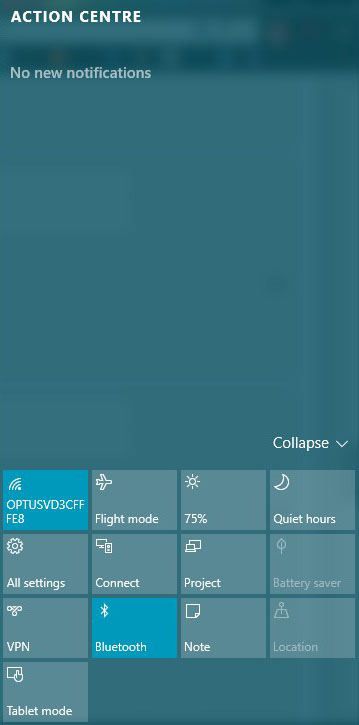
Basically everytime I reboot/restart,the operating system,I have a "bluetooth" notofication in Action Centre!
The thing is that there is NO bluetooth on that particular laptop(Asus)
When I hit the button to toggle it,it does nothing!!
Not a deal breaker, but if someone has any further information!?
Thanks:)

1.jpg
 
I have exactly the same. A bluetooth light but no bluetooth, not sure why but when i click it sometimes the light goes out and sometimes not.
Weird issue indeed!
For me it does nothing at all,
The only way to make it "disappear" from Action Centre is to replace with another notification from Quick Actions:confused::confused:
nkivpkksrjtsleslebgckhhicyxeytcdqqxgdkuhoyqmdkuvjmlqzzwhixoicittevzjbbvgucsqzsklmutdytrezyhhcmkapodj
 
Well an OS sometimes undergone weird operation likely 'once in a blue moon' where the problem is considered very minor and solve on restarts.

Never encounter that problem, likely you forgot something to turn off hence refresh after restart.
 
  • Like
Reactions: Venustus
Check your privacy settings, some apps may have control over your Bluetooth for them to work.

Open Settings > Privacy > Radios > Turn Off.

upload_2016-2-4_20-52-41.png
 
  • Like
Reactions: Venustus
Check your privacy settings, some apps may have control over your Bluetooth for them to work.

Open Settings > Privacy > Radios > Turn Off.

View attachment 82780
Thanks for the tip,but I already have this off!!
wejtmtigvknwqheglmqovfpkcxmtpzhtfjwfvqassznaunozcwglqomqoyqohprwduqhlylulyvvrpqojnqstwcrwgrwamldirwa

I'm baffled as to why this is happening on every reboot/restart:confused::mad:

Cheers!!:)
 
Status
Not open for further replies.