


Kardo Kristal
From Crystal Security
Thread author
Verified
Top Poster
Developer
Well-known
Forum Veteran
- Jul 12, 2014
- 1,143
- 7,365
- 2,079
- 33
Hello,
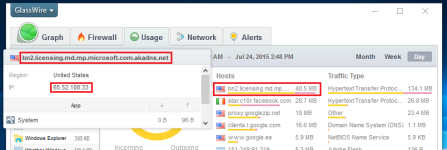
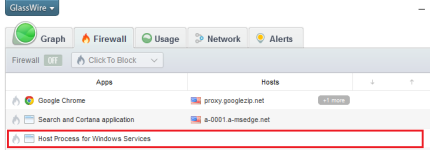
When I installed Windows 10 then I noticed that something is using network bandwidth all the time (even when browser is closed). I installed Glasswire and saw that Host Process is downloading 1 MB within 4 minutes. It means that it downloads 15 MB in 1 hour.
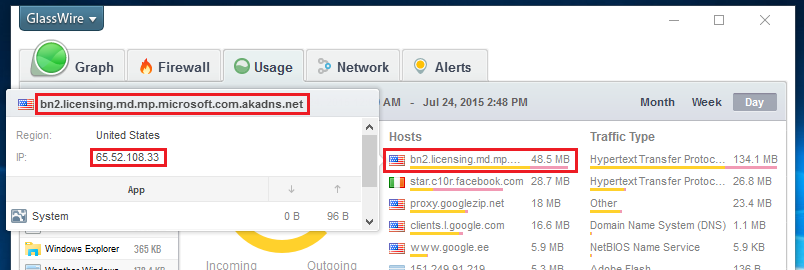
I tried to block connection with Glasswire but then I saw that it blocks connection in browser too.
Finally I tried to block only outbound (outgoing) connection with Windows built-in Firewall and it worked.
1. Open Windows Firewall with Advanced Security
2. Create new outbound rule
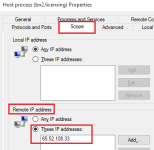
3. Now you must enter the following IP (remote): 65.52.108.33
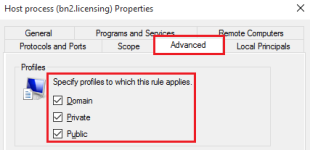
4. Check: Domain, Private and Public
5. Set action to: Block connection

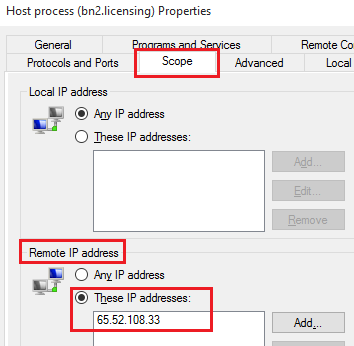
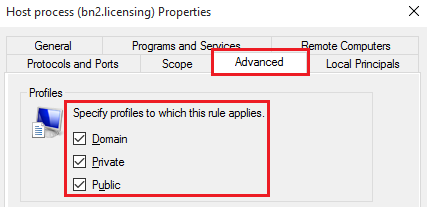
...When it is done then you can see under Glasswire that connection is terminated.
It stopped that connection and I can still use browser. This method can save few gigabytes (bandwith) per month.
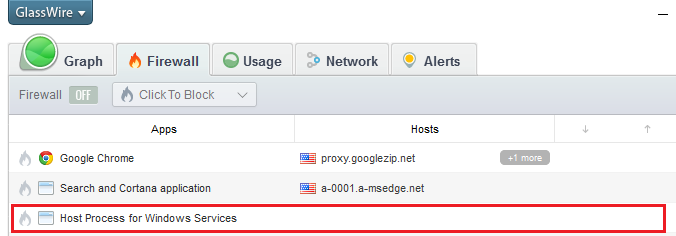
I guess that this IP checks some kind of license every few seconds (when you look at host name in Glasswire).
I hope it helps to save your network bandwidth.
Regards,
Kardo
When I installed Windows 10 then I noticed that something is using network bandwidth all the time (even when browser is closed). I installed Glasswire and saw that Host Process is downloading 1 MB within 4 minutes. It means that it downloads 15 MB in 1 hour.
I tried to block connection with Glasswire but then I saw that it blocks connection in browser too.
Finally I tried to block only outbound (outgoing) connection with Windows built-in Firewall and it worked.
1. Open Windows Firewall with Advanced Security
2. Create new outbound rule
3. Now you must enter the following IP (remote): 65.52.108.33
4. Check: Domain, Private and Public
5. Set action to: Block connection
...When it is done then you can see under Glasswire that connection is terminated.
It stopped that connection and I can still use browser. This method can save few gigabytes (bandwith) per month.
I guess that this IP checks some kind of license every few seconds (when you look at host name in Glasswire).
I hope it helps to save your network bandwidth.
Regards,
Kardo
Attachments

Last edited:


