

Advice Request Worst Thing About Windows 8 (According to Me)

Please provide comments and solutions that are helpful to the author of this topic.
Status
Not open for further replies.

Shadow King

Level 1
Thread author
Jun 11, 2012
114
10
31
New Delhi
The Thing I Hate In Windows 8
I Think Many People Hate this things In Windows 8​
  1. to dock any app we need minimum resolution above 1024x600
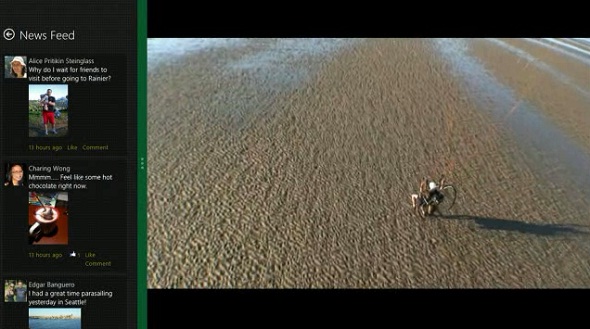
windows_8_2_apps_at_once.jpg


And If We Increase Our Resolution It Will Led To the Destruction Of Start Menu
 
Haven't tried it so I can't say I dislike anything. Plus "hate" is a strong word, I would prefer to use dislike.
 
Hardware that meet this minimum screen resolution requirement should not have this issue. However, this requirement does not stop you from using Windows 8 itself.

This should become less common as more manufacturers use higher resolution displays (unless it's low budget-ware) or you're using old hardware.
 
If the picture that you have shown is the problem, there is a registry tweak to "force snap" on resolutions below 1366 x 768.
 
As I've using Windows 8 for a couple months from now, no attempts to make a multitasking since desktop is only the primary used at all in my case.
 
The worst to me is now i can't have access anymore to the "non-plug and play driver" in device manager...on Win7 i could delete them manually and increase my system response by cleaning manually the leftovers there.
 
What I hate the most is no close or minimize on the Apps in Metro.
How hard would it be to add close and minimize buttons?

From what I read the Apps suppose to close on their own after awhile when you go back to your Desktop.

I have tested this and mine never close, my laptop can go to sleep for two days and I start it and guess what all of the Apps are still running in my Task Manager. I have to remember to launch Task Manager and manually kill them or they use up my battery.

I'm on the default Acer laptop Power settings.

Thanks.:D
 
you can close them by selecting them by: go to desktop > mouse-overing the top left corner of the screen > right click > close

can you?

unless i misunderstand your issue.
 
Umbra Corp. said:
you can close them by selecting them by: go to desktop > mouse-overing the top left corner of the screen > right click > close

can you?

unless i misunderstand your issue.

How do you right click on touch screen? I usually disable my touch pad while playing Game Apps because it messes me up while playing if I accidentally touch it. Of coarse I can manually plug in my external mouse and right click but that is an inconvenience to have to do each time.

If I leave the external mouse plugged in all the time, it gets moved and still messes me up while playing Game Apps especially with Angry Birds.

Thanks.:D
 
Littlebits said:
How do you right click on touch screen? I usually disable my touch pad while playing Game Apps because it messes me up while playing if I accidentally touch it. Of coarse I can manually plug in my external mouse and right click but that is an inconvenience to have to do each time.

i don't know for touch screen since i don't have one, but on my tablet, you do a long press (around 2-3sec) and release ; it simulate the right click.
 
Best part solution for metro apps to be closed is alt+f4, I've didn't shocked why no close button from the first place.

And metro apps could not guaranteed for multitasking well as our vital applications were installed om desktop.
 
2 Methods for Mouse & Keyboard users to Close Metro Apps:
- From Top of App, Click-n-Drag bottom on the screen (including the Desktop = returns you back to the Start Screen)
- Alt+F4
- Frozen apps can be terminated from the Task Manager

Some Apps go into a Suspended state, I suppose it's for the ones that ask you to run the background (Mail, Skype etc). Possibly?

Littlebits said:
What I hate the most is no close or minimize on the Apps in Metro.
How hard would it be to add close and minimize buttons?

From what I read the Apps suppose to close on their own after awhile when you go back to your Desktop.
 
Click-n-Drag bottom on the screen doesn't close the Apps, they will continue to run in the background until killed with Task Manager. I'm talking about all Apps like Windows Store, all games, X-box Live, etc.

I haven't tried Alt+F4 but from what I have read, it just moves the Apps to the background as well.

I'm not on my Windows 8 laptop now, so I will have to check later and report back.

It appears all Apps on my laptop require manual killing with Task Manger.

What was Microsoft thinking? adding a close button must have been to simple for them. :s

Thanks.:D
 
If you watch from the Task Manager they take a few seconds to actually close, but they do close - at least for me.

http://windows.microsoft.com/en-gb/windows-8/how-close-app
http://winsupersite.com/windows-8/windows-8-tip-shut-down-metro-style-apps

If you want, you could try ModernMix (30-day trial, not free).
http://rohitshaw.com/2013/03/29/run-metro-apps-on-windows-8-desktop-add-minimize-maximize-and-close-buttons/
 
Also if you wanted a classic multi tasking from metro applications then Atl+tab is still exist which for me a better choice.

Except when dealing full screen games.
 
Worst thing about Windows 8.1 that caused me to downgrade to 8. Bugs and more bugs, bugs that existed in the preview and still do, bugs that many others are experiencing like me.

Microsoft need to get up on that and fix it in an update or two before I go back. Will be keeping my eye out on the update catalog.
 
MrXidus said:
Worst thing about Windows 8.1 that caused me to downgrade to 8. Bugs and more bugs, bugs that existed in the preview and still do, bugs that many others are experiencing like me.

Microsoft need to get up on that and fix it in an update or two before I go back. Will be keeping my eye out on the update catalog.

Thanks for the heads up, was going to take this for a drive in next day or two, but think i will wait now...
 
illumination said:
MrXidus said:
Worst thing about Windows 8.1 that caused me to downgrade to 8. Bugs and more bugs, bugs that existed in the preview and still do, bugs that many others are experiencing like me.

Microsoft need to get up on that and fix it in an update or two before I go back. Will be keeping my eye out on the update catalog.

Thanks for the heads up, was going to take this for a drive in next day or two, but think i will wait now...

Actually don't get me wrong, you might install it and experience no issues - atleast not right away, but my bugs are visible right after a fresh install and even more after extended use and nothing to do with drivers, the same either way. It's very odd.
I recommend you go ahead and give 8.1 a go and see how you like it, you might be lucky as it seems to be varied person to person. Cheers.
 
Status
Not open for further replies.

You may also like...