Solved www.startgo123.com - Browser Hijacker

terrya86

Level 1
Thread author
Verified
Aug 17, 2016
28
7
27
39
UK
After downloading something called NOX, an Android system emulator, I had MPC search taking over my browser - now it's startgo123 and I've run various malware/adware/virus scanners that picked it up, said it removed them, but didn't. I've also changed my homepage within firefox, but to no avail.

If we're able to fix it, could you please tell me the best way to protect my computer?

Doing my nut in!

Thanks.
 

Attachments

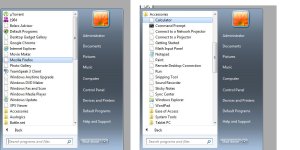
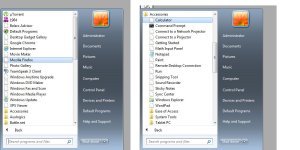
Managed to get rid of it but look what's happened to some of my files; they're missing.
 

Attachments

  • missing.jpg
    missing.jpg
    110.2 KB · Views: 12
Hello,


FRST.gif
Scan with Farbar Recovery Scan Tool

Please re-run Farbar Recovery Scan Tool to give me a fresh look at your system.
  • Right-click on
    FRST.gif
    icon and select
    RunAsAdmin.jpg
    Run as Administrator to start the tool.
    (XP users click run after receipt of Windows Security Warning - Open File).
  • Make sure that Addition.txt option is checked.

    2873ryc.png

  • Press Scan button and wait.
  • The tool will produce two logfiles on your desktop: FRST.txt and Addition.txt.
Please attach report into your next reply.
 
FRST.gif
Fix with Farbar Recovery Scan Tool

icon_exclaim.gif
This fix was created for this user for use on that particular machine.
icon_exclaim.gif

icon_exclaim.gif
Running it on another one may cause damage and render the system unstable.
icon_exclaim.gif

Download attached fixlist.txt file and save it to the Desktop:

Both files, FRST and fixlist.txt have to be in the same location or the fix will not work!

  • Right-click on
    FRST.gif
    icon and select
    RunAsAdmin.jpg
    Run as Administrator to start the tool.
    (XP users click run after receipt of Windows Security Warning - Open File).
  • Press the Fix button just once and wait.
  • If for some reason the tool needs a restart, please make sure you let the system restart normally. After that let the tool complete its run.
  • When finishes FRST will generate a log on the Desktop, called Fixlog.txt.

Please attach it to your reply.
 

Attachments

Please see above post with the 'missing' file attachment, post #3.

Don't appear to have any issues with startgo anymore, but since removing it previously, it ruined the shortcuts in my start button.
 
1) Scratch that; still taken over my chrome.
2) See attached file named
 

Attachments

  • chrome.jpg
    chrome.jpg
    113.4 KB · Views: 9
  • missing.jpg
    missing.jpg
    110.2 KB · Views: 9
We did not touch anything related to your icons. What happens if you try to open Calculator for example?


FRST.gif
Scan with Farbar Recovery Scan Tool

Please re-run Farbar Recovery Scan Tool to give me a fresh look at your system.
  • Right-click on
    FRST.gif
    icon and select
    RunAsAdmin.jpg
    Run as Administrator to start the tool.
    (XP users click run after receipt of Windows Security Warning - Open File).
  • Make sure that Addition.txt option is checked.

    2873ryc.png

  • Press Scan button and wait.
  • The tool will produce two logfiles on your desktop: FRST.txt and Addition.txt.
Please attach report into your next reply.
 
FRST.gif
Fix with Farbar Recovery Scan Tool

icon_exclaim.gif
This fix was created for this user for use on that particular machine.
icon_exclaim.gif

icon_exclaim.gif
Running it on another one may cause damage and render the system unstable.
icon_exclaim.gif

Download attached fixlist.txt file and save it to the Desktop:

Both files, FRST and fixlist.txt have to be in the same location or the fix will not work!

  • Right-click on
    FRST.gif
    icon and select
    RunAsAdmin.jpg
    Run as Administrator to start the tool.
    (XP users click run after receipt of Windows Security Warning - Open File).
  • Press the Fix button just once and wait.
  • If for some reason the tool needs a restart, please make sure you let the system restart normally. After that let the tool complete its run.
  • When finishes FRST will generate a log on the Desktop, called Fixlog.txt.

Please attach it to your reply.


cmd_icon.png
Check Disk
  • Press the
    WindowsKey.png
    on your keyboard. Type cmd and right click >> Run as Administrator.
  • Copy/Enter the command below and press Enter:
  • Code:
    chkdsk C: /r
  • You should get a message to schedule Check Disk at next system restart. Please type Y and press Enter.
  • All you should do now is to restart your PC and let the Check Disk process finish uninterrupted.
Check Disk report:
  • Press the
    WindowsKey.png
    + R on your keyboard at the same time. Type eventvwr and click OK.
  • In the left panel, expand Windows Logs and then click on Application.
  • Now, on the right side, click on Filter Current Log.
  • Under Event Sources, check only Wininit and click OK.
  • Now you'll be presented with one or multiple Wininit logs.
  • Click on an entry corresponding to the date and time of the disk check.
  • On the top main menu, click Action > Copy > Copy Details as Text.
  • Paste the contents into your next reply.

2eyjdoj.png
System File Checker
  • Press the
    WindowsKey.png
    on your keyboard. Type cmd and right click >> Run as Administrator.
  • Copy/Enter the command below and press Enter:
  • Code:
    sfc /scannow
  • Windows will begin with system scan.
  • When done, please reboot your system.
System File Checker report:
  • Press
    WindowsKey.png
    + R on your keyboard at the same time. Type cmd and click OK.
  • Copy/Enter the command below and press Enter:
  • Code:
    findstr /c:"[SR]" %windir%\Logs\CBS\CBS.log >"%userprofile%\Desktop\sfcdetails.txt"
  • Attach sfcdetails.txt from your Desktop in your next reply.
 

Attachments

Log Name: Application
Source: Microsoft-Windows-Wininit
Date: 23/08/2016 9:33:05 PM
Event ID: 1001
Task Category: None
Level: Information
Keywords: Classic
User: N/A
Computer: Terry-PC
Description:


Checking file system on C:
The type of the file system is NTFS.

A disk check has been scheduled.
Windows will now check the disk.

CHKDSK is verifying files (stage 1 of 5)...
476416 file records processed.

File verification completed.
906 large file records processed.

0 bad file records processed.

2 EA records processed.

83 reparse records processed.

CHKDSK is verifying indexes (stage 2 of 5)...
561642 index entries processed.

Index verification completed.
0 unindexed files scanned.

0 unindexed files recovered.

CHKDSK is verifying security descriptors (stage 3 of 5)...
476416 file SDs/SIDs processed.

Cleaning up 1648 unused index entries from index $SII of file 0x9.
Cleaning up 1648 unused index entries from index $SDH of file 0x9.
Cleaning up 1648 unused security descriptors.
Security descriptor verification completed.
42614 data files processed.

CHKDSK is verifying Usn Journal...
36580624 USN bytes processed.

Usn Journal verification completed.
CHKDSK is verifying file data (stage 4 of 5)...
476400 files processed.

File data verification completed.
CHKDSK is verifying free space (stage 5 of 5)...
39968780 free clusters processed.

Free space verification is complete.
Windows has checked the file system and found no problems.

312568831 KB total disk space.
151907172 KB in 223580 files.
193584 KB in 42615 indexes.
0 KB in bad sectors.
592951 KB in use by the system.
65536 KB occupied by the log file.
159875124 KB available on disk.

4096 bytes in each allocation unit.
78142207 total allocation units on disk.
39968781 allocation units available on disk.

Internal Info:
00 45 07 00 dd 0f 04 00 35 b5 07 00 00 00 00 00 .E......5.......
63 04 00 00 53 00 00 00 00 00 00 00 00 00 00 00 c...S...........
00 00 00 00 00 00 00 00 00 00 00 00 00 00 00 00 ................

Windows has finished checking your disk.
Please wait while your computer restarts.

Event Xml:
<Event xmlns="http://schemas.microsoft.com/win/2004/08/events/event">
<System>
<Provider Name="Microsoft-Windows-Wininit" Guid="{206f6dea-d3c5-4d10-bc72-989f03c8b84b}" EventSourceName="Wininit" />
<EventID Qualifiers="16384">1001</EventID>
<Version>0</Version>
<Level>4</Level>
<Task>0</Task>
<Opcode>0</Opcode>
<Keywords>0x80000000000000</Keywords>
<TimeCreated SystemTime="2016-08-23T20:33:05.000000000Z" />
<EventRecordID>65210</EventRecordID>
<Correlation />
<Execution ProcessID="0" ThreadID="0" />
<Channel>Application</Channel>
<Computer>Terry-PC</Computer>
<Security />
</System>
<EventData>
<Data>

Checking file system on C:
The type of the file system is NTFS.

A disk check has been scheduled.
Windows will now check the disk.

CHKDSK is verifying files (stage 1 of 5)...
476416 file records processed.

File verification completed.
906 large file records processed.

0 bad file records processed.

2 EA records processed.

83 reparse records processed.

CHKDSK is verifying indexes (stage 2 of 5)...
561642 index entries processed.

Index verification completed.
0 unindexed files scanned.

0 unindexed files recovered.

CHKDSK is verifying security descriptors (stage 3 of 5)...
476416 file SDs/SIDs processed.

Cleaning up 1648 unused index entries from index $SII of file 0x9.
Cleaning up 1648 unused index entries from index $SDH of file 0x9.
Cleaning up 1648 unused security descriptors.
Security descriptor verification completed.
42614 data files processed.

CHKDSK is verifying Usn Journal...
36580624 USN bytes processed.

Usn Journal verification completed.
CHKDSK is verifying file data (stage 4 of 5)...
476400 files processed.

File data verification completed.
CHKDSK is verifying free space (stage 5 of 5)...
39968780 free clusters processed.

Free space verification is complete.
Windows has checked the file system and found no problems.

312568831 KB total disk space.
151907172 KB in 223580 files.
193584 KB in 42615 indexes.
0 KB in bad sectors.
592951 KB in use by the system.
65536 KB occupied by the log file.
159875124 KB available on disk.

4096 bytes in each allocation unit.
78142207 total allocation units on disk.
39968781 allocation units available on disk.

Internal Info:
00 45 07 00 dd 0f 04 00 35 b5 07 00 00 00 00 00 .E......5.......
63 04 00 00 53 00 00 00 00 00 00 00 00 00 00 00 c...S...........
00 00 00 00 00 00 00 00 00 00 00 00 00 00 00 00 ................

Windows has finished checking your disk.
Please wait while your computer restarts.
</Data>
</EventData>
</Event>

 

Attachments