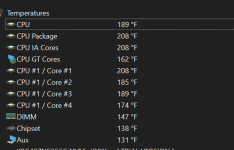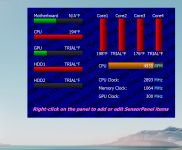
yall i think my laptop finna explode.😭

i dont know whats happening on this computer at this point
 

Attachments

  • Screenshot 2024-03-25 003217.png
    Screenshot 2024-03-25 003217.png
    24.4 KB · Views: 296
It sounds like you're having trouble. Could you please provide more details about the issues you're experiencing? It'll be easier to help then.
 
Upvote 0
Along with the above, have you installed a new app recently, or did something recently update? In Task Manager/Startup apps, disable all the non Microsoft apps you can, especially the ones that show high startup impact. Restart your notebook and see if it helps, if it does, enable the apps 2 at a time until you find out which one may be causing the issue. Check Task Manager for any app using high CPU.
 
Last edited:
Upvote 0
You might need a new CPU cooler or a replacement laptop. Check for high CPU usage, and if needed use a undervolting tutorial. This will violate warranty, but will decrease temps a decent amount.

What CPU do you have? What about the cooler (if you know). Since it’s a laptop try increasing airflow as well.
 
Upvote 0
I guess it was one of your first choices. The first thing I do when the processor reaches high temperatures during normal use is check the cooling.

If you have never replaced the paste that sits between the processor and extractor, it is wise to do so. Cleaning the processor fan is also necessary. I check the correct placement of the fan on the processor, I have seen loose fans, literally floating on the processor.

In the case of liquid-cooled equipment, I have also seen that some users forget to check the level.
 
Upvote 0

MalwareTips community

Join the discussion

Create a free account to reply to this thread, ask your own questions and get help from the community.

  • Reply and ask questions
  • Get alerts when someone answers
  • Free malware removal help
Create free account
or continue with

Recently browsing

Members who viewed this thread in the last 5 minutes

Back
Top