New Update Zen Browser Updates

Zen Stable Release build - 1.14.6b (2025-07-24)

Security​


New Features​

  • Updated to Firefox 141.0
  • Improved accent color detection, making elements such as toasts more vibrant.
  • Added a better custom color picker (experimental UI, might change)
  • Improved and optimized glance animations and UI
  • WebGPU is now enabled by default on windows
  • Added a more native feel to windows 11 window buttons

Fixes​

  • picture caching and scroll optimization issues
  • a bug where adding or removing colors in the color picker would make the UI white
  • On Linux, Zen uses less memory and no longer requires a forced restart after an update has been applied by a package manager.
  • Fixed 'copy calculation' in the urlbar not working
 
Zen Stable Release build - 1.14.7b (2025-07-25)

Fixes​

  • Fixed an issue when changing workspaces not changing tabs
  • Fixed native windows caption buttons displaying the grid display dialog even if it's hidden
 
Release build - 1.14.10b (2025-08-05)

New Features​

  • New windows should be opening faster now.
  • Updated to Firefox 141.0.2

Fixes​

  • Fixed hovering over the tabs in compact mode having weird behavior on windows.
 
Release build - 1.14.11b (2025-08-09)
Just a small update since we are focusing on folders! now on twilight.

New Features​

  • Updated to Firefox 141.0.3

Fixes​

  • Fixed the download having poor visibility
 
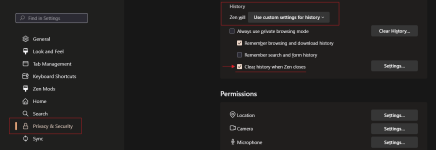
How to clean Zen like Edge, chrome etc?

I am testing from time to time Zen browser in one of my VMs,
Zen: Settings => Privacy & Security => History

Z#1.png
 
Release build - 1.15b (2025-08-26)

Security​

Various security fixes


New Features​

  • Folders!
  • Updated to firefox 142.0
  • Implemented monochromatic icons for spaces, folders, etc.
  • Added a small animation when updating Zen

Fixes​

  • Resolved compact mode twitching issue when hovering the URL bar.
  • Fixed pinned tab titles not showing on the urlbar search results
  • Fix performance issue with pinned tabs pre-loading at startup

Changes​

  • Third party domains now open in their own tabs when opened on pinned and essential tabs
  • Added a more native feel to windows users
  • New profiles or resetting to default shortcuts will now have next/previous workspace assigned as ctrl+alt+LEFT/RIGHT, toggle compact mode as ctrl+S and save page as ctrl+alt+S
  • Compact mode with no browser padding will now have a separation between the sidebar and the window edge
 
Release build - 1.15.1b (2025-08-28)

New Features​

  • Updated to Firefox 142.0.1

Fixes​

  • Fixed issues with the folder context menu not working on collapsed mode
  • Fixed tab becoming invisible on some occasions when collapsing active folders
 
  • Hundred Points
Reactions: silversurfer
Release build - 1.15.3b (2025-08-31)

New Features​

  • Wheel clicking on a pending pinned tab will now close it.
  • Instead of the default orange color, the accent color will now be the system accent color.

Fixes​

  • Fixed compact mode turning off after startup.
  • Fixed memory issues when creating new folders. (#10145)
  • Fixed startup freezes on some systems.
  • Fixed hovering over the urlbar making the compact mode sidebar appear

Changes​

  • 'Split Tabs' context menu item won't show if it's not applicable.
 
Release build - 1.15.4b (2025-09-05)
This release is mostly important for Windows users as the previous certificate will expire soon.

New Features​

  • Added a 'tada' folder icon
  • Added faster tab open animations, and a new tab close animation

Fixes​

  • Fixed using the scrollbar on the sidebar, moving the window instead of scrolling.
  • Fixed potential crashes on flatpak and updated flatpak dependencies.

Changes​

  • The Windows build is now signed with a new certificate since the previous will expire soon.
 
Release build - 1.15.5b (2025-09-06)

Fixes​

  • Fixed potential crashes on flatpak and updated flatpak dependencies.
  • Fixed double clicking on the empty space of the sidebar not making a new tab.
 
Release build - 1.16b (2025-09-22)
This update focuses on the URL bar, letting you open extensions and switch spaces by typing their names, with a redesigned interface for clearer, richer results. It also adds smoother transitions, improved split view creation, and general performance fixes.

Security​

Various security fixes


New Features​

  • Upgraded to Firefox 143.0
  • Introduced command bar actions (e.g., toggle Compact Mode directly from the command bar). More commands and features will be added over time—contributions are welcome!
  • Extensions can now be opened by typing their name directly in the URL bar
  • Compact Mode backgrounds now transition smoothly when switching spaces instead of changing instantly
  • Added a new shortcut (cmd+alt+=) for creating split views, along with a redesigned split view creation interface
  • Redesigned URL bar for improved usability and richer results
  • Spaces can now be switched by typing the space name directly into the URL bar
  • Optimized Glance for smoother scrolling and faster performance

Fixes​

  • Resolved an issue where pinned tabs were not being saved or restored correctly
  • Fixed a bug preventing tabs from being restored across different spaces

Changes​

  • Reassigned the 'cmd+O' shortcut from opening a file to expanding Glance
  • Reassigned the 'cmd+shift+D' shortcut from saving all bookmarks to pinning/unpinning tabs
  • Enhanced performance of space-swiping gestures
  • Keyboard shortcuts on macOS now use native system symbols
  • Improved both performance and interface for the drag-to-split action
 
Release build - 1.16.1b (2025-09-25)

New Features​

  • Command Bar commands will now obtain more priority in the URL bar
  • Enabled Firefox's crash reporter to better identify crashes

Fixes​

  • Fixed not being able to close the window on an empty state
  • Fixed broken UI when using split views on collapsed mode
  • Fixed a memory leak due to the the folder icon animation
  • Improved performance when having compact mode enabled, reducing the amount of observations
 
Release build - 1.16.2b (2025-09-29

New Features​

  • Pressing 'TAB' on an empty command bar will show all the available commands
  • Improved URL Bar command search performance and implemented a learning algorithm
  • Compact mode + fullscreen will no longer have borders
  • Added more icons to folders and workspaces

Fixes​

  • Themed compact mode top toolbar is back, sorry for the small confusion!
  • Fixed symbols on certain languages not rendering correctly for flatpack users
  • Fixed mute button on collapsed sidebar not displaying unless selecting the tab

Changes​

  • URL Bar commands will now be enabled regardless of the browser's language
 
Release build - 1.16.3b (2025-10-04)

Security​

Various security fixes

New Features​

  • Updated to Firefox 143.0.4

Fixes​

  • Fixed switching spaces making essentials disappear sometimes
  • Fixed small visual inconsistencies
  • Fixed the urlbar staying floating on compact mode
  • Fixed addons not being able to automatically update
 
Release build - 1.16.4b (2025-10-08)

New Features​

  • Added support for a 'unload space' context menu item to unload all tabs in a space.
  • Added an about:config to limit the number of essentials (zen.tabs.essentials.max) and to prevent compact mode from hiding the borders in fullscreen (zen.view.borderless-fullscreen).

Fixes​

  • Fixed wrong version of ffmpeg being used for AUR users.
  • Fixed a bug where compact mode wouldn't hide
  • Fixed poor performance when the media controller is shown.
  • Fixed hang when having 'switch space automatically' enabled and using automatic container add-ons.
 
Release build - 1.17b (2025-10-21)

Security​

Various security fixes

New Features​

  • Updated to Firefox 144.0
  • New unified panel to show site permissions, security, add-ons, quick actions and more to de-clutter the address bar.
  • Added toolbar button to quickly toggle compact mode
  • Improved glance animations to make it feel like the element is being lifted off the page
  • Added an urlbar button to quickly copy the current page url
  • Zen will now start using the new MacOS Tahoe look and feel
  • The operating system accent color will now be used instead of the default orange color when there's no browser theme applied

Fixes​

  • Fixed the urlbar not opening in fullscreen mode
  • Fixed performance for macos users when using transparency on the window
  • Other fixes with compact mode on double toolbar mode
  • Fixed issues with 'Firefox Multiaccount Containers' extension freezing Zen (#10666)
  • Fixed slow split view switching and scroll positions not being remembered
  • Various stability and performance fixes for glance

Changes​

  • On double toolbar mode, compact mode will have a new UI, where it overlays the web view instead of sliding like the sidebar
  • Hovering over the window captions on windows/linux or double toolbar in compact mode will stop pushing the web view down, instead it will overlay it
  • For enhanced privacy, 'Copy current page url' button will not copy tracking parameters by default
 

You may also like...